nasti4
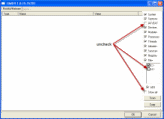
explorer is going back to google, opening new windows n doing alsorts of strnge things, also seems to log me out alot of ebay ect heres my list thanks!
Logfile of Trend Micro HijackThis v2.0.4
Scan saved at 5:32:16 PM, on 7/20/2010
Platform: Windows 7 (WinNT 6.00.3504)
MSIE: Internet Explorer v8.00 (8.00.7600.16385)
Boot mode: Normal
Running processes:
C:\Windows\system32\Dwm.exe
C:\Windows\Explorer.EXE
C:\Program Files\Alwil Software\Avast5\AvastUI.exe
C:\Program Files\iTunes\iTunesHelper.exe
C:\Program Files\Common Files\Ahead\Lib\NMBgMonitor.exe
C:\Windows\system32\taskhost.exe
C:\Program Files\Internet Explorer\iexplore.exe
C:\Program Files\Common Files\Ahead\Lib\NMIndexStoreSvr.exe
C:\Program Files\Trend Micro\HiJackThis\HiJackThis.exe
R1 - HKCU\Software\Microsoft\Internet Explorer\Main,Search Bar = Preserve
R1 - HKCU\Software\Microsoft\Internet Explorer\Main,Search Page = http://go.microsoft.com/fwlink/?LinkId=54896
R0 - HKCU\Software\Microsoft\Internet Explorer\Main,Start Page = http://google.com.au/
R1 - HKLM\Software\Microsoft\Internet Explorer\Main,Default_Page_URL = http://go.microsoft.com/fwlink/?LinkId=69157
R1 - HKLM\Software\Microsoft\Internet Explorer\Main,Default_Search_URL = http://go.microsoft.com/fwlink/?LinkId=54896
R1 - HKLM\Software\Microsoft\Internet Explorer\Main,Search Page = http://go.microsoft.com/fwlink/?LinkId=54896
R0 - HKLM\Software\Microsoft\Internet Explorer\Main,Start Page = http://go.microsoft.com/fwlink/?LinkId=69157
R0 - HKLM\Software\Microsoft\Internet Explorer\Search,SearchAssistant =
R0 - HKLM\Software\Microsoft\Internet Explorer\Search,CustomizeSearch =
R1 - HKCU\Software\Microsoft\Windows\CurrentVersion\Internet Settings,ProxyOverride = *.local
R0 - HKCU\Software\Microsoft\Internet Explorer\Toolbar,LinksFolderName =
O2 - BHO: AcroIEHelperStub - {18DF081C-E8AD-4283-A596-FA578C2EBDC3} - C:\Program Files\Common Files\Adobe\Acrobat\ActiveX\AcroIEHelperShim.dll
O2 - BHO: (no name) - {5C255C8A-E604-49b4-9D64-90988571CECB} - (no file)
O2 - BHO: Windows Live Sign-in Helper - {9030D464-4C02-4ABF-8ECC-5164760863C6} - C:\Program Files\Common Files\Microsoft Shared\Windows Live\WindowsLiveLogin.dll
O4 - HKLM\..\Run: [avast5] "C:\Program Files\Alwil Software\Avast5\avastUI.exe" /nogui
O4 - HKLM\..\Run: [NeroFilterCheck] C:\Program Files\Common Files\Ahead\Lib\NeroCheck.exe
O4 - HKLM\..\Run: [Adobe ARM] "C:\Program Files\Common Files\Adobe\ARM\1.0\AdobeARM.exe"
O4 - HKLM\..\Run: [Adobe Reader Speed Launcher] "C:\Program Files\Adobe\Reader 9.0\Reader\Reader_sl.exe"
O4 - HKLM\..\Run: [QuickTime Task] "C:\Program Files\QuickTime\QTTask.exe" -atboottime
O4 - HKLM\..\Run: [iTunesHelper] "C:\Program Files\iTunes\iTunesHelper.exe"
O4 - HKLM\..\Run: [TrojanScanner] C:\Program Files\Trojan Remover\Trjscan.exe /boot
O4 - HKCU\..\Run: [BgMonitor_{79662E04-7C6C-4d9f-84C7-88D8A56B10AA}] "C:\Program Files\Common Files\Ahead\Lib\NMBgMonitor.exe"
O4 - HKCU\..\Run: [{493B05B9-2ACE-F011-7A66-F4929EF566FC}] C:\Users\azas\AppData\Roaming\Evse\vuox.exe
O4 - HKUS\S-1-5-19\..\Run: [Sidebar] %ProgramFiles%\Windows Sidebar\Sidebar.exe /autoRun (User 'LOCAL SERVICE')
O4 - HKUS\S-1-5-19\..\RunOnce: [mctadmin] C:\Windows\System32\mctadmin.exe (User 'LOCAL SERVICE')
O4 - HKUS\S-1-5-20\..\Run: [Sidebar] %ProgramFiles%\Windows Sidebar\Sidebar.exe /autoRun (User 'NETWORK SERVICE')
O4 - HKUS\S-1-5-20\..\RunOnce: [mctadmin] C:\Windows\System32\mctadmin.exe (User 'NETWORK SERVICE')
O4 - .DEFAULT User Startup: woarq.exe (User 'Default user')
O16 - DPF: {D27CDB6E-AE6D-11CF-96B8-444553540000} (Shockwave Flash Object) - http://fpdownload2.macromedia.com/get/s ... wflash.cab
O17 - HKLM\System\CCS\Services\Tcpip\..\{4EAA8037-EA01-41E9-B8B6-F35A87F7D916}: NameServer = 93.188.162.61,93.188.161.201
O17 - HKLM\System\CS1\Services\Tcpip\Parameters: NameServer = 93.188.162.61,93.188.161.201
O17 - HKLM\System\CS1\Services\Tcpip\..\{4EAA8037-EA01-41E9-B8B6-F35A87F7D916}: NameServer = 93.188.162.61,93.188.161.201
O17 - HKLM\System\CS2\Services\Tcpip\Parameters: NameServer = 93.188.162.61,93.188.161.201
O17 - HKLM\System\CS2\Services\Tcpip\..\{4EAA8037-EA01-41E9-B8B6-F35A87F7D916}: NameServer = 93.188.162.61,93.188.161.201
O17 - HKLM\System\CCS\Services\Tcpip\Parameters: NameServer = 93.188.162.61,93.188.161.201
O23 - Service: Apple Mobile Device - Apple Inc. - C:\Program Files\Common Files\Apple\Mobile Device Support\AppleMobileDeviceService.exe
O23 - Service: avast! Antivirus - AVAST Software - C:\Program Files\Alwil Software\Avast5\AvastSvc.exe
O23 - Service: avast! Firewall - AVAST Software - C:\Program Files\Alwil Software\Avast5\afwServ.exe
O23 - Service: avast! Mail Scanner - AVAST Software - C:\Program Files\Alwil Software\Avast5\AvastSvc.exe
O23 - Service: avast! Web Scanner - AVAST Software - C:\Program Files\Alwil Software\Avast5\AvastSvc.exe
O23 - Service: Bonjour Service - Apple Inc. - C:\Program Files\Bonjour\mDNSResponder.exe
O23 - Service: iPod Service - Apple Inc. - C:\Program Files\iPod\bin\iPodService.exe
O23 - Service: LightScribeService Direct Disc Labeling Service (LightScribeService) - Hewlett-Packard Company - C:\Program Files\Common Files\LightScribe\LSSrvc.exe
O23 - Service: NVIDIA Display Driver Service (nvsvc) - NVIDIA Corporation - C:\Windows\system32\nvvsvc.exe
--
Adobe Flash Player 10 ActiveX
Adobe Flash Player 10 Plugin
Adobe Reader 9.3.3
Apple Application Support
Apple Mobile Device Support
Apple Software Update
Ashampoo Burning Studio 10.0.1
avast! Internet Security
BitComet 1.22
Bonjour
HiJackThis
iTunes
Microsoft .NET Framework 4 Client Profile
Microsoft .NET Framework 4 Client Profile
Microsoft Choice Guard
Microsoft Silverlight
Microsoft Visual C++ 2008 Redistributable - x86 9.0.30729.4148
MSVCRT
MSXML 4.0 SP2 (KB954430)
MSXML 4.0 SP2 (KB973688)
Nero 7 Essentials
Nero 7 Essentials
neroxml
NVIDIA Display Control Panel
NVIDIA Drivers
Opera 10.60
OziExplorer 3.95
PVSonyDll
QuickTime
RollerCoaster Tycoon 3 Platinum
StarCraft II Beta
Trojan Remover 6.8.2
VCRedistSetup
Windows Live Call
Windows Live Communications Platform
Windows Live Essentials
Windows Live Essentials
Windows Live Messenger
Windows Live Sign-in Assistant
Windows Live Upload Tool
WinRAR archiver
Logfile of Trend Micro HijackThis v2.0.4
Scan saved at 5:32:16 PM, on 7/20/2010
Platform: Windows 7 (WinNT 6.00.3504)
MSIE: Internet Explorer v8.00 (8.00.7600.16385)
Boot mode: Normal
Running processes:
C:\Windows\system32\Dwm.exe
C:\Windows\Explorer.EXE
C:\Program Files\Alwil Software\Avast5\AvastUI.exe
C:\Program Files\iTunes\iTunesHelper.exe
C:\Program Files\Common Files\Ahead\Lib\NMBgMonitor.exe
C:\Windows\system32\taskhost.exe
C:\Program Files\Internet Explorer\iexplore.exe
C:\Program Files\Common Files\Ahead\Lib\NMIndexStoreSvr.exe
C:\Program Files\Trend Micro\HiJackThis\HiJackThis.exe
R1 - HKCU\Software\Microsoft\Internet Explorer\Main,Search Bar = Preserve
R1 - HKCU\Software\Microsoft\Internet Explorer\Main,Search Page = http://go.microsoft.com/fwlink/?LinkId=54896
R0 - HKCU\Software\Microsoft\Internet Explorer\Main,Start Page = http://google.com.au/
R1 - HKLM\Software\Microsoft\Internet Explorer\Main,Default_Page_URL = http://go.microsoft.com/fwlink/?LinkId=69157
R1 - HKLM\Software\Microsoft\Internet Explorer\Main,Default_Search_URL = http://go.microsoft.com/fwlink/?LinkId=54896
R1 - HKLM\Software\Microsoft\Internet Explorer\Main,Search Page = http://go.microsoft.com/fwlink/?LinkId=54896
R0 - HKLM\Software\Microsoft\Internet Explorer\Main,Start Page = http://go.microsoft.com/fwlink/?LinkId=69157
R0 - HKLM\Software\Microsoft\Internet Explorer\Search,SearchAssistant =
R0 - HKLM\Software\Microsoft\Internet Explorer\Search,CustomizeSearch =
R1 - HKCU\Software\Microsoft\Windows\CurrentVersion\Internet Settings,ProxyOverride = *.local
R0 - HKCU\Software\Microsoft\Internet Explorer\Toolbar,LinksFolderName =
O2 - BHO: AcroIEHelperStub - {18DF081C-E8AD-4283-A596-FA578C2EBDC3} - C:\Program Files\Common Files\Adobe\Acrobat\ActiveX\AcroIEHelperShim.dll
O2 - BHO: (no name) - {5C255C8A-E604-49b4-9D64-90988571CECB} - (no file)
O2 - BHO: Windows Live Sign-in Helper - {9030D464-4C02-4ABF-8ECC-5164760863C6} - C:\Program Files\Common Files\Microsoft Shared\Windows Live\WindowsLiveLogin.dll
O4 - HKLM\..\Run: [avast5] "C:\Program Files\Alwil Software\Avast5\avastUI.exe" /nogui
O4 - HKLM\..\Run: [NeroFilterCheck] C:\Program Files\Common Files\Ahead\Lib\NeroCheck.exe
O4 - HKLM\..\Run: [Adobe ARM] "C:\Program Files\Common Files\Adobe\ARM\1.0\AdobeARM.exe"
O4 - HKLM\..\Run: [Adobe Reader Speed Launcher] "C:\Program Files\Adobe\Reader 9.0\Reader\Reader_sl.exe"
O4 - HKLM\..\Run: [QuickTime Task] "C:\Program Files\QuickTime\QTTask.exe" -atboottime
O4 - HKLM\..\Run: [iTunesHelper] "C:\Program Files\iTunes\iTunesHelper.exe"
O4 - HKLM\..\Run: [TrojanScanner] C:\Program Files\Trojan Remover\Trjscan.exe /boot
O4 - HKCU\..\Run: [BgMonitor_{79662E04-7C6C-4d9f-84C7-88D8A56B10AA}] "C:\Program Files\Common Files\Ahead\Lib\NMBgMonitor.exe"
O4 - HKCU\..\Run: [{493B05B9-2ACE-F011-7A66-F4929EF566FC}] C:\Users\azas\AppData\Roaming\Evse\vuox.exe
O4 - HKUS\S-1-5-19\..\Run: [Sidebar] %ProgramFiles%\Windows Sidebar\Sidebar.exe /autoRun (User 'LOCAL SERVICE')
O4 - HKUS\S-1-5-19\..\RunOnce: [mctadmin] C:\Windows\System32\mctadmin.exe (User 'LOCAL SERVICE')
O4 - HKUS\S-1-5-20\..\Run: [Sidebar] %ProgramFiles%\Windows Sidebar\Sidebar.exe /autoRun (User 'NETWORK SERVICE')
O4 - HKUS\S-1-5-20\..\RunOnce: [mctadmin] C:\Windows\System32\mctadmin.exe (User 'NETWORK SERVICE')
O4 - .DEFAULT User Startup: woarq.exe (User 'Default user')
O16 - DPF: {D27CDB6E-AE6D-11CF-96B8-444553540000} (Shockwave Flash Object) - http://fpdownload2.macromedia.com/get/s ... wflash.cab
O17 - HKLM\System\CCS\Services\Tcpip\..\{4EAA8037-EA01-41E9-B8B6-F35A87F7D916}: NameServer = 93.188.162.61,93.188.161.201
O17 - HKLM\System\CS1\Services\Tcpip\Parameters: NameServer = 93.188.162.61,93.188.161.201
O17 - HKLM\System\CS1\Services\Tcpip\..\{4EAA8037-EA01-41E9-B8B6-F35A87F7D916}: NameServer = 93.188.162.61,93.188.161.201
O17 - HKLM\System\CS2\Services\Tcpip\Parameters: NameServer = 93.188.162.61,93.188.161.201
O17 - HKLM\System\CS2\Services\Tcpip\..\{4EAA8037-EA01-41E9-B8B6-F35A87F7D916}: NameServer = 93.188.162.61,93.188.161.201
O17 - HKLM\System\CCS\Services\Tcpip\Parameters: NameServer = 93.188.162.61,93.188.161.201
O23 - Service: Apple Mobile Device - Apple Inc. - C:\Program Files\Common Files\Apple\Mobile Device Support\AppleMobileDeviceService.exe
O23 - Service: avast! Antivirus - AVAST Software - C:\Program Files\Alwil Software\Avast5\AvastSvc.exe
O23 - Service: avast! Firewall - AVAST Software - C:\Program Files\Alwil Software\Avast5\afwServ.exe
O23 - Service: avast! Mail Scanner - AVAST Software - C:\Program Files\Alwil Software\Avast5\AvastSvc.exe
O23 - Service: avast! Web Scanner - AVAST Software - C:\Program Files\Alwil Software\Avast5\AvastSvc.exe
O23 - Service: Bonjour Service - Apple Inc. - C:\Program Files\Bonjour\mDNSResponder.exe
O23 - Service: iPod Service - Apple Inc. - C:\Program Files\iPod\bin\iPodService.exe
O23 - Service: LightScribeService Direct Disc Labeling Service (LightScribeService) - Hewlett-Packard Company - C:\Program Files\Common Files\LightScribe\LSSrvc.exe
O23 - Service: NVIDIA Display Driver Service (nvsvc) - NVIDIA Corporation - C:\Windows\system32\nvvsvc.exe
--
Adobe Flash Player 10 ActiveX
Adobe Flash Player 10 Plugin
Adobe Reader 9.3.3
Apple Application Support
Apple Mobile Device Support
Apple Software Update
Ashampoo Burning Studio 10.0.1
avast! Internet Security
BitComet 1.22
Bonjour
HiJackThis
iTunes
Microsoft .NET Framework 4 Client Profile
Microsoft .NET Framework 4 Client Profile
Microsoft Choice Guard
Microsoft Silverlight
Microsoft Visual C++ 2008 Redistributable - x86 9.0.30729.4148
MSVCRT
MSXML 4.0 SP2 (KB954430)
MSXML 4.0 SP2 (KB973688)
Nero 7 Essentials
Nero 7 Essentials
neroxml
NVIDIA Display Control Panel
NVIDIA Drivers
Opera 10.60
OziExplorer 3.95
PVSonyDll
QuickTime
RollerCoaster Tycoon 3 Platinum
StarCraft II Beta
Trojan Remover 6.8.2
VCRedistSetup
Windows Live Call
Windows Live Communications Platform
Windows Live Essentials
Windows Live Essentials
Windows Live Messenger
Windows Live Sign-in Assistant
Windows Live Upload Tool
WinRAR archiver