This thread's last reply is from July 22, 2007, 10:43 PM UTC. Software, malware, and removal-tool
advice below may be out of date — treat specific steps and download links with caution.
In the picture there are I think:-
- 1 Brown slot which I think is a PCIe x4 (Bottom of picture)
- 3 White PCI slots
- 1 Red AGP slot . (Top of picture)
Is this correct ?

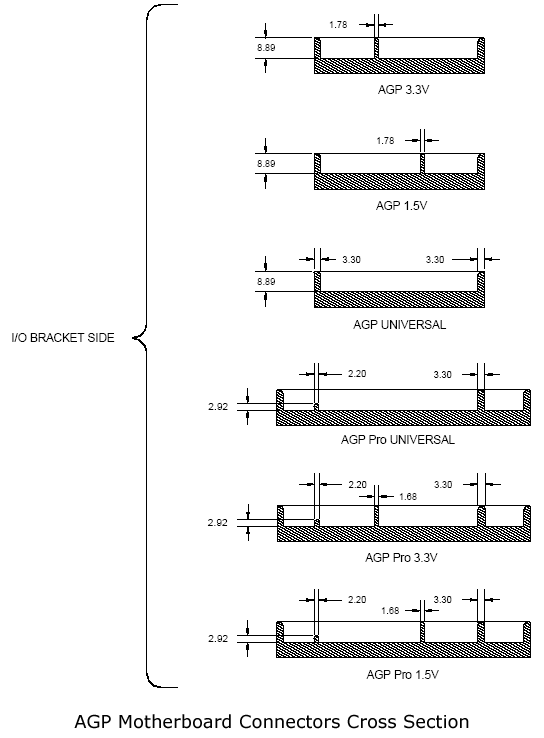
The first one is a AGP 1,5 volts slot. You cannot tell wheither its x4 or x8 just by the picture, depending on the motherboard it doesn't support one or an other. I can tell you however that you will have no problems in using an x8 card in an x4 slot. The burstable speed difference is minimum.
http://www.playtool.com/pages/agpcompat/agpslots.gif
The next three are normal PCI slots.
The last one is not an AGP card, but a CNR like previously said.
http://en.wikipedia.org/wiki/Communicat ... king_Riser
The best graphics card you can equip your computer with is probably an GeForce 7800 GS.
Thanks for the info Wynand

The graphics card that you refer to
GeForce 7800 GS.
Does this go into the AGP slot or one of the PCI slots ?
Good evening Curlylad,
The 7800 GS goes into the AGP slot. If you can give me an URL of a webstore in your neighbourhood, I can have a look to the graphics cards they offer and advice you which one to take for how much money.
The 7800 is with its 250 euro's (170 pounds using my head) not very cheap, least said. An other good graphics card is an 7600 GT or 7600 GS.
You might aswell look onto the ATI Radeon 1600 Pro, which has compareable powers to the 7600GT.
If you are an ATI fan, you also could have a look to the ATI Radeon X1950 in AGP version, they are 'cheap' and quite powerfull. May I ask you for the rest of your computer specifications?
This because it would be pointless to put such a graphics card into a computer which has, for example, a Pentium 3 with 733MHz.
That'd be like having a tuned car racing against a vespa scooter.
 While your case is open anyway, could you check how many watts your powersupply has? Graphics cards require quite a lot of power.
Regards,
Wynand
Don't know exactly what specs you're after, if you're more specific I will get the relevant info but for now
AMD Athlon XP-A 2079MHz 2800+
2GB Memory
As for the power supply all I could see on the label was:-
MAX OUTPUT POWER 250W +3.3V & 5V = 180W(MAX)
+3.3V & 5V & 12V = 230W (MAX)
The nearest or best suggested sites are:-
http://www.maplin.co.uk/
http://www.amazon.co.uk/Good evening again (no, I'm going to sleep after this one! (23:44 here)),
Fair enough, should not be overkill.
This one is probably a good choise.
http://www.amazon.co.uk/Club-NVidia-7600GT-Graphics-adapter/dp/B000M1Z7O6/ref=sr_1_3/202-9849847-6785427?ie=UTF8&s=electronics&qid=1185140800&sr=1-3
Your powersupply unfortunatly, is not strong enough to provide stable power to your computer and the graphics card.
This one should be a good one.
http://www.amazon.co.uk/Atrix-Black-Silent-Power-Supply/dp/B000MUH3QW/ref=sr_1_5/202-9849847-6785427?ie=UTF8&s=electronics&qid=1185140858&sr=1-5
A pitty I can't find any power supply's over there I use to see in stores here (Belgium/Netherlands).
Regards,
Wynand
Thanks for all your help/advice.
You are welcome, if its above your budget, I can look for less expensive materials.
No I should be able to manage the budget but just a few more questions.
Can you guarantee the graphics card and power supply are definately compatible with my system ?
Are the 2 items what you would choose in my situation ?
How easy is it to fit a new power supply, what other changes if any have to be made ?
I'll let you go after this !

"curlylad" wrote:Can you guarantee the graphics card and power supply are definately compatible with my system ?
They should, unless you have a computer case which isn't default ATX by standards or you have a motherboard that doesn't like getting graphics cards it intself.
If you bring it to a local computer store they can make it absolutely sure. Doing that remotly would like telling an other human being to move his arm foward, stretch his fingers out and don't forget to keep breathing in the meanwhile.
Don't let the shop keepers talk into you though, most of them like telling people they should get theirselves a new computer.
"curlylad" wrote:Are the 2 items what you would choose in my situation ?
Can cannot reply to that, the only powersupply's I see on that website I recognize from makes I know having a good name here, are terrible weak ones, and the better ones are expensive to say the least.
For a pound or 350-400 you could get yourself a new computer, but NO, I'm not going to make an example tonight.

"curlylad" wrote:How easy is it to fit a new power supply, what other changes if any have to be made ?
If you can get some screws out, disattach some plugs and put something else instead of it, you can replace a powersupply. There are plenty of video's on google video or youtube on how to mount a powersupply, or even how to assemble an entire computer.
"curlylad" wrote:I'll let you go after this !
You'd better!
Good night now.
Wynand
Again thanks for all that !
So the answer to my first question is more than likely yes.
Answer to second question is without buying a new PC probably yes.
Answer to third question is easy.
Now you can get some sleep, I owe you one !