This thread's last reply is from November 28, 2008, 12:10 AM UTC. Software, malware, and removal-tool
advice below may be out of date — treat specific steps and download links with caution.
Hi,
The mouse seems to work good for a few seconds and then all of a suddenly stall and slow, then about 10 secs later back to normal? Any help?
I'm run Microsoft VP 7, Host:XP home Guest: XP Pro
Thanks

How much memory is the guest OS allowed?
How much memory does the host have?
Did you install VM additions?
Host has 1gb of ram and guest is getting 265 mb.
Nope i've not added any kind of additions to the VM, its just a new download.
Think it could be the allocated ram that i gave it is not enough?
Thanks

My VPC VM gets 192MB and runs very smooth (as long as I don't install an AV)
However, I have noticed that without the addons installed, it does not correctly get keystrokes (e.g. when I type in the window 'ooooooook' it shows 'oook') and that the mouse is slow, like you are saying.
Try if it improves when you install the addons.
Hi,
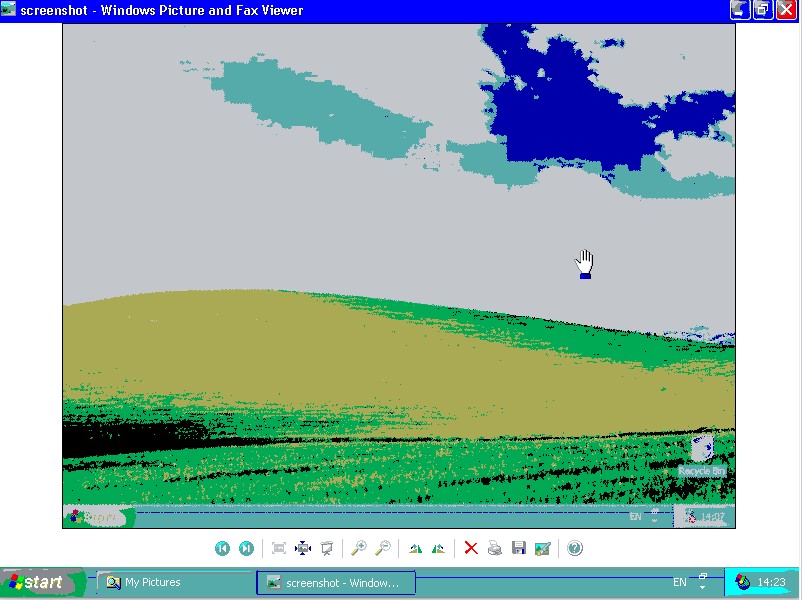
No luck, i tried to install the addons and no difference except the screen is changed to a very low quality but i just removed the addons and the quality is back to normal!
OK, THAT is messed up.
I'm out of ideas....
How much did you load on this VM yet? If I were you (and I am extremely lazy) I wouldn't bother with it and reformat the VM.
Colour looks off.
Can you check the settings for the graphics card? It should be using 32-bit, instead of 16 bits or 8 bits. By the way, did you install the graphics driver for VM? It's needed for the graphics to work correctly.
Right click on Desktop, select Properties. Select the Settings tab.
Thats what i was saying, when i install the addons it does that to the Graphics for some reason and i can't adjust the settings at all?
Hi andy
I am running VPC07sp1, Host - Vista HP, guest XP Pro
Don't know if you got this fixed or not but I was having the same problems after installing VM Additions.... really low resolution (could not change it from 4 bit), choppy sound & mouse stalling. However after installing XP Service Pack 2, it immediately fixed all of the problems. Worth trying if you have not already fixed or installed SP2.
Thanks for the help, i've not tried that yet, i'll give that a go
Hi guys,
Just to let you(s) know that everything is fixed and running good.
Basically i deleted the Virtual machine and created a new one with a new Virtual hard disk, installed the VM Additions and then updated to Sp2 and Viola! Sorted
Thanks for the help