
This is a read-only archive of malwareremoval.com. No new posts or registrations. Privacy Page
Malware Removal Forums

Everest University Popups

1 min read

✨ The volunteers who helped with this thread aren't active anymore, but you can still get a personalized answer — click Ask AI below.

This thread's last reply is from August 19, 2016, 10:31 PM UTC. Software, malware, and removal-tool advice below may be out of date — treat specific steps and download links with caution.

deke997
I have a laptop that I got from someone who attended Everest University, which is an online college. Ever since they graduated, there have been these pop-ups that open in Internet Explorer which say "refer a friend" or "re-enroll". It's quite annoying. I have seen on other forums that this has something to do with Computrace and that it is baked into the UEFI/BIOS, but no one knows how to remove it.

I was hoping that the problem would go away after I upgraded to Windows 10. It didn't. The popups only ever open in Internet Explorer though, even in windows 10.

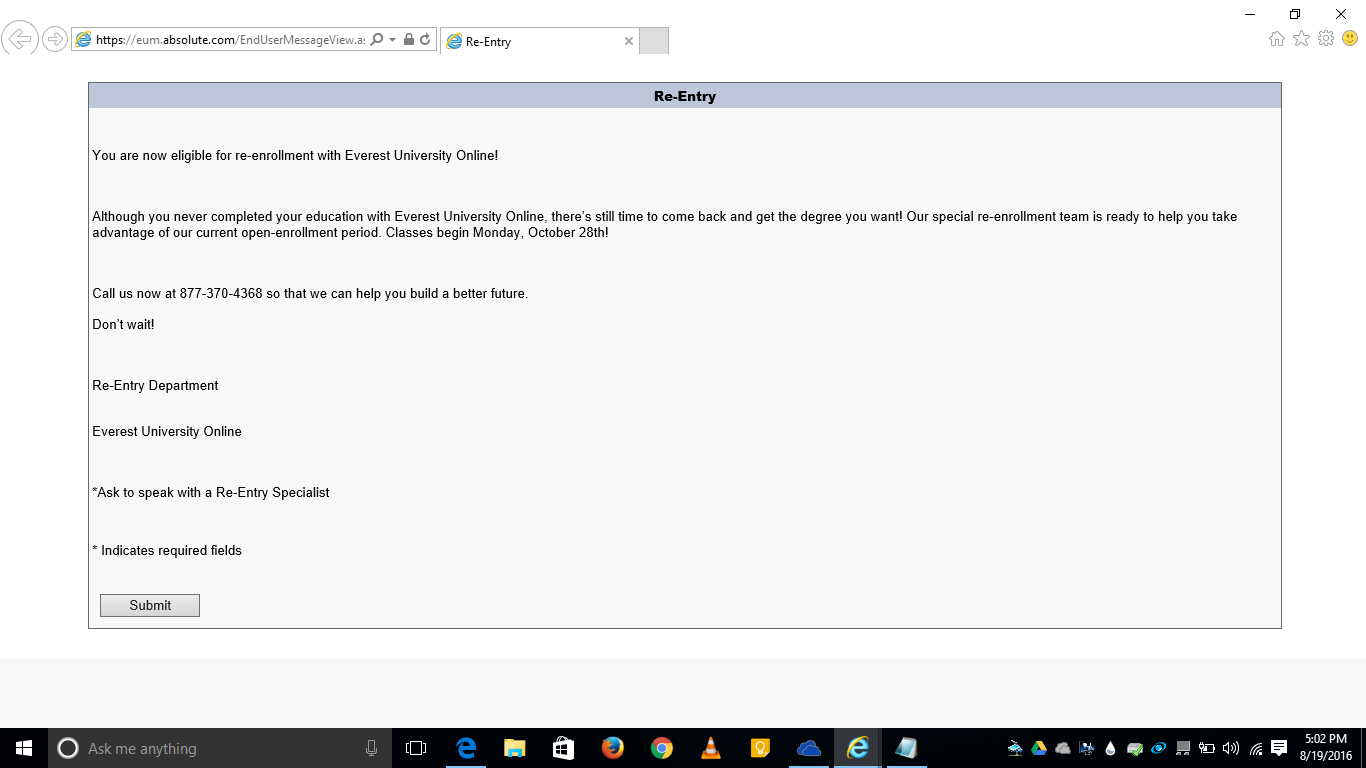
Attachments:

pgmigg Admin/Teacher
By posting just a description of your problems it is likely that your topic will be passed by and you will not receive the help you're looking for.

We need to know what's running on your computer so we can give you appropriate instructions.

May I draw your attention to THIS topic, which you should have read, and which tells you what we need you to post so that we can help you.

This topic will now be closed.

If you still need help, please start a new thread with:
  • FRST.txt
  • Addition.txt
  • Details of your problems.


If for any reason you can't run FRST, please let us know in your post.

✨ Ask AI about this thread

No ads, no affiliate links — generated on request from this thread's own archived content, not written by forum staff. Never run a scan/removal tool as a self-service step if the original thread describes it being done under a helper's direct supervision, and don't include your name, email, or other personal details in a follow-up question. See our privacy page for details on how this works.