This thread's last reply is from March 6, 2016, 3:27 PM UTC. Software, malware, and removal-tool
advice below may be out of date — treat specific steps and download links with caution.
📎Addition.txt📎FRST.txtSeveral weeks ago, I encountered a problem trying to update from IE 9 to IE 11 on my Windows 7 SP1 Dell desktop. I thought that I had a problem with MS update notifications, which had backed up on me for several issue cycles without providing notice to me. I finally got many updates to install but with remaining issues with IE Updates and Administrative Permissions on my computer and denials of access for applications.
Thinking that I still had W7 update issues, I posted on a W7 dedicated site, but they felt that my problems were deeper seated. I have many screenshots that I can share if/when required. However, I have used a number of tools, utilities & programs on my computer, including Norton 360 that is always up-to-date and active for firewall and antivirus, and still have disconcerting properties and observations. A couple of the most noteworthy, is a list of users that has changer over time, when I am the sole user and Administrator of this computer, and a partition of my hard drive that has no name/owner, but is inaccessible to me. To top this off, I believe that I have been contacted verbally by the perpetrator and I heard a caption of the mocking warning that he provided to me.
I will forego anymore details until such time that I learn that there is someone who feels that may be able to assess my situation and provide advice. I will attach the FRST logs, but after that I am keeping this computer mostly off-line, as I am afraid that someone evil may be living with me.
Thank you for any help
Warning!
The steps presented in these posts are for this person and machine ONLY. Do not apply these steps to your own system, without the guidance of a trained malware removal helper. Doing so, may possibly damage your system, preventing it from starting.
Hello
the stuart and welcome to the Malware Removal Forums

Apologies for the delay in getting to your topic. My name is
capnkrunch and I will be helping you with your malware problems.
Before we begin, please read and follow these important guidelines, so things will proceed smoothly.
- The instructions being given are for YOUR computer and system only!
Using these instructions on a different computer can cause damage to that computer and possibly render it inoperable! - You must have Administrator rights, permissions for this computer.
- DO NOT run any other fix or removal tools unless instructed to do so.
- DO NOT install any other software (or hardware) during the cleaning process.
- Only post your problem at (1) one help site. Applying fixes from multiple help sites can cause problems.
- Print each set of instructions, if possible. Your Internet connection will not be available during some fix processes.
- Only reply to this thread, do not start another ... Please, continue responding, until I give you the "All Clean".
Remember, absence of symptoms does mean the infection is all gone. - Your security programs may give warnings for some of the tools I will ask you to use. Be assured, any links I give are safe.
- Failure to respond for 3 days, will result in your topic being closed.
Note: If you haven't done so already, please read this topic ALL USERS OF THIS FORUM MUST READ THIS FIRST where the conditions for receiving help here are explained.
Please be aware that removing Malware is a potentially hazardous undertaking. I will take care, not to knowingly suggest courses of action that might damage your computer. However it is impossible for me to foresee all interactions that may happen between the software on your computer and those we'll use to clear you of infection and I cannot guarantee the safety of your system. It is possible that we might encounter situations where the only recourse is to re-format and re-install your operating system, or to necessitate you taking your computer to a repair shop.
For your safety and protection,
I would advise backing up all your important documents, personal data files and photos to a CD or DVD drive as some infections may render your computer unbootable during or before the disinfection process. The
safest practice is not to backup any files with the following file extensions:
exe, .scr, .ini, .htm, .html, .php, .asp, .xml, .zip, .rar, .cab as they may be infected.
- Back up your files
- How to back up or transfer your data on a Windows-based computer
- How to use Ubuntu Live CD to Backup Files from your dead Windows Computer
Is this computer used for business purposes, including home or small business? Or is it ever connected to an educational network, for example at a college or university? I need to know so I can provide accurate instructions.
Thanks,
capnkrunch
capnkrunch, thank you for responding to my request for help.
I am a senior who has not held employment of any sort for a number of years. Please forgive me if I appear a little slow to comprehend some things. I have never been connected to a university network, although I do have a daughter who works part time at a university.
I do not have any threads open on any other forums. I had an active thread on Windows Sevenforum when I thought that I just had a Windows Update issue. However, they felt that I had evidence of malware and were not confident that they could get me functioning. I started a thread at Bleeping Computer, but, due to my ignorance, the title was ineffective and I included inappropriate logs and I had undermined my own efforts. So, I abandoned that thread a few days ago and came to this site for a fresh start. I have read all of the forum rules here before my first post, so I have tried not to include too much information or to break any rules.
I have been fairly disciplined over the years about backing my files up. I have a Western Digital external hard drive connected at all times with a mirror of my files, but I have not been of the belief that it is an image of my C: drive, including the program files. When I bought this desktop, I just connected the WD drive with its included software and have let it do its thing. I have viewed it as insurance against hard drive failure, but I do not know about its susceptibility to the same malware as the C drive. At the time that my problems started to emerge, I started to experience various forms of "permissions" symptoms and "access denied" to my own hardware and software. To top it off, Microsoft offered an update for my WD which only reverted the original software to some generic variety and now I have lost communication with the WD, although I can access its contents via Windows Explorer. But, I have no idea if it is mirroring the C drive anymore.
I have also attempted to backup to two other external hard drives, using two different programs, one being the W7 included backup program. However, due to the ongoing problems, I am never completely sure that a given operation has complete successfully.
As a last resort, I just took a half dozen -r DVD's and did a straight copy of the most important files on the C drive. I have transferred files from probably a couple of earlier computers dating to W98 SE and covering nearly 20 years. I have been using Office 2003, although I know that it is unsupported. I have a lot of old correspondence in MS Outlook that I have kept backed up to a .pst files and stored externally. But, again, I do not know how far I have been compromised. I have always kept Norton products (currently 360) current and active to provide spyware, anti-virus and firewall protection, so I was caught offguard by this apparent incursion. The .pst backup has grown too large for me to drag & drop, so I have been cleaning house and am going to try to drag & drop a .pst to a thumb drive.
Since I have access to other computers in the house, I will probably rely on that means of following your instructions, rather than printing them out. Due to a frightening experience, I have kept the LAN connector unplugged from the troublesome computer most of the time lately.
I am the only user of this computer and possess all of the Administrator's permissions that the apparent intruder has not usurped.
Would you like me to post a link to my original thread on the Windows Sevenforum where I related my experience with this computer and where some unexplained behaviour was documented?
stu
Hello stu
Thanks for answering my questions.
"the stuart" wrote:Would you like me to post a link to my original thread on the Windows Sevenforum where I related my experience with this computer and where some unexplained behaviour was documented?
Yes please. Please post a link to the BleepingComputer thread as well.
Step one...
Please answer these questions:
GoToAssist 8.0.0.514
WinPcap 4.1.2
Yahoo! Toolbar
Do you recognize these programs? Were they installed voluntarily by you? If so, what do you use the first two for?
Step two...
Please post the following logs:
C:\TDSSKiller.3.1.0.9_10.02.2016_17.00.07_log.txt
C:\TDSSKiller.3.1.0.9_10.02.2016_13.14.15_log.txt
C:\TDSSKiller.3.1.0.9_10.02.2016_13.03.37_log.txt
Step three...
Create a Backup With Tweaking.com Registry Backup (TCRB)
There is also a tutorial with pictures available
HERE.
- Download TCRB from HERE and save it to your Desktop.
- Double-click on tweaking.com_registry_backup_setup.exe and follow the prompts to install TCRB.
- Launch TCRB.
- Click the Backup Registry tab and make sure all the boxes are checked.
- Click on Backup Now.
- Once the backup is finished you can now exit the program.
STOP! If you were unable to create a TCRB backup
do not proceed. Please report back with what happened and I will provide further instructions.
Step four...
Uninstall Programs
- Click on Start.
- Enter appwiz.cpl into the Search programs and files text box and press Enter.
- Locate the following programs:
Elf 1 Toolbar
Freemake Video Downloader
Freemake Youtube Mp3 Converter
Veetle TV 0.9.18
vShare Plugin - Press the Uninstall or Uninstall/Change button and carefully follow any prompts to uninstall the program.
- Take care to read through any prompts completely! Some uninstallers may attempt to trick you into keeping the program.
- Do this for every program listed.
- Don't worry if you can't find one of the programs. Just be sure to let me know in your reply.
- Once finished reboot your computer.
Step five...
AdwCleaner - Scan Only
- Please download AdwCleaner by Xplode save it to your Desktop.
- Close all open programs and windows so that you are at your Desktop.
- Right click on adwcleaner.exe and click Run as administrator.
- Click on the Scan button.
When the scan finishes, you'll see a message in the AdwCleaner window: "Waiting for action. Please uncheck elements you want to keep." - Do not attempt to clean anything at this point.
- Click on the Logfile button.
- This will open a file, AdwCleaner[S1].txt. Copy and paste the contents of that logfile in your reply.
Please post each log separately to prevent it being cut off by the forum post size limiter.
Check each after you've posted it to make sure it's all present, if any log is cut off you'll have to post it in sections...
In your next reply please include:
- Did you have any problems with the instructions?
- Links to your SevenForums and BleepComputer topics
- Answers to my questions
- The TDSSKiller logs
- AdwCleaner[S1].txt
- Are there any changes in computer behavior?
Here is the Windows Sevenforums post:
http://www.sevenforums.com/windows-upda ... lures.html
Here is the Bleeping Computer forum post:
http://www.bleepingcomputer.com/forums/t/605520/repeated-ie-11-install-failures/
GoToAssist 8.0.0.514 was installed 2010-04-19
I do not recall that I granted permission for the installation of this program. I believe that I have refused all offers to take over my computer to solve a problem since Windows XP Sp-1 when MS dedicated customer service left me in a mess and I had to dig myself out. But, memory does weaken with age.
WinPCap from CACE Technologies was installed 2013-07-24. I have no idea where it came from or what it might have been bundled with.
Yahoo Toolbar was installed 1012-07-21. I have used Yahoo mail for a number of years. I keep Google Toolbar activated on IE9. I do not have Yahoo Toolbar activated. I have recently been migrating to Firefox, as I was unable to update to IE11 and IE9 is working on fewer web sites all the time. I don't see where either Yahoo or Google Toolbars are an option in Firefox
capnkrunch, you requested that I post the TDSSKiller logs, rather than attach them. I will include the two smaller logs in this post and see if the larger one will fit in a following post.
C:\TDSSKiller.3.1.0.9_10.02.2016_13.03.37_log.txt:
13:03:37.0166 0x1f3c TDSS rootkit removing tool 3.1.0.9 Dec 11 2015 22:49:12
13:13:37.0144 0x1f3c EULA was not accepted, exiting. For auto accept you could use -accepteula command line parameter.
13:13:37.0146 0x133c Deinitialize success
...13.14.15_log.txt:
13:14:15.0314 0x1d98 TDSS rootkit removing tool 3.1.0.9 Dec 11 2015 22:49:12
13:15:53.0966 0x1d98 EULA was not accepted, exiting. For auto accept you could use -accepteula command line parameter.
13:15:53.0969 0x18c8 Deinitialize success
📎TDSSKiller.3.1.0.9_10.02.2016_17.00.07_log.txt
C:\TDSSKiller.3.1.0.9_10.02.2016_17.00.07_log.txt:
Too large to include, so it is attached.
Step Three:
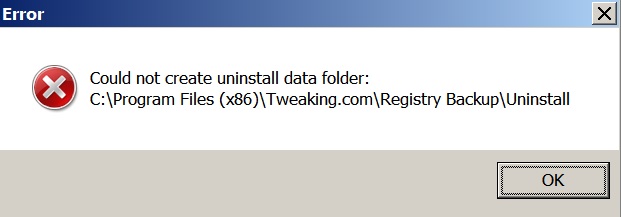
As has been my recent experience, I am unable to install Tweaking.com Registry Backup Tool to C:\Program Files(x86)
capnkrunch, I will wait for further instruction from you.
Thanks,
stu
Hello stu
Attachments Warning
Please do not post logs as attachments unless I specifically request it. If a log is too long you will have to split it among multiple posts. The reason for this is that this is a teaching forum and it lets other students and members watching this thread learn as well. In addition it is more convenient for me.
Also, do not post pictures unless I request it. Simply typing out the error message is fine and it saves bandwidth.
"the stuart" wrote:As has been my recent experience, I am unable to install Tweaking.com Registry Backup Tool to C:\Program Files(x86)
Thanks for letting me know. Please follow these instructions instead.
Step one...
FRST Search
- You should still have FRST64.exe, if not please download it HERE.
- Right click on FRST64.exe and select Run as administrator.
- Copy and paste the following line into the Search: box:
mbar*;system-log.txt
- Click the Search Files button.
- When the search is finished a file Search.txt will open in Notepad. Please copy and paste the contents in your reply.
Step two...
Create a System Restore Point
- Click on Start.
- Type Create a restore point into the Search programs and files box and select it from the results.
- From the Available Drives list select the Windows drive. It will be the one that says (System) after it.
- If Protection is Off, click Configure.
- Select Restore system settings and previous versions of files and click OK.
- Click on Create.
- Type precleanup into the textbox and click Create.
- Once it is finished click Close
STOP! If you were unable to create a new System Restore Point
do not proceed. Please report back with what happened and I will provide further instructions.
Step three...
TDSSKiller - Scan Only
- Please delete any copies of TDSSKiller that you have and download a new one HERE and save it to your Desktop.
- Close all open programs and windows so that you are at your Desktop.
- Right click on tdsskiller.exe and select Run as administrator.
- If you are not able to run it then right click tdsskiller.exe and select Rename.
- Rename it to a random string of letters with a .com extension (for example eajkxiga.com).
- If UAC prompts you to allow it to make changes to your computer please click Yes.
- When the End User License Agreement opens click Accept.
- Click Accept again for the KSN Statement.
- Click on Change parameters and check Verify file digital signatures.
IMPORTANT: ensure that Detect TDLFS file system remains UNCHECKED. - Click on OK to close the Settings window.
- Click on Start Scan. Do not use your computer during the scan.
- If malicious objects are found change the action from Cure to Skip.
DO NOT attempt to Cure anything at this point. - Once the scan is finished click on Report in the top right corner. Copy and paste the contents of that log in your next reply.
The log can also be found at C:\TDSSKiller.version_dd.mm.yyyy_hh.mm.ss_log.txt.
Step four...
aswMBR - Scan Only
- Please download aswMBR ... © Avast Software and save it to your Desktop.
- Right click aswMBR.exe and select Run as administrator.
- If prompted to download virus definitions click Yes.
This may take some time, please be patient. - Make sure Quick Scan is set in the options, then click the Scan button to start the scan.
The scan wil take a few minutes, please be patient. - Once the scan is finished you will see "Scan finished successfully" displayed. Click Save log.
- You will be prompted to save a file named aswMBR.txt. Save it to your Desktop.
- Copy and paste the contents of that file in your reply.
NOTE: aswMBR will also create a backup of your MBR in a file called mbr.dat on the Desktop. DO NOT delete this file.
Please post each log separately to prevent it being cut off by the forum post size limiter.
Check each after you've posted it to make sure it's all present, if any log is cut off you'll have to post it in sections...
In your next reply please include:
- Did you have any problems with the instructions?
- Search.txt
- TDSSKiller.version_dd.mm.yyyy_hh.mm.ss_log.txt
- aswMBR.txt
- Are there any changes in computer behavior?
capnkrunch, sorry that I messed up on following exactly the instructions. No attachments; no jpeg's.
I will be following your latest instruction to the "t" as best I am able.
Meanwhile, I have an enquiry. As I had mentioned, the main question that I have had is whether I have been successful in actually backing up the .pst files that contains all of the Outlook correspondence that I have on the C drive. I still have full access to Outlook and other Office programs, as well as other software that is installed on this computer.
I was able to generate a fresh backup .pst to my preferred folder on C:. The larger of the two .pst was over 5 GB, so I inserted a 15GB thumb drive. My attempt to copy the .pst to the thumb drive failed. The message said that there was insufficient room. This did not make sense. So, I ran another backup .pst with the target location being the thumb drive itself. I received the same message. In looking at the properties of the thumb drive, I observed that its file structure was FAT32. I wondered if W7 was looking for NFTS, so I reformatted the thumb drive to NFTS. I do not recall if I attempted to drag & drop the .pst on file first, but I eventually tried to do a straight backup to the thumb drive again.
This time I received this error message:
ERROR 0x80070021 The process cannot access the file because another process has locked a portion of the file.
In searching this Error, I learned that this condition can be the result of prior malware infection, and there is at least one tool specific to correcting this situation. However, since you have cautioned me not to do anything on my own, I have not gone further with that.
I do not have confidence that I was successful in transferring my .pst files in any of my recent backup attempts to external media. Should I be connecting these media to my affected computer and looking for the .pst files? I have been reluctant to connect the external hard drives to other computers at my disposal, all of which are old and have XP OS.
I will start to follow your most recent instructions later this morning; but not without a little trepidation at the status of the old Outlook correspondence.
I have used PC's for a couple of decades, but do not consider myself an authority on much of anything related. My training has been pretty basic on how to use the programs.
If you consider me sane and would like to learn the verbal taunt that I believe I heard via my computer speakers, let me know. Is that even possible?
Hello stu
"the stuart" wrote:The message said that there was insufficient room.
FAT32 has a file size limit of 4GB. Even though there was enough free space the file was too large for it to handle.
"the stuart" wrote:In searching this Error, I learned that this condition can be the result of prior malware infection, and there is at least one tool specific to correcting this situation.
There are definitely damaged permissions on your system that might cause this but I suspect this simply has to do with the file being in use. For now you can try rebooting, copying it
once only and then being patient. It is a large file so it may time a while even for the
Copying progress Window to appear.
"the stuart" wrote:Should I be connecting these media to my affected computer and looking for the .pst files?
Yes. That would be the easiest way to check whether or not you were successful.
"the stuart" wrote:Is that even possible?
It's very uncommon but not impossible. You don't need to prove anything to me though, it's not going to change our steps either way.
Please post the logs requested in my last post when ready.
capnkrunch, thank you for the sound advice on backup of Outlook. After a reboot, I was able to copy .pst's from their folder and paste them into the NTFS thumb drive. It did take some time. I feel better now.
Step one...
Farbar Recovery Scan Tool (x64) Version:27-02-2016
Ran by [redacted] (2016-03-02 13:11:26)
Running from C:\Users\[redacted]\Documents\Computing\Troubleshooting Tools\FRST64
Boot Mode: Normal
================== Search Files: "Code: Select all
mbar*;system-log.txt" =============
====== End of Search ======
That is not much, but I did follow the instructions.
On to Step two
Step two...
Windows drive Is C: and it says (System) after it.
However, it says that Protection is ON, so I am going no further until I hear from you.