Hi JDJD,
You wouldn't be the first to pick up junk from CNET.
-----------------------------------------------
It's really important, if you value your PC at all, to stay away from P2P file sharing programs, like
µTorrent, Bittorrent, Azureus, Frostwire, Vuze, Shareaza, Bitlord.
Criminals have "planted" thousands upon thousands of infections in the "free" shared torrent files.
Virtually all of these recent infections will compromise your Security, and some can turn your machine into a useless "doorstop".
------------------------------------------------
Remove Programs Using Control Panel
From
Start, Control Panel, click on
Uninstall a program under the Programs heading.
Right click each Entry, as follows, one by one, if it exists, choose
Uninstall/Change, and give permission to Continue:
µTorrent
Take extra care in answering questions posed by any Uninstaller.
-----------------------------------------------------------
REBOOT (RESTART) Your Machine
-------------------------------------------------------------
AdwCleaner Download and Run
Click on this link to download :
ADWCleaner
Click on the
Download Now button and save it to your desktop.
NOTE: If using Internet Explorer and you get an alert that stops the program downloading click on
Tools > Smartscreen Filter > Turn off Smartscreen Filter then click on
OK in the box that opens. Then click on the link again.
Close your browser and double click on this icon on your desktop:

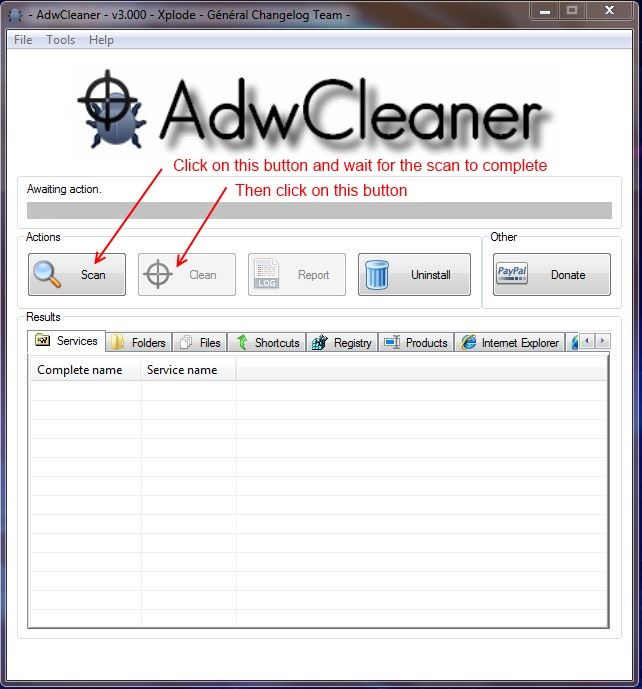
You will then see the screen below. Click on the
Scan button (as indicated), accept any prompts that appear and allow it to run.
It may take several minutes to complete. When it is done click on the
Clean button, accept any prompts that appear and allow the system to reboot.
You will then be presented with the report. Copy & Paste it into your next post.
 ---------------------------------------------
Run CKScanner
---------------------------------------------
Run CKScanner
Download CKScanner from
HERE
Important - Save it to your desktop.
Right-Click
CKScanner.exe, choose
Run as administrator and click
Search For Files.
After a couple minutes or less, when some text appears in the box, click
Save List To File.
A message box will verify the file saved.
It is important that you run the program just once..
Double-click the
CKFiles.txt icon on your desktop, give permission if asked, and copy/paste the contents in your next reply.
askey127

