This thread's last reply is from August 27, 2013, 10:42 PM UTC. Software, malware, and removal-tool
advice below may be out of date — treat specific steps and download links with caution.
I have a piece of Malware that is telling me that for 50 bucks I can clean my PC of W32/blaster.worm. Problem is this malware is blocking all attempts to download or execute anything. I can not download valid anti-malware or virus software because I think it is being blocked by this Malware. At a total loss.

posting.php?mode=post&f=11#
What type of Operating System are you using (XP, Vista, Windows 7, Windows 8) ???
In that case, we should be able to run a scan from Recovery Environment, since your infection should not be active in that mode, and therefore should not interfere with things.
- If using a 32 bit version of W7 ... Download FRST to a USB flash drive.
- If using a 64 bit version of W7 ... Download FRST64 to a USB flash drive.
- Plug the USB drive into the infected machine.
Boot your computer into Recovery Environment
- Restart the computer and press F8 repeatedly until the Advanced Options Menu appears.
- Select Repair your computer.
- Select Language and click Next
- Enter password (if necessary) and click OK, you should now see the screen below ...
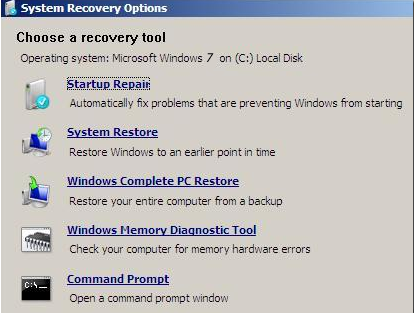
- Select the Command Prompt option.
- A command window will open.
- Type notepad then hit Enter.
- Notepad will open.
- Click File > Open then select Computer.
- Note down the drive letter for your USB Drive.
- Close Notepad.
- Back in the command window ....
- If using the 32 bit version of FRST type e:/frst.exe and hit Enter (where e: is replaced by the drive letter for your USB drive)
- If using the 64 bit version of FRST type e:/frst64.exe and hit Enter (where e: is replaced by the drive letter for your USB drive)
- FRST will start to run.
- When the tool opens click Yes to disclaimer.
- Press Scan button.
- When finished scanning it will make a log FRST.txt on the flash drive.
- Next
- Type services.exe;explorer.exe into the Search: box in FRST
- Click the Search Files button.
- FRST will scan your machine once more, this time looking for files.
- When finished scanning it will make a log Search.txt on the flash drive.
- Close the command window.
- Boot back into normal mode and post me the FRST.txt log and the Search.txt log please.

