creamtheater
Hello folks. i use windows 7 on my toshiba and the following variety of virus has crept into my system and isnt going away!
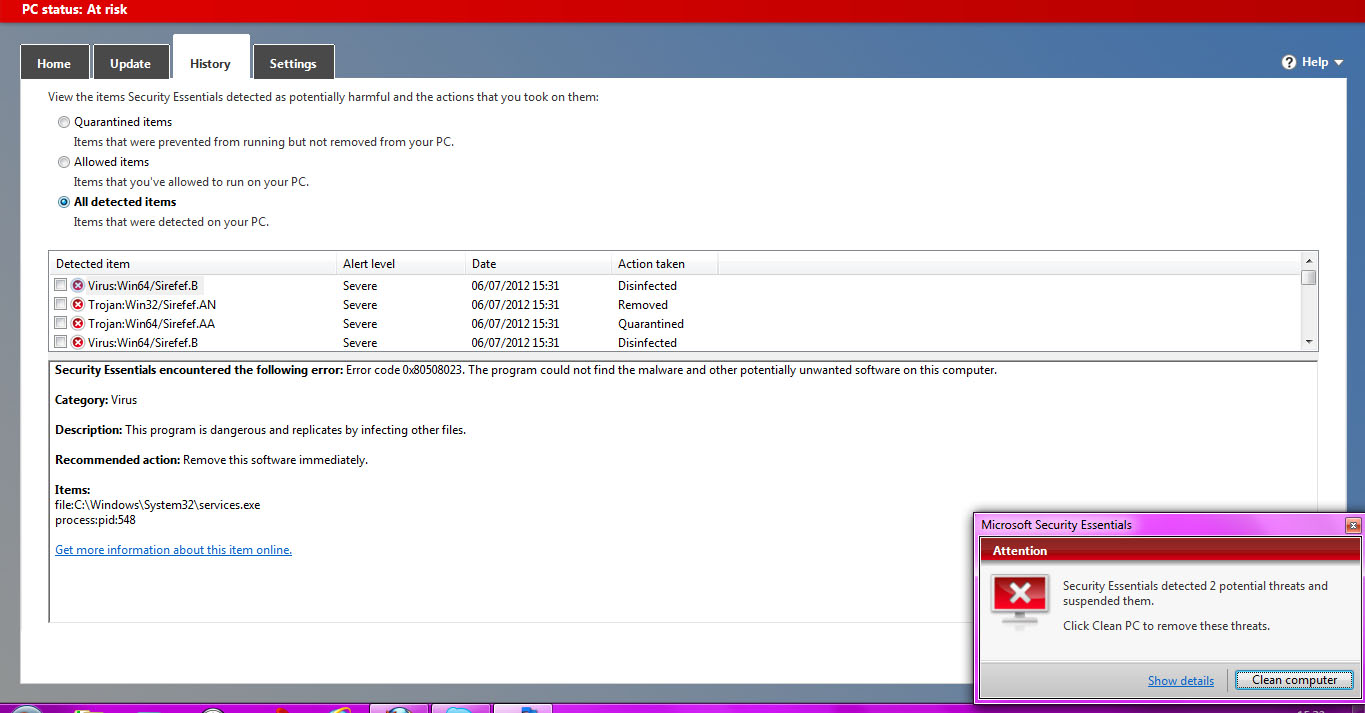
trojan:win64/sirefef.AA
trojan:win32/sirefef.AN
I have Security Essentials that's continuously detecting them and even though im doing a 'clean pc' and 'remove all' it comes back again in a second.
I tried looking up and it says it's a malware so i downloaded malwarebytes and did a full scan and cleaned the pc, yet the popup by security essentials isn't going away. I am getting so fedup with it, because it has slowed my system down greatly! .exe files that i want to install are taking ages, files of simple applications. Skype has become very slow too.. image quality is severely affected.
I gave my machine to a friend and he deleted a few files from the location it was showing under antivirus, so it went away for a while but came crawling back again.
Is there anyway to get rid of it? Kindly help, im getting really upset cos of this. I posted on PCWorld and they guided me here.
All your help will be really appreciated.
http://tinypic.com/view.php?pic=t85e1y&s=6
trojan:win64/sirefef.AA
trojan:win32/sirefef.AN
I have Security Essentials that's continuously detecting them and even though im doing a 'clean pc' and 'remove all' it comes back again in a second.
I tried looking up and it says it's a malware so i downloaded malwarebytes and did a full scan and cleaned the pc, yet the popup by security essentials isn't going away. I am getting so fedup with it, because it has slowed my system down greatly! .exe files that i want to install are taking ages, files of simple applications. Skype has become very slow too.. image quality is severely affected.
I gave my machine to a friend and he deleted a few files from the location it was showing under antivirus, so it went away for a while but came crawling back again.
Is there anyway to get rid of it? Kindly help, im getting really upset cos of this. I posted on PCWorld and they guided me here.
All your help will be really appreciated.
http://tinypic.com/view.php?pic=t85e1y&s=6