This is a read-only archive of malwareremoval.com. No new posts or registrations. Privacy Page
Malware Removal Forums

google redirect virus problem

2 min read

This thread's last reply is from October 15, 2011, 9:56 PM UTC. Software, malware, and removal-tool advice below may be out of date — treat specific steps and download links with caution.

I am using Avast antivirus in my laptop. I don't know how but my laptop got infected with google redirect virus and so I did complete scan of my laptop. Avast found 3 infected files. Two of them are "consrv.dll" in "c:\windows\system32\" and also "c:\windows\system64\" both have severity as high and status as"Threat:Win32:Malware-gen". I tried to repair by avast but it don't got repaired and throws error.then i moved it to avast's chest, after that the windows is not booting and it prompted to make startup repair.but it can't repair it. My problem is I can't boot or restore or repair my laptop. Is there any way to boot my computer to access my files? I have not partitioned my drive so everything is stored in the c: drive. I mean to say I can't go for new installation otherwise I will loose all my data. Please help me.

OS : Windows 7 ( 64 bit) home edition''

  • Download FRST64 to a USB flash drive.
  • Plug the USB drive into the infected machine.


Boot your computer into Recovery Environment

  • Restart the computer and press F8 repeatedly until the Advanced Options Menu appears.
  • Select Repair your computer.
  • Select Language and click Next
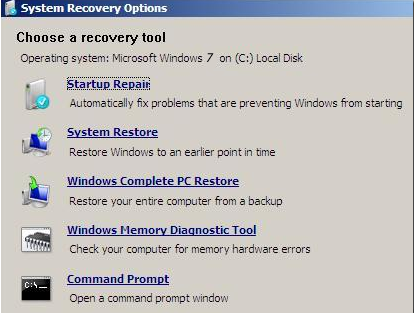
  • Enter password (if necessary) and click OK, you should now see the screen below ...


  • Select the Command Prompt option.
  • A command window will open.
    • Type notepad then hit Enter.
    • Notepad will open.
      • Click File > Open then select Computer.
      • Note down the drive letter for your USB Drive.
      • Close Notepad.
  • Back in the command window ....
    • Type e:/frst64.exe and hit Enter (where e: is replaced by the drive letter for your USB drive)
    • FRST will start to run.
      • When the tool opens click Yes to disclaimer.
      • Press Scan button.
      • When finished scanning it will make a log FRST.txt on the flash drive.
  • Close the command window.
  • Post me the FRST.txt log please.
Thanks Gary for your extended help.

As I posted my problem on Malware Removal Univ, I keep reading other posts (Malware removal univ) on how to back up the data when one can not boot the system. In one of the thread, it was mentioned that one can run Ubuntu on USB and recover the data. Fortunately the trick works for me and I recover all my data. After that I use onekey recovery option (provided by Lenovo) to restore my laptop at factory settings.

I really appreciate your help and time.

Thank you once again.

Shailesh
Thanks for letting me know you've resolved your problem.

Glad you were able to retrieve your data. :)

This topic is now closed.