This thread's last reply is from June 5, 2009, 2:45 AM UTC. Software, malware, and removal-tool
advice below may be out of date — treat specific steps and download links with caution.
Why when me try to install or uninstall something notepad will appeared?!
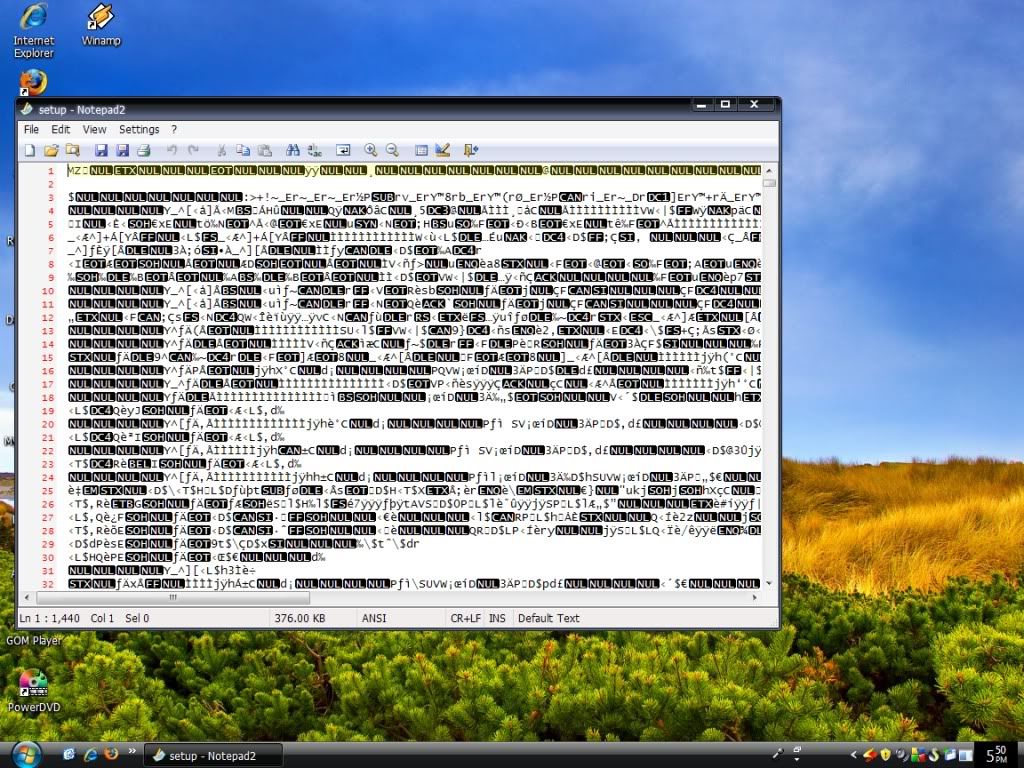
even trying to open certain program notepad appeared...
The most worst thing is i cant do anything because of this...
i tried to reformat but nothing happened...
Please help me!! :0
It appears that what you are probably experiencing may likely be "file association" issues, e.g., a file type (or types) is being associated with a particular program that cannot correctly execute or display that file type. In your case, Notepad has been incorrectly told to execute or display files that it is not designed to execute or display. Therefore, you get a display of gibberish instead of the expected action.
From your screenshot, it appears that your operating system is Windows Vista. Therefore, I suggest that a fix for your problem, if it is indeed a file association problem, may likely be found here:
http://www.winhelponline.com/articles/105/1/File-association-fixes-for-Windows-Vista.html
If that does not work for you, then you may have better luck posting for help at a site that hosts a general troubleshooting forum such as WhatTheTech:
http://forums.whatthetech.com/forums.html
From your screenshot, it appears that your operating system is Windows Vista. Therefore, I suggest that a fix for your problem, if it is indeed a file association problem, may likely be found here:
i'm sorry this is windows xp (service pack 3)

forgot to tell... this notepad also affected my task manager
For file association issues in Windows XP:
http://support.microsoft.com/kb/307859
http://www.dougknox.com/xp/file_assoc.htm
If you feel you have additional issues that are unrelated to malware, then you should post in a general troubleshooting forum as this site only works on malware related issues.
http://forums.whatthetech.com/forums.html
However, if after the file association issue has been resolved you feel you have further issues that may be related to malware, please follow the guideline at the link below to start a new topic and post your HijackThis log, then wait for a helper to assist you. If you are unable to create and post a HijackThis log, then your only option may be to reformat your computer and reinstall the operating system.
This topic is now closed. Please start a new topic by following the HijackThis Guideline posted here, just be certain to rename HijackThis: >Guideline for posting your HijackThis log<
