This thread's last reply is from December 10, 2008, 7:38 AM UTC. Software, malware, and removal-tool
advice below may be out of date — treat specific steps and download links with caution.
Ok, I really have a bad one this time!!!
I merely copied and pasted a link into my browser, and my computer immediately shut down and restarted, which immediately sent up red flags to me. Sure enough, I start getting messages "Your computer is infected!" popups, and another icon has appeared on my taskbar that I don't recognize. Also, whatever webpage I try to go to, I get redirected to another site advertising all manner of products. However, the worst thing is that I can't even open other applications on the computer without it crashing!
Worse still, even booting in safe mode/safe mode with networking, no icons appear! Only the "safe mode" words at each corner. I can't even run Hijackthis to diagnose the issue. But even if I could diagnose it, I wouldn't be able to run the cure. The mouse works fine, but there's nothing to click on. This has moved from the realm of "spyware" to "malware/virus" for sure.
Is there another option to explore before I turn to the Geeksquad or a computer repair shop?
Hi Crunchyhippo,
Welcome to Malware Removal.

Sorry for the delay, the forums are busy lately.
Step 1
Please download DDS from
Tech Support Forum and save it to your desktop.
- Double click on dds to run it.
- When done, DDS.txt will open.
- You will receive another prompt after a while. Click Yes at the prompt. It will take another few minutes to scan.
- When done, Attach.txt will open.
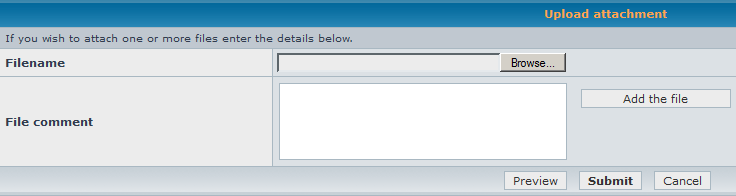
- Please attach Attach.txt to this topic by scrolling down to Upload attachment and click on Browse.... Please also copy and paste the contents of DDS.txt in your next reply.
An image for attaching files is below for your reference.
 Step 2
Please download
gmer.zip from Gmer and save it to your desktop.
- Right click on gmer.zip and select Extract All....
- Click Next on seeing the Welcome to the Compressed (zipped) Folders Extraction Wizard.
- Click on the Browse button. Click on Desktop. Then click OK.
- Click Next. It will start extracting.
- Once done, check (tick) the Show extracted files box and click Finish.
Double click on
gmer.exe to run it. It will start running a scan. If it detects rootkit activity, you will receive a prompt to run a full scan. Click
Yes.
- When done, you may receive another notice. Click OK.
- Click on Save ... to save a log.
- Copy and paste in Gmer.txt and click Save.
- Close Gmer.
If you receive no notice, click on the
Scan button.
- It will start scanning again.
- When done, click on Save ... to save a log.
- Copy and paste in Gmer.txt and click Save.
- Close Gmer.
Note: Do not run any programs while Gmer is running.
In your next reply, please post:
- DDS.txt
- Attach.txt (attached it to this topic)
- Gmer.txt
I can't run any application to scan since I can't get any application to run, including the "Start" button nor any desktop icons. I get a totally black screen after the computer is fully booted - even in Safe Mode.
I will probably have to get my desktop HD to boot off a secondary computer so I can access it (which may take a day), unless you have another suggestion. Thanks.
Hmm... a black screen.
Did you manage to get to the log in screen? (if there's any)
Huh. Well, the computer's been sitting off for several days now. I just turned it back on and it booted up like normal. I'm not about to try and go online, though. That's when all my troubles began.
Let me try your aforementioned recommendations and see what happens.
Ok, I managed to download gmer.zip to a flash drive and copy it to my desktop on my infected computer. However, when I click the extraced .exe icon, nothing will open. I also tried to open my Hijackthis program to run a scan, and that also won't open. As a test I tried to open Wordpad, and it opened fine. I also noticed that when I right-clicked the program and could see the "Run Zonealarm Antivirus" option (my antivirus program), it's dimmed out, though I never disabled it.
It almost sounds like this infection won't let me run any diagnositc program which will get rid of it, doesn't it?
I couldn't get gmer.exe to open on my infected computer.
However, I was able to run the other that you requested. I am uploading those two log files.
I don't know if DDS is working or not. It opened fine on my flash drive and extracted to my infected computer. It just won't open, nor will Hijackthis or ZoneAlarm. I might add that Zonealarm is running and turned on. It never detected this new infection.
Hi Crunchyhippo,
It's all right for now if HijackThis can't run. I've already gotten some of the necessary info needed via the logs you provided.
Please download Combofix from one of these locations. You
must rename it before clicking on the
Save button.
Link 1
Link 2
Link 3


Save it to your desktop.
- Double click on Combo-Fix.exe & follow the prompts.
- As part of its process, ComboFix will check to see if the Microsoft Windows Recovery Console is installed. You will see the following message if Microsoft Windows Recovery Console is not installed.
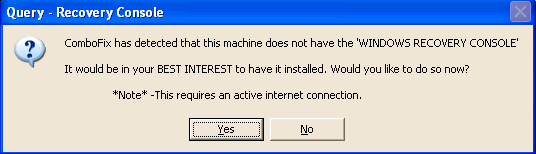
With malware infections being as they are today, it's strongly recommended to have this pre-installed on your machine before doing any malware removal. It will allow you to boot up into a special recovery/repair mode that will allow us to more easily help you should your computer have a problem after an attempted removal of malware.
- Follow the prompts to allow ComboFix to download and install the Microsoft Windows Recovery Console, and when prompted, agree to the End-User License Agreement to install the Microsoft Windows Recovery Console.
**Please note: If the Microsoft Windows Recovery Console is already installed, ComboFix will continue its malware removal procedures.
Once the Microsoft Windows Recovery Console is installed using ComboFix, you should see the following message:
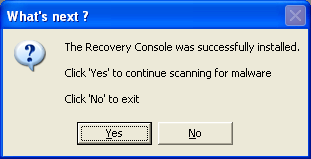
Click on
Yes to continue scanning for malware.
When finished, a log will be produced. Please post this log in your next reply.
Do not mouse click on Combofix while it is running. That may cause it to stall.I ran Combofix and it produced a log file, after finding some items. I'm posting it here.
Hi Cruncyhippo,
Please open Notepad and copy and paste the following in the Code box into Notepad:
http://malwareremoval.com/forum/viewtopic.php?f=11&t=36724


Collect::

c:\documents and settings\jeffrey\Application Data\jale.pif

c:\program files\Common Files\casutapeti.inf

c:\documents and settings\All Users\Application Data\rorocesok.com

c:\documents and settings\jeffrey\Application Data\urime.pif

c:\documents and settings\jeffrey\Application Data\ulyqyt.sys


Suspect::

c:\program files\Realplayer.exe

c:\program files\Realplayer7.exe

C:\program files\Backup-Wizard.exe


Registry::

[HKEY_CURRENT_USER\software\microsoft\windows\currentversion\policies\explorer]

"New Value #1"=-


Folder::

c:\program files\ErrorSmart


File::

c:\windows\Tasks\ErrorSmart Scheduled Scan.job
Warning: The above script is just for Crunchyhippo. If you are not Crunchyhippo, please do not use this script as it may damage the workings of your system.
Click on
File >
Save As....
In the File Name field, copy and paste in
CFScript.txt.
Do not change the file name.
Click
Save.
Referring to the picture below, drag CFScript into Combofix.
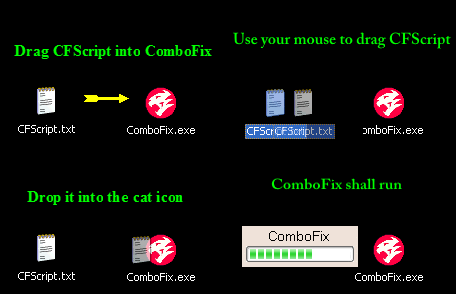
Combofix will start running. When done, a log will be produced. Please post this log in your next reply.
In addition, it will prompt you to submit some files for analyzing.

Click
OK.
Your web browser (by default it's Internet Explorer) will open.
Please refer to the image below to submit the file for analysis.
http://i35.photobucket.com/albums/d165/ndmmxiaomayi/mayi/submit_CF.gif
Do not mouse click on Combofix while it is running. That may cause it to stall.I will reply as soon as possible - working double shift right now.
Hi Crunchyhippo,
Are you still working on this?

