This thread's last reply is from February 13, 2007, 8:46 AM UTC. Software, malware, and removal-tool
advice below may be out of date — treat specific steps and download links with caution.
We had some friends over and their kids were on the wife's computer and now there are all kinds of pop-ups. Can someone please take a look and see if they can identify my problems.
Here is the latest HJT log:
Logfile of HijackThis v1.99.1
Scan saved at 1:51:12 PM, on 2/4/2007
Platform: Windows XP SP1 (WinNT 5.01.2600)
MSIE: Internet Explorer v6.00 SP1 (6.00.2800.1106)
You've got some nasty things on board, one is a file infector. I'll post back in about 1 hour or so with instructions for cleanup as I have to do a couple of things at home first. Try to keep the PC offline for the moment please.
A long list of things to do ... but PC will feel better afterwards. ;)
Please print out or copy these instructions/tutorial to Notepad as the internet will not be (while in Safe Mode) available to you at certain points of the removal process. Make sure to work through all the Steps in the exact order in which they are listed below. If there's anything that you don't understand, ask your question(s) before moving on with the fixes.
Stay away from Internet until the point where I ask you to post logs.
______________________________
Download http://www.mvps.org/winhelp2002/DelDomains.inf and place it on desktop
Download SmitfraudFix (by S!Ri) to your Desktop.
http://siri.urz.free.fr/Fix/SmitfraudFix.exe
Download SDFix and save it to your Desktop.
Double click SDFix.exe and it will extract the files to %systemdrive%
(Drive that contains the Windows Directory, typically C:\SDFix)
______________________________
Please download AVG Anti-Spyware to your Desktop or to your usual Download Folder.
http://www.ewido.net/en/download/
Install AVG Anti-Spyware by double clicking the installer.
Follow the prompts. Make sure that Launch AVG Anti-Spyware is checked.
On the main screen under Your Computer's security.
Click on Change state next to Resident shield. It should now change to inactive.
Click on Change state next to Automatic updates. It should now change to inactive.
Next to Last Update, click on Update now. (You will need an active internet connection to perform this)
Wait until you see the Update succesfull message.
Right-click the AVG Anti-Spyware Tray Icon and uncheck Start with Windows.
Right-click the AVG Anti-Spyware Tray Icon and select Exit. Confirm by clicking Yes.
If you are having problems with the updater, you can use this link to manually update ewido. AVG Anti-Spyware manual updates.
Download the Full database to your Desktop or to your usual Download Folder and install it by double clicking the file. Make sure that AVG Anti-Spyware is closed before installing the update.
______________________________
Right click the BFU folder on your desktop, and choose Extract All
Click "Next"
In the box to choose where to extract the files to,
Click "Browse"
Click on the + sign next to "My Computer"
Click on "Local Disk (C:) or whatever your primary drive is
Click "Make New Folder"
Type in BFU
Click "Next", and Uncheck the "Show Extracted Files" box and then click "Finish".
RIGHT-CLICK HERE and choose "Save As" (in IE it's "Save Target As") in order to download Alcra PLUS Remover. Save it in the same folder you made earlier (c:\BFU).
______________________________
Copy/paste the following text into a new Notepad document.
@echo off
if exist "C:\WINNT\GWMDMpi.exe" del /q "C:\WINNT\GWMDMpi.exe"
copy /y "C:\WINNT\bak\GWMDMpi.exe" "C:\WINNT\GWMDMpi.exe"
if exist "C:\Program Files\AGEIA Technologies\TrayIcon.exe" del /q "C:\Program Files\AGEIA Technologies\TrayIcon.exe"
copy /y "C:\Program Files\AGEIA Technologies\bak\TrayIcon.exe" "C:\Program Files\AGEIA Technologies\TrayIcon.exe"
if exist "C:\Program Files\iTunes\iTunesHelper.exe" del /q "C:\Program Files\iTunes\iTunesHelper.exe"
copy /y "C:\Program Files\iTunes\bak\iTunesHelper.exe" "C:\Program Files\iTunes\iTunesHelper.exe"
if exist "C:\Program Files\Microsoft Works\wkfud.exe" del /q "C:\Program Files\Microsoft Works\wkfud.exe"
copy /y "C:\Program Files\Microsoft Works\bak\wkfud.exe" "C:\Program Files\Microsoft Works\wkfud.exe"
if exist "C:\Program Files\Microsoft Works\WksSb.exe" del /q "C:\Program Files\Microsoft Works\WksSb.exe"
copy /y "C:\Program Files\Microsoft Works\bak\WksSb.exe" "C:\Program Files\Microsoft Works\WksSb.exe"
if exist "C:\Program Files\Norton AntiVirus\navapw32.exe" del /q "C:\Program Files\Norton AntiVirus\navapw32.exe"
copy /y "C:\Program Files\Norton AntiVirus\bak\navapw32.exe" "C:\Program Files\Norton AntiVirus\navapw32.exe"
if exist "C:\Program Files\QuickTime\qttask.exe" del /q "C:\Program Files\QuickTime\qttask.exe"
copy /y "C:\Program Files\QuickTime\bak\qttask.exe" "C:\Program Files\QuickTime\qttask.exe"
if exist "C:\Program Files\SymNetDrv\SNDMon.exe" del /q "C:\Program Files\SymNetDrv\SNDMon.exe"
copy /y "C:\Program Files\SymNetDrv\bak\SNDMon.exe" "C:\Program Files\SymNetDrv\SNDMon.exe"
if exist "C:\WINNT\system32\hkcmd.exe" del /q "C:\WINNT\system32\hkcmd.exe"
copy /y "C:\WINNT\system32\bak\hkcmd.exe" "C:\WINNT\system32\hkcmd.exe"
if exist "C:\WINNT\system32\igfxtray.exe" del /q "C:\WINNT\system32\igfxtray.exe"
copy /y "C:\WINNT\system32\bak\igfxtray.exe" "C:\WINNT\system32\igfxtray.exe"
if exist "C:\Program Files\ATI Multimedia\main\ATISched.EXE" del /q "C:\Program Files\ATI Multimedia\main\ATISched.EXE"
copy /y "C:\Program Files\ATI Multimedia\main\bak\ATISched.EXE" "C:\Program Files\ATI Multimedia\main\ATISched.EXE"
if exist "C:\Program Files\ATI Multimedia\main\LaunchPd.exe" del /q "C:\Program Files\ATI Multimedia\main\LaunchPd.exe"
copy /y "C:\Program Files\ATI Multimedia\main\bak\LaunchPd.exe" "C:\Program Files\ATI Multimedia\main\LaunchPd.exe"
if exist "C:\Program Files\ATI Multimedia\RemCtrl\ATIX10.exe" del /q "C:\Program Files\ATI Multimedia\RemCtrl\ATIX10.exe"
copy /y "C:\Program Files\ATI Multimedia\RemCtrl\bak\ATIX10.exe" "C:\Program Files\ATI Multimedia\RemCtrl\ATIX10.exe"
if exist "C:\Program Files\Adaptec\Easy CD Creator 5\DirectCD\DirectCD.exe" del /q "C:\Program Files\Adaptec\Easy CD Creator 5\DirectCD\DirectCD.exe"
copy /y "C:\Program Files\Adaptec\Easy CD Creator 5\DirectCD\bak\DirectCD.exe" "C:\Program Files\Adaptec\Easy CD Creator 5\DirectCD\DirectCD.exe"
if exist "C:\Program Files\Common Files\Microsoft Shared\Works Shared\WkUFind.exe" del /q "C:\Program Files\Common Files\Microsoft Shared\Works Shared\WkUFind.exe"
copy /y "C:\Program Files\Common Files\Microsoft Shared\Works Shared\bak\WkUFind.exe" "C:\Program Files\Common Files\Microsoft Shared\Works Shared\WkUFind.exe"
if exist "C:\Program Files\Common Files\Smith Micro Shared\Fax\SMLoader.exe" del /q "C:\Program Files\Common Files\Smith Micro Shared\Fax\SMLoader.exe"
copy /y "C:\Program Files\Common Files\Smith Micro Shared\Fax\bak\SMLoader.exe" "C:\Program Files\Common Files\Smith Micro Shared\Fax\SMLoader.exe"
if exist "C:\Program Files\Common Files\Symantec Shared\Security Center\UsrPrmpt.exe" del /q "C:\Program Files\Common Files\Symantec Shared\Security Center\UsrPrmpt.exe"
copy /y "C:\Program Files\Common Files\Symantec Shared\Security Center\bak\UsrPrmpt.exe" "C:\Program Files\Common Files\Symantec Shared\Security Center\UsrPrmpt.exe"
if exist "C:\Program Files\Java\jre1.5.0_06\bin\jusched.exe" del /q "C:\Program Files\Java\jre1.5.0_06\bin\jusched.exe"
copy /y "C:\Program Files\Java\jre1.5.0_06\bin\bak\jusched.exe" "C:\Program Files\Java\jre1.5.0_06\bin\jusched.exe"
Save it to your desktop as cleanme.bat. Save it as:
File Type: All Files (not as a text document or it wont work).
Name: cleanme.bat
______________________________
Reboot your computer in Safe Mode.
If the computer is running, shut down Windows, and then turn off the power.
Wait 30 seconds, and then turn the computer on.
Start tapping the F8 key. The Windows Advanced Options Menu appears. If you begin tapping the F8 key too soon, some computers display a "keyboard error" message. To resolve this, restart the computer and try again.
Ensure that the Safe Mode option is selected.
Press Enter. The computer then begins to start in Safe mode.
Login on your usual account.
______________________________
Please go to Start > My Computer and navigate to the C:\BFU folder.
Start the Brute Force Uninstaller by doubleclicking BFU.exe
Behind the scriptline to execute field click the folder icon and select alcanshorty.bfu
Press Execute and let the program do it’s job. (You ought to see a progress bar if you did this correctly.)
Wait for the complete script execution box to pop up and press OK.
Press exit to terminate the BFU program.
SDFix
Open the extracted SDFix folder and double click RunThis.bat to start the script.
Type Y to begin the cleanup process.
It will remove any Trojan Services and Registry Entries that it finds then prompt you to press any key to Reboot.
Press any Key and it will restart the PC.
When the PC restarts the Fixtool will run again and complete the removal process then display Finished, press any key to end the script and load your desktop icons.
Once the desktop icons loaded, the SDFix report will open on screen and will also be saved into the SDFix folder as Report.txt
(Report.txt will also be copied to Clipboard ready for posting back on the forum). Close it for now.
______________________________
Reboot your computer in Safe Mode.
If the computer is running, shut down Windows, and then turn off the power.
Wait 30 seconds, and then turn the computer on.
Start tapping the F8 key. The Windows Advanced Options Menu appears. If you begin tapping the F8 key too soon, some computers display a "keyboard error" message. To resolve this, restart the computer and try again.
Ensure that the Safe Mode option is selected.
Press Enter. The computer then begins to start in Safe mode.
______________________________
Double click cleanme.bat on your desktop. A CMD window will open / close, this is normal.
______________________________
Double-click SmitfraudFix.exe
Select option #2 - Clean by typing 2 and press Enter.
Wait for the tool to complete and disk cleanup to finish.
You will be prompted : "Registry cleaning - Do you want to clean the registry ?" answer Yes by typing Y and hit Enter.
The tool will also check if wininet.dll is infected. If a clean version is found, you will be prompted to replace wininet.dll. Answer Yes to the question "Replace infected file ?" by typing Y and hit Enter.
A reboot may be needed to finish the cleaning process, if you computer does not restart automatically please do it yourself manually. Reboot in Safe Mode.
The tool will create a log named rapport.txt in the root of your drive, eg: Local Disk C: or partition where your operating system is installed. Please post that log along with all others requested in your next reply.
______________________________
Run HijackThis, click on None of the above, just start the program, click on Scan. Put a check in the box on the left side of the following items if still present:
Navigate to C:\WINNT\Temp
Click Edit, click Select All, press the DELETE key, and then click Yes to confirm that you want to send all the items to the Recycle Bin.
Navigate to C:\Documents and Settings\(EVERY LISTED USER)\Local Settings\Temp
Click Edit, click Select All, press the DELETE key, and then click Yes to confirm that you want to send all the items to the Recycle Bin.
Clean out your Temporary Internet files. Proceed like this:
Quit Internet Explorer, all browsers and quit any instances of Windows Explorer.
For Internet Explorer 7
Click Start, click Control Panel, and then double-click Internet Options.
On the General tab, click Delete... under Browsing History.
Next to Temporary Internet Files, click Delete files, and then click OK.
Next to Cookies, click Delete cookies, and then click OK.
Next to History, click Delete history, and then click OK.
Click the Close button.
Click OK.
For Internet Explorer 4.x - 6.x
Click Start, click Control Panel, and then double-click Internet Options.
On the General tab, click Delete Files under Temporary Internet Files.
In the Delete Files dialog box, tick the Delete all offline content check box, and then click OK.
On the General tab, click Delete Cookies under Temporary Internet Files, and then click OK.
Click on the Programs tab then click the Reset Web Settings button. Click Apply then OK.
Click OK.
For Netscape 4.x and Up
Click Edit from the Netscape menubar.
Click Preferences... from the Edit menu.
Expand the Advanced menu by clicking the triangle sign.
Click Cache.
Click both the Clear Memory Cache and the Clear Disk Cache buttons.
For Mozilla 1.x and Up
Click Edit from the Mozilla menubar.
Click Preferences... from the Edit menu.
Expand the Advanced menu by clicking the plus sign.
Click Cache.
Click the Clear Cache button.
For Opera
Click File from the Opera menubar.
Click Preferences... from the File menu.
Click the History and Cache menu.
Click the two Clear buttons next to Typed in addresses and Visited addresses (history) and click the Empty now button to clear the Disk cache.
Click Ok to close the Preferences menu.
Next Click Start, click Control Panel and then double-click Display. Click on the Desktop tab, then click the Customize Desktop button. Click on the Web tab. Under Web Pages you should see a checked entry called Security info or something similar. If it is there, select that entry and click the Delete button. Click Ok then Apply and Ok.
Empty the Recycle Bin by right-clicking the Recycle Bin icon on your Desktop, and then clicking Empty Recycle Bin.
______________________________
Close ALL open Windows / Programs / Folders. Please start AVG Anti-Spyware and run a full scan.
Click on Scanner on the toolbar.
Click on the Settings tab.
Under How to act?
Click on Recommended Action and choose Quarantine from the popup menu.
Under How to scan?
All checkboxes should be ticked.
Under Possibly unwanted software:
All checkboxes should be ticked.
Under Reports:
Select Automatically generate report after every scan and uncheck Only if threats were found.
Under What to scan?
Select Scan every file.
Click on the Scan tab.
Click on Complete System Scan to start the scan process.
Let the program scan the machine.
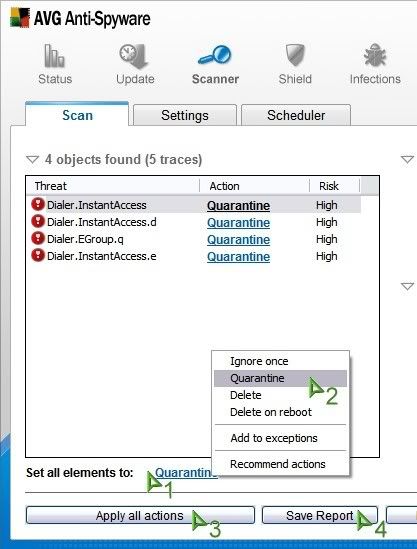
When the scan has finished, follow the instructions below. IMPORTANT : Don't click on the "Save Scan Report" button before you did hit the "Apply all Actions" button.
Make sure that Set all elements to: shows Quarantine(1), if not click on the link and choose Quarantine from the popup menu. (2)
At the bottom of the window click on the Apply all Actions button. (3)
When done, click the Save Scan Report button. (4)
Click the Save Report as button.
Save the report to your Desktop.
Right-click the AVG Anti-Spyware Tray Icon and select Exit. Confirm by clicking Yes.
Reboot in Normal Mode.
______________________________
Locate DelDomains.inf on your desktop right click the file and select install, that will reset the zone settings that have been altered.
Locate "ResetProtocolDefaults.reg"
Right-click and select: Merge (Ok the prompt)
______________________________
Copy/paste the following quote box into a new notepad (not wordpad) document. Make sure that wordwrap is turned off.
Save it to your Desktop as inspect.bat. Save it as:
File Type: All Files (not as a text document or it wont work).
Name: inspect.bat
Locate inspect.bat on your Desktop and double-click it. When finished it will open a file in Notepad. That file will be named lsa.txt. Copy/paste the content in your reply. When you close Notepad the CMD window will close automatically and the new folder will be deleted.
______________________________
Please post:
c:\SDfix\Report.txt
c:\rapport.txt
AVG log
c:\lsa.txt
A new HijackThis log
Your may need several replies to post the requested logs, otherwise they might get cut off.
Scan done at 17:35:22.60, Sun 02/04/2007
Run from C:\Documents and Settings\Owner\Desktop\SmitfraudFix
OS: Microsoft Windows XP [Version 5.1.2600] - Windows_NT
The filesystem type is NTFS
Fix run in safe mode
»»»»»»»»»»»»»»»»»»»»»»»» Before SmitFraudFix
!!!Attention, following keys are not inevitably infected!!!
SrchSTS.exe by S!Ri
Search SharedTaskScheduler's .dll
»»»»»»»»»»»»»»»»»»»»»»»» Killing process
Notice!
A new version of Kaspersky Virus Scanner has been released on August 8, 2006. If you have installed a previous version, you must unistall that program first before installing the new version. To uninstall, please go to the computer control panel and select "Add/Remove Programs." Close all Internet Explorer windows before uninstalling the Kaspersky Online Scanner.
Click on Kaspersky Online Scanner
You will be promted to install an ActiveX component from Kaspersky, Click Yes.
Note for Internet Explorer 7 users: If at any time you have trouble with the accept button of the licence, click on the Zoom tool located at the right bottom of the IE window and set the zoom to 75 %. Once the license accepted, reset to 100%.
The program will launch and then start to download the latest definition files.
Once the scanner is installed and the definitions downloaded, click Next.
Now click on Scan Settings
In the scan settings make that the following are selected:
Scan using the following Anti-Virus database:
Extended (If available otherwise Standard)
Scan Options:
Scan Archives
Scan Mail Bases
Click OK
Now under select a target to scan select My Computer
The scan will take a while so be patient and let it run. Once the scan is complete it will display if your system has been infected.
Now click on the Save Report As button:
Save the file to your desktop.
File Type: Text file (*.txt).
Name: Kav.txt for example
Copy and paste that information in your next post.
Please post the awf log, the Kaspersky log and a fresh hijackthis log.
21504 "C:\Documents and Settings\Owner\My Documents\Backup of 10-25-04 wedding.wbk"
21504 "C:\Documents and Settings\Owner\My Documents\Backup of 10-13-04 Everybody Love Raymond.wbk"
21504 "C:\Documents and Settings\Owner\My Documents\Backup of 10-31-04 Columbus Zoo.wbk"
21504 "C:\Program Files\WildTangent\Apps\DRM0302.dll"
21504 "C:\Program Files\WildTangent\Components\wtPropertyBag0200.dll"
21504 "C:\WINNT\$hf_mig$\KB873339\update\spcustom.dll"
21504 "C:\WINNT\$hf_mig$\KB885835\update\spcustom.dll"
21504 "C:\WINNT\$hf_mig$\KB885836\update\spcustom.dll"
21504 "C:\WINNT\$hf_mig$\KB888113\update\spcustom.dll"
21504 "C:\WINNT\$hf_mig$\KB888302\update\spcustom.dll"
21504 "C:\WINNT\$hf_mig$\KB891781\update\spcustom.dll"
21504 "C:\WINNT\$hf_mig$\KB900725\SP2QFE\xpsp3res.dll"
21504 "C:\WINNT\ServicePackFiles\i386\lang\cintlgnt.ime"
21504 byte files sorted with strings
~~~~~~~~~~~~~~~~~~~~~
25600 byte files found
~~~~~~~~~~~~~
25600 "C:\Documents and Settings\Owner\My Documents\Backup of 10-18-04 Worlds of Wonder, Days of Judgment.wbk"
25600 "C:\Documents and Settings\Owner\My Documents\Backup of 11-12-04 familiy outline.wbk"
25600 "C:\Documents and Settings\shane\Desktop\Book2.xls"
25600 byte files sorted with strings
~~~~~~~~~~~~~~~~~~~~~
26450 byte files found
~~~~~~~~~~~~~
26450 byte files sorted with strings
~~~~~~~~~~~~~~~~~~~~~
bak folders found
~~~~~~~~~~~
Directory of C:\WINNT\BAK
03/06/2002 10:08 AM 40,960 GWMDMpi.exe
1 File(s) 40,960 bytes
Directory of C:\OEMDRVRS\KEYB\BAK
0 File(s) 0 bytes
Directory of C:\PROGRA~1\ITUNES\BAK
12/18/2004 12:20 AM 278,528 iTunesHelper.exe
1 File(s) 278,528 bytes
This was not run in Safe Mode. Don't know if it matters. Safe Mode didn't have network support.
-------------------------------------------------------------------------------
KASPERSKY ONLINE SCANNER REPORT
Tuesday, February 05, 2002 10:01:58 PM
Operating System: Microsoft Windows XP Home Edition, Service Pack 1 (Build 2600)
Kaspersky Online Scanner version: 5.0.83.0
Kaspersky Anti-Virus database last update: 6/02/2007
Kaspersky Anti-Virus database records: 265241
-------------------------------------------------------------------------------
Scan Settings:
Scan using the following antivirus database: extended
Scan Archives: true
Scan Mail Bases: true
Scan Target - My Computer:
A:\
C:\
D:\
E:\
Scan Statistics:
Total number of scanned objects: 60165
Number of viruses found: 16
Number of infected objects: 44 / 0
Number of suspicious objects: 0
Duration of the scan process: 01:29:07
Infected Object Name / Virus Name / Last Action
C:\Documents and Settings\LocalService\Cookies\index.dat Object is locked skipped
C:\Documents and Settings\LocalService\Local Settings\Application Data\Microsoft\Windows\UsrClass.dat Object is locked skipped
C:\Documents and Settings\LocalService\Local Settings\Application Data\Microsoft\Windows\UsrClass.dat.LOG Object is locked skipped
C:\Documents and Settings\LocalService\Local Settings\History\History.IE5\index.dat Object is locked skipped
C:\Documents and Settings\LocalService\Local Settings\Temporary Internet Files\Content.IE5\index.dat Object is locked skipped
C:\Documents and Settings\LocalService\NTUSER.DAT Object is locked skipped
C:\Documents and Settings\LocalService\ntuser.dat.LOG Object is locked skipped
C:\Documents and Settings\NetworkService\Local Settings\Application Data\Microsoft\Windows\UsrClass.dat Object is locked skipped
C:\Documents and Settings\NetworkService\Local Settings\Application Data\Microsoft\Windows\UsrClass.dat.LOG Object is locked skipped
C:\Documents and Settings\NetworkService\NTUSER.DAT Object is locked skipped
C:\Documents and Settings\NetworkService\ntuser.dat.LOG Object is locked skipped
C:\Documents and Settings\Owner\Cookies\index.dat Object is locked skipped
C:\Documents and Settings\Owner\Desktop\computer clean up\SmitfraudFix\Reboot.exe Infected: not-a-virus:RiskTool.Win32.Reboot.f skipped
C:\Documents and Settings\Owner\Desktop\computer clean up\SmitfraudFix.exe/data.rar/SmitfraudFix/Reboot.exe Infected: not-a-virus:RiskTool.Win32.Reboot.f skipped
C:\Documents and Settings\Owner\Desktop\computer clean up\SmitfraudFix.exe/data.rar Infected: not-a-virus:RiskTool.Win32.Reboot.f skipped
C:\Documents and Settings\Owner\Desktop\computer clean up\SmitfraudFix.exe RarSFX: infected - 2 skipped
C:\Documents and Settings\Owner\Desktop\computer clean up\SmitfraudFix.exe PE_Patch.UPX: infected - 2 skipped
C:\Documents and Settings\Owner\Local Settings\Application Data\Microsoft\Windows\UsrClass.dat Object is locked skipped
C:\Documents and Settings\Owner\Local Settings\Application Data\Microsoft\Windows\UsrClass.dat.LOG Object is locked skipped
C:\Documents and Settings\Owner\Local Settings\History\History.IE5\index.dat Object is locked skipped
C:\Documents and Settings\Owner\Local Settings\Temporary Internet Files\Content.IE5\I5AH8TKF\ErrorSafeNewReleaseInstall[1].exe Infected: not-a-virus:Downloader.Win32.WinFixer.o skipped
C:\Documents and Settings\Owner\Local Settings\Temporary Internet Files\Content.IE5\index.dat Object is locked skipped
C:\Documents and Settings\Owner\NTUSER.DAT Object is locked skipped
C:\Documents and Settings\Owner\ntuser.dat.LOG Object is locked skipped
C:\Documents and Settings\shane\Desktop\New Folder\UBCD4WinV255.exe/data.rar/plugin/keyfinderpe/keyfinder.exe/data.rar/xpkey.exe Infected: not-a-virus:PSWTool.Win32.RAS.a skipped
C:\Documents and Settings\shane\Desktop\New Folder\UBCD4WinV255.exe/data.rar/plugin/keyfinderpe/keyfinder.exe/data.rar/officekey.exe Infected: not-a-virus:PSWTool.Win32.RAS.a skipped
C:\Documents and Settings\shane\Desktop\New Folder\UBCD4WinV255.exe/data.rar/plugin/keyfinderpe/keyfinder.exe/data.rar Infected: not-a-virus:PSWTool.Win32.RAS.a skipped
C:\Documents and Settings\shane\Desktop\New Folder\UBCD4WinV255.exe/data.rar/plugin/keyfinderpe/keyfinder.exe Infected: not-a-virus:PSWTool.Win32.RAS.a skipped
C:\Documents and Settings\shane\Desktop\New Folder\UBCD4WinV255.exe/data.rar/plugin/VNCServer/vncconfig.exe Infected: not-a-virus:RemoteAdmin.Win32.WinVNC.4 skipped
C:\Documents and Settings\shane\Desktop\New Folder\UBCD4WinV255.exe/data.rar/plugin/VNCServer/winvnc4.exe Infected: not-a-virus:RemoteAdmin.Win32.WinVNC.4 skipped
C:\Documents and Settings\shane\Desktop\New Folder\UBCD4WinV255.exe/data.rar/plugin/VNCServer/wm_hooks.dll Infected: not-a-virus:RemoteAdmin.Win32.WinVNC.4 skipped
C:\Documents and Settings\shane\Desktop\New Folder\UBCD4WinV255.exe/data.rar Infected: not-a-virus:RemoteAdmin.Win32.WinVNC.4 skipped
C:\Documents and Settings\shane\Desktop\New Folder\UBCD4WinV255.exe RarSFX: infected - 8 skipped
C:\Documents and Settings\shane\Local Settings\Temporary Internet Files\Content.IE5\MRSL658F\popcaploader_v6[1].cab/PopCapLoader.dll Infected: not-a-virus:Downloader.Win32.PopCap.b skipped
C:\Documents and Settings\shane\Local Settings\Temporary Internet Files\Content.IE5\MRSL658F\popcaploader_v6[1].cab CAB: infected - 1 skipped
C:\Program Files\Norton AntiVirus\Quarantine\0E516C40.htm Infected: Trojan-Dropper.Win32.Runme skipped
C:\SDFix\backups\backups.zip/backups/svchosts.exe Infected: Trojan-Downloader.Win32.Agent.bca skipped
C:\SDFix\backups\backups.zip ZIP: infected - 1 skipped
C:\System Volume Information\_restore{0193FC1C-0A70-478B-8107-B531B8E70CAB}\RP960\A0041862.exe/data0002 Infected: not-a-virus:AdWare.Win32.PurityScan.fl skipped
C:\System Volume Information\_restore{0193FC1C-0A70-478B-8107-B531B8E70CAB}\RP960\A0041862.exe/data0003 Infected: not-a-virus:AdWare.Win32.PurityScan.bu skipped
C:\System Volume Information\_restore{0193FC1C-0A70-478B-8107-B531B8E70CAB}\RP960\A0041862.exe NSIS: infected - 2 skipped
C:\System Volume Information\_restore{0193FC1C-0A70-478B-8107-B531B8E70CAB}\RP984\A0041900.exe/data0002 Infected: not-a-virus:AdWare.Win32.PurityScan.fl skipped
C:\System Volume Information\_restore{0193FC1C-0A70-478B-8107-B531B8E70CAB}\RP984\A0041900.exe/data0003 Infected: not-a-virus:AdWare.Win32.PurityScan.bu skipped
C:\System Volume Information\_restore{0193FC1C-0A70-478B-8107-B531B8E70CAB}\RP984\A0041900.exe NSIS: infected - 2 skipped
C:\System Volume Information\_restore{0193FC1C-0A70-478B-8107-B531B8E70CAB}\RP995\A0041973.exe/data.rar/SmitfraudFix/Reboot.exe Infected: not-a-virus:RiskTool.Win32.Reboot.f skipped
C:\System Volume Information\_restore{0193FC1C-0A70-478B-8107-B531B8E70CAB}\RP995\A0041973.exe/data.rar Infected: not-a-virus:RiskTool.Win32.Reboot.f skipped
C:\System Volume Information\_restore{0193FC1C-0A70-478B-8107-B531B8E70CAB}\RP995\A0041973.exe RarSFX: infected - 2 skipped
C:\System Volume Information\_restore{0193FC1C-0A70-478B-8107-B531B8E70CAB}\RP995\A0041973.exe PE_Patch.UPX: infected - 2 skipped
C:\System Volume Information\_restore{0193FC1C-0A70-478B-8107-B531B8E70CAB}\RP995\A0041983.exe Infected: Trojan-Downloader.Win32.Agent.awf skipped
C:\System Volume Information\_restore{0193FC1C-0A70-478B-8107-B531B8E70CAB}\RP995\A0041984.dll Infected: Trojan-Spy.Win32.Delf.mk skipped
C:\System Volume Information\_restore{0193FC1C-0A70-478B-8107-B531B8E70CAB}\RP995\A0041987.exe/msbb.exe Infected: not-a-virus:AdWare.Win32.180Solutions skipped
C:\System Volume Information\_restore{0193FC1C-0A70-478B-8107-B531B8E70CAB}\RP995\A0041987.exe CAB: infected - 1 skipped
C:\System Volume Information\_restore{0193FC1C-0A70-478B-8107-B531B8E70CAB}\RP995\A0041987.exe MimarSinan: infected - 1 skipped
C:\System Volume Information\_restore{0193FC1C-0A70-478B-8107-B531B8E70CAB}\RP995\A0041987.exe UPX: infected - 1 skipped
C:\System Volume Information\_restore{0193FC1C-0A70-478B-8107-B531B8E70CAB}\RP995\A0041989.exe Infected: not-a-virus:AdWare.Win32.Softomate.u skipped
C:\System Volume Information\_restore{0193FC1C-0A70-478B-8107-B531B8E70CAB}\RP995\A0041990.exe Infected: not-a-virus:AdWare.Win32.Softomate.ac skipped
C:\System Volume Information\_restore{0193FC1C-0A70-478B-8107-B531B8E70CAB}\RP995\A0041991.dll Infected: not-a-virus:AdWare.Win32.Softomate.ac skipped
C:\System Volume Information\_restore{0193FC1C-0A70-478B-8107-B531B8E70CAB}\RP995\A0041992.dll Infected: not-a-virus:AdWare.Win32.Softomate.u skipped
C:\System Volume Information\_restore{0193FC1C-0A70-478B-8107-B531B8E70CAB}\RP995\A0041993.dll Infected: not-a-virus:AdWare.Win32.CommAd.a skipped
C:\System Volume Information\_restore{0193FC1C-0A70-478B-8107-B531B8E70CAB}\RP995\A0041994.exe Infected: not-a-virus:AdWare.Win32.CommAd.a skipped
C:\System Volume Information\_restore{0193FC1C-0A70-478B-8107-B531B8E70CAB}\RP995\A0041995.exe/data0004 Infected: not-a-virus:AdWare.Win32.Sidesearch.b skipped
C:\System Volume Information\_restore{0193FC1C-0A70-478B-8107-B531B8E70CAB}\RP995\A0041995.exe NSIS: infected - 1 skipped
C:\System Volume Information\_restore{0193FC1C-0A70-478B-8107-B531B8E70CAB}\RP997\change.log Object is locked skipped
C:\WINNT\$NtUninstallKB835732$\callcont.dll Object is locked skipped
C:\WINNT\$NtUninstallKB835732$\gdi32.dll Object is locked skipped
C:\WINNT\$NtUninstallKB835732$\h323.tsp Object is locked skipped
C:\WINNT\$NtUninstallKB835732$\h323msp.dll Object is locked skipped
C:\WINNT\$NtUninstallKB835732$\helpctr.exe Object is locked skipped
C:\WINNT\$NtUninstallKB835732$\ipnathlp.dll Object is locked skipped
C:\WINNT\$NtUninstallKB835732$\lsasrv.dll Object is locked skipped
C:\WINNT\$NtUninstallKB835732$\mf3216.dll Object is locked skipped
C:\WINNT\$NtUninstallKB835732$\msasn1.dll Object is locked skipped
C:\WINNT\$NtUninstallKB835732$\msgina.dll Object is locked skipped
C:\WINNT\$NtUninstallKB835732$\mst120.dll Object is locked skipped
C:\WINNT\$NtUninstallKB835732$\netapi32.dll Object is locked skipped
C:\WINNT\$NtUninstallKB835732$\nmcom.dll Object is locked skipped
C:\WINNT\$NtUninstallKB835732$\rtcdll.dll Object is locked skipped
C:\WINNT\$NtUninstallKB835732$\schannel.dll Object is locked skipped
C:\WINNT\Debug\oakley.log Object is locked skipped
C:\WINNT\Debug\PASSWD.LOG Object is locked skipped
C:\WINNT\SchedLgU.Txt Object is locked skipped
C:\WINNT\SoftwareDistribution\ReportingEvents.log Object is locked skipped
C:\WINNT\Sti_Trace.log Object is locked skipped
C:\WINNT\system32\config\AppEvent.Evt Object is locked skipped
C:\WINNT\system32\config\DEFAULT Object is locked skipped
C:\WINNT\system32\config\default.LOG Object is locked skipped
C:\WINNT\system32\config\SAM Object is locked skipped
C:\WINNT\system32\config\SAM.LOG Object is locked skipped
C:\WINNT\system32\config\SecEvent.Evt Object is locked skipped
C:\WINNT\system32\config\SECURITY Object is locked skipped
C:\WINNT\system32\config\SECURITY.LOG Object is locked skipped
C:\WINNT\system32\config\SOFTWARE Object is locked skipped
C:\WINNT\system32\config\software.LOG Object is locked skipped
C:\WINNT\system32\config\SysEvent.Evt Object is locked skipped
C:\WINNT\system32\config\SYSTEM Object is locked skipped
C:\WINNT\system32\config\system.LOG Object is locked skipped
C:\WINNT\system32\h323log.txt Object is locked skipped
C:\WINNT\system32\wbem\Repository\FS\INDEX.BTR Object is locked skipped
C:\WINNT\system32\wbem\Repository\FS\OBJECTS.DATA Object is locked skipped
C:\WINNT\wiadebug.log Object is locked skipped
C:\WINNT\wiaservc.log Object is locked skipped
C:\WINNT\WindowsUpdate.log Object is locked skipped
Logfile of HijackThis v1.99.1
Scan saved at 10:07:10 PM, on 2/5/2002
Platform: Windows XP SP1 (WinNT 5.01.2600)
MSIE: Internet Explorer v6.00 SP1 (6.00.2800.1106)

 and select alcanshorty.bfu