This thread's last reply is from February 2, 2008, 6:34 AM UTC. Software, malware, and removal-tool
advice below may be out of date — treat specific steps and download links with caution.
Hi there,I downloaded and installed windows installer,rebooted then tried to remove adobe.It still wouldn't uninstall.Saying the windows installer service can't be accessed.What should I do now?Thankyou.
I'm researching your problems now. Please be patient.
Hi there,I've done as you said and I'm now getting a different message when I try to uninstall adobe.It says"the patch package could not be opened,verify that the package exists and you have access to it"What should I do next?Thankyou very much for your help.
Hi there,something serious has happened since I carried out your last instructions.When I reboot the computer I cant log on.It reboots but then hangs at the windows xp logo.I've tried safe mode etc but can't get in.I hope you can help me.P.s I had to add a system account under group names as it only had one for administrator.It's as if my account has been deleted.There is no box to enter my password.Please help me.Thanks.
Hi there,I done this because there wasn't an option for system there.So I added one.What have I done.Why is this stopping me from accessing my computer.I'm really worried now.I need my computer.I've came to my brothers house to use his to do this.Please help.Thankyou.
Do you have the Windows Installation CD (not Recovery CD). Installation CD has a hologram on the CD.
No.I don't have any windows cd.Is there anthing I can do to get my computer working?What has happend?Thanks.
We can try. Do you have a CD burner?
Hi.Yes I have a cd burner.I think I've accidently deleted my(everyone)account.I feel sick.Thanks.
Possible to try.
First, download
rc.iso and save it to your desktop.
Next, download
BurnCDCC.zip and save it to your desktop. Extract the files to your desktop.
Double click on BurnCDCC.exe to run it. In the File Image field, Browse to
rc.iso file that you've downloaded earlier. Click
Open.
Click
Start to burn the CD. It will prompt you to insert a CD, insert a blank CD. It will then start burning. When done, the CD drive will automatically open.
Go back to your computer. Put this CD in. Set your BIOS to boot up from the CD (usually pressing the Del key immediately when the computer starts). Save the settings and exit BIOS.
Here's how -
http://www.hiren.info/pages/bios-boot-cdrom
1st, you will see this screen:
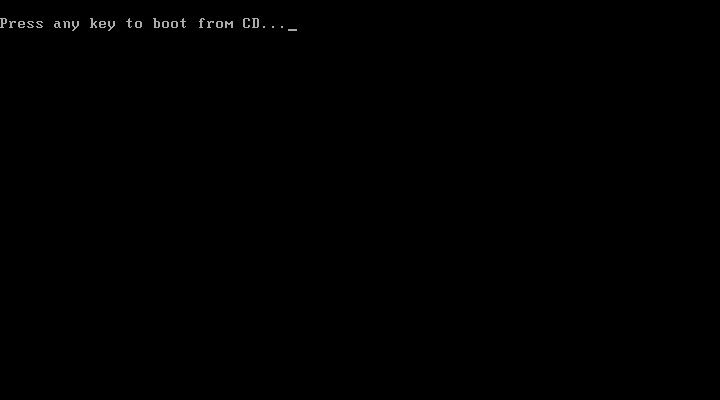
Press any key to continue.
Let the setup files load. When done, you will see this:
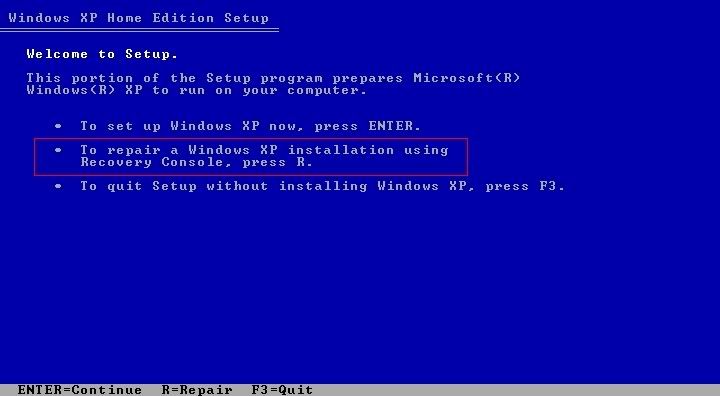
Press
R to continue.
You will see this screen next:
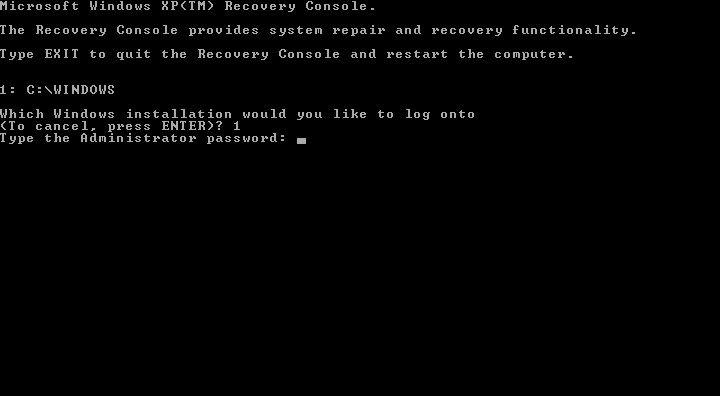
Press
1 and press Enter. When prompted, enter your password and press Enter.
You will see a new line if the password is correct -
C:\Windows
Type in
cd erdnt\subs and press Enter.
This new line will appear -
C:\Windows\ERUNT\sUBs
Type in
batch erdnt.con and press Enter.
When done, you will see this screen:
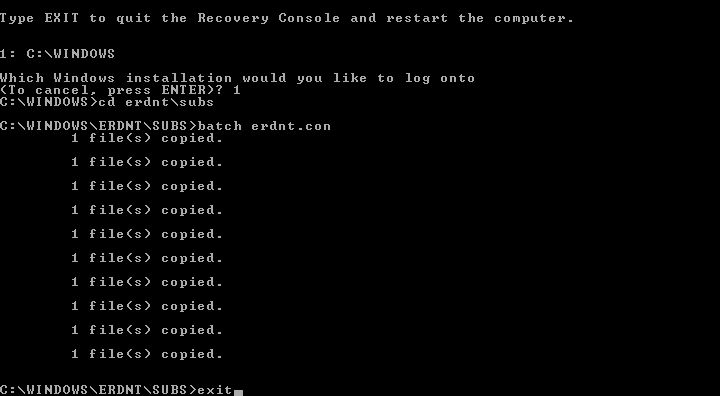
Type in
exit and press Enter. Restart Windows.
Hi there,I've brought my computer round to my brothers house to make it easier to follow your instructions.Ive downloaded the rc file and the burn cdcc file.Can you tell me what program I should use to open them.When I double click the rc file it's opening with roxio media centre.Thankyou.
Double click on BurnCDCC.exe to run it. Click on the
Browse button. Browse to the
rc.iso file.




