This thread's last reply is from February 8, 2011, 5:06 AM UTC. Software, malware, and removal-tool
advice below may be out of date — treat specific steps and download links with caution.
SystemLook 04.09.10 by jpshortstuff
Log created at 21:37 on 26/01/2011 by User
Administrator - Elevation successful
========== filefind ==========
Searching for "svchost.ex*"
C:\WINDOWS\$NtServicePackUninstall$\svchost.exe -----c- 14336 bytes [21:11 29/08/2010] [07:56 04/08/2004] 8F078AE4ED187AAABC0A305146DE6716
C:\WINDOWS\ERDNT\cache\svchost.exe --a---- 14336 bytes [15:30 12/01/2011] [00:12 14/04/2008] 27C6D03BCDB8CFEB96B716F3D8BE3E18
C:\WINDOWS\ServicePackFiles\i386\svchost.exe ------- 14336 bytes [18:54 24/06/2010] [00:12 14/04/2008] 27C6D03BCDB8CFEB96B716F3D8BE3E18
C:\WINDOWS\system32\svchost.exe --a---- 14336 bytes [12:00 29/08/2002] [00:12 14/04/2008] 27C6D03BCDB8CFEB96B716F3D8BE3E18
C:\WINDOWS\system32\svchost.exe --a---- 110592 bytes [12:00 29/08/2002] [02:38 21/01/2011] 65DF52F5B8B6E9BBD183505225C37315
Searching for "winm.dl*"
C:\Qoobox\Quarantine\C\WINDOWS\system32\winm.dll.vir --a---- 64512 bytes [11:11 06/02/2009] [02:37 15/01/2011] 51F1B700E39308C2AA07DE65572D2957
C:\WINDOWS\system32\winm.dll --a---- 64512 bytes [11:11 06/02/2009] [03:14 22/01/2011] (Unable to calculate MD5)
-= EOF =-
Hi crazyfirex,
Thank you for the log. Will be back asap, may be late tonight or by morning with a fix.
turtledove
Hello crazyfirex,
Please copy the following for easy reference.
***USB MUST be attached***
***Do NOT try deleting any files on your own please; No other scan until further notice.***
Please delete ONLY ComboFix.exe
Next, Download ComboFix from one of these locations:
Link 1
Link 2
Place it on the computer we're working on on the desktop.
Run the above instructions as written, do not rearrange anything in the log please.
Backup with ERUNT
- Please navigate to Start >> All Programs >> ERUNT, then double-click ERUNT from the menu.
- Click on OK within the pop-up menu.
- In the next menu under C:\WINDOWS\ERDNT\DD-MM-YYYY under Backup options make sure both the following are selected:
- System registry.
- Current user registry.
- Next click on "OK"... at the prompt... reply "Yes".
After a short duration the Registry backup is complete! pop-up message will appear.
- Now click on "OK". A registry backup has now been created.
--------------------------------
ComboFix - CFScript
This script is for this user and computer ONLY! Using this tool incorrectly could cause problems with your operating system... preventing it from ever starting again!
You will not have Internet access when you execute ComboFix. All open windows will need to be closed!
- Please open Notepad and copy/paste all the text below... into the window:
    KILLALL::

    FCopy::

    c:\windows\system32\dllcache\services.exe | c:\windows\system32\services.exe

    File::

    C:\WINDOWS\system32\ .cmd

    C:\windows\system32\winm.dll

    E:\dllrun.exe
- Save it to your desktop as CFScript.txt
- Please disable any Antivirus or Firewall you have active, as shown in this topic. Please close all open application windows.
*Only* when the 2 items above have been taken care of...
- Drag the CFScript.txt (icon) into the ComboFix.exe icon... as seen in the image below:
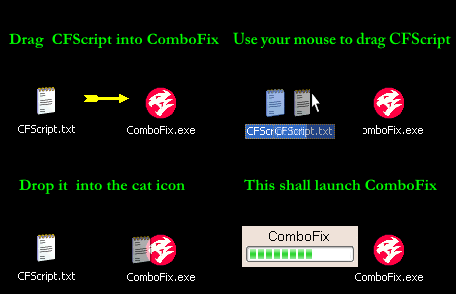
This will cause ComboFix to run again.
Do Not use your keyboard or mouse click anywhere in the ComboFix window, as this may cause the program to stall or crash.
Do Not touch your computer when ComboFix is running!
- When finished ComboFix will create a log file... you can save this file to a convenient place.
Post Instructions - Use attach please
Please use the Upload Attachment at bottom of reply screen and attach the ComboFix log file ,
NOT copy/paste in your next reply.
Post in the reply window with how the computer is doing now please.
Thank you
turtledove
Hello crazyfirex,
Please do the following (If possible, before the above script), if script already run then proceed with this anyway.
If this other computer is a Vista computer: Right Click tool, then Run as Administrator.
Note: You should run only one anti virus program at a time. Having more than one antivirus program active in memory uses additional resources and results in program conflicts and false virus alerts. As such, we will need remove this if you wish to keep a different Anti Virus program. I'll let you know after I see results.**
**Turn off other Anti Virus and install and do a full scan; let it fix. Keep the usb in please. Do not put in the system we are now posting about yet.
DownloadMicrosoft Security Essentials (MSE) to the computer if not present.
http://www.microsoft.com/security_essentials/default.aspx?mkt=en-us
Keep a log of the results and attach to post please.
-------------------------------------------------------
After the above, insert USB into this XP Machine:
Flash_Disinfector
- Download Flash_Disinfector here and save it to your desktop.
- Double click to run it
- You will be prompted to plug in your USB drive. Plug it in
- Flash_Disinfector will start disinfecting your flash and hard drives. This takes a few seconds. Your desktop will disappear in the meantime
- When done, a message box will appear. Click OK. Your desktop should now appear. If it doesn't, press Ctrl + Shift + Esc to open Task Manager
- Click on File > New Task (Run...). Type in explorer.exe and press Enter. Your desktop should now appear
Note: Flash_Disinfector will create a hidden folder named autorun.inf in each partition and every USB drive plugged in when you ran it. Don't delete this folder...it will help protect your drives from future infection.
-------------------------------------------------------
What to Post:
How the XP is, how the other system is running, and the MSE log and CFScript log as separate attachments(2).
What Anti Virus/Firewall do you have for the other system?
Thanks
turtledove
I have McAfee on the vista computer, and want to keep it. I already ran ComboFix. will post log later today and run MSE.
I believe ESET may have interfered with ComboFix since it runs again on startup after being disabled.
Here is the ComboFix log.
Running MSE Soon
I am sorry, you aren't being clear enough. Please indicate which computer I need to run each program on.
My Vista x32 computer is not infected
My Vista x32 computer has McAfee installed.
My XP x32 computer has ESET Trial installed.
Am I correct that you want me to:
Disable McAfee on the Vista x32
Install MSE on the Vista x32, run while USB is in the Vista and post log
Download Flash Disinfector to the XP and run while USB is in the XP
If so, can you provide instructions for disabling/re-enabling McAfee? Is suspending real-time scanning and firewall indefinitely enough?
I do not believe it would be good to uninstall/reinstall, have had issues with their licensing routine lately, and the Vista is also not solely mine.
Hi crazyfirex,
My apologies if not clear. We're going to re-do the CFScript, but after doing the steps on the Vista machine. Something keeps this going, that is what we're looking for.
We may need to do something different after I see the new results.
Disable McAfee on the Vista x32
Install MSE on the Vista x32, run while USB is in the Vista and post log
Download Flash Disinfector to the XP and run while USB is in the XP
The above is correct.
We're trying to find out more. Below is how to disable McAfee; we only do that while running the MSE, then re-enable McAfee.
Disable McAfee Antivirus
- Please navigate to the system tray on the bottom right hand corner and look for a
 sign.
sign.
- right-click the McAfee system tray icon... chose Exit from the available option.
- Click on Yes...at the prompt warning that protection will be disabled. This will disable the Antivirus guard.
You successfully disabled the McAfee Guard.
Just to double check, I'd like you to run the same CFScript again please on the XP,
after Flash Disinfector, USB attached please.
For the XP: **Disable AV for CF re-run, re-enable when CF is done**
Post
Attach the new CFScript run
Attach MSE
Any problems or questions?
Thanks
turtledove
posting from phone again (won't be able to follow steps until tomorrow.)
wanted to let you know that without uninstalling, I can't really disable ESET. When I try, it is re-enabled at startup. (interfering with CF?)
Hello,
Go ahead and uninstall ESET.
Tomorrow is fine. I'll post asap, having connection issues some of the time due to weather.
Remember, do the steps on Vista first, then the flash and CF on XP second. Look at the last CFScript I posted if you need it again.
Thanks
turtledove
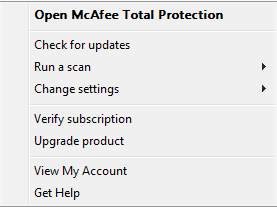
I do not see an exit button:
📎mcafee.png
Is it enough to disable real time scanning and firewall? I am very unenthusiastic about uninstalling McAfee.
McAfee picked up on the dllrun.exe file in the first place, so I think it safe to assume my Vista is uninfected (at least with this malware)
Hi crazyfirex,
Is it enough to disable real time scanning and firewall?
Yes, we want real time scanning and the firewall disabled. Just long enough for MSE to run a scan.
Then re-enable them and turn off MSE/uninstall if no off option. We don't want to take McAfee out.
turtledove
Sorry, something came up. I will most likely be able to run those things tomorrow.
I had a thought - If ComboFix still fails, would it work to boot the XP into FreeDOS or something similar,
and follow the same instructions you are trying to give ComboFix? I'm pretty sure the files won't be in use
when running under a non-windows OS.
Good evening ,
Tomorrow is fine. If this run doesn't work, I have already to go another way to go about it.
Thanks for letting me know.
turtledove
The MSE scan has been running for the past 4 hours. It appears to be about 1/4 done. Is this normal? It hasn't found any problems.