

Scotty
Retired Graduate
Hi
Ive already had you install a replacement. MalwareBytes Anti-Malware.
[Party Poker, PartyCasino, UltimateBet, EmpirePoker, and the related sites are a risk and that's where most malware gets installed. Online Poker sites are well known for placing all manner of Internet parasites on their visitors' computers and continue to do so. They should be highly suspect for any Malware on your computer. In a lot of cases, these Poker plugins are also getting installed without your asking for it. You can read Poker gamers targeted by a rootkit backdoor regarding the risk involved with visiting the Poker games web sites. Two safe alternatives are PokerStars and Pogo.com.
I recommend that you remove Party Poker and Empire Poker.
To uninstall the Party Poker.
Run HijackThis, select Do a system scan only and place checks against the following entries (if they are still present):
Time for some housekeeping
[colour=blue]Open OTMoveIt2 again and this time, click on the Clean Up. Then just leave it to finish. It should be more than a couple of minutes.[/color]
Delete the older versions of Java and download the newest.
Please follow these steps to remove older version Java components.
Then download the latest version of Java Runtime Environment (JRE) (4th one down the list), which is JRE6u4, and click Yes at the page warning. Under "Platform" select Windows, then check the box to accept the Licence Agreement. Click Yes at the second page warning before downloading the Offline file.
Open Malwarebytes Anti-Malware (MBAM) and click on Update to ensure it is up to date, then select Perform full scan, then click Scan.
Ive already had you install a replacement. MalwareBytes Anti-Malware.
[Party Poker, PartyCasino, UltimateBet, EmpirePoker, and the related sites are a risk and that's where most malware gets installed. Online Poker sites are well known for placing all manner of Internet parasites on their visitors' computers and continue to do so. They should be highly suspect for any Malware on your computer. In a lot of cases, these Poker plugins are also getting installed without your asking for it. You can read Poker gamers targeted by a rootkit backdoor regarding the risk involved with visiting the Poker games web sites. Two safe alternatives are PokerStars and Pogo.com.
I recommend that you remove Party Poker and Empire Poker.
To uninstall the Party Poker.
- Click Start > Control Panel.
- In Control Panel, double-click Add or Remove Programs.
- In Add or Remove Programs, highlight Party Poker, click Remove.
- Close the Add or Remove Programs and the Control Panel windows.
- Using Windows Explorer (Windows key+e), search for the Party Poker folder. If the program folder is still there, select/highlight the PartyPoker folder. DELETE it. (File > Delete.) If Windows is not installed on the C drive, replace C:\ with the appropriate drive letter.
- Close Windows Explorer.
Run HijackThis, select Do a system scan only and place checks against the following entries (if they are still present):
R3 - URLSearchHook: OLE (Part 1 of 5) - - (no file)
O2 - BHO: (no name) - rsion - (no file)
O2 - BHO: PCTools Site Guard - {5C8B2A36-3DB1-42A4-A3CB-D426709BBFEB} - C:\PROGRA~1\SPYWAR~1\tools\iesdsg.dll
O2 - BHO: PCTools Browser Monitor - {B56A7D7D-6927-48C8-A975-17DF180C71AC} - (no file)
O9 - Extra button: Spyware Doctor - {2D663D1A-8670-49D9-A1A5-4C56B4E14E84} - C:\WINDOWS\system32\shdocvw.dll
O9 - Extra button: PartyPoker.net - {F4430FE8-2638-42e5-B849-800749B94EED} - C:\Program Files\PartyGaming.Net\PartyPokerNet\RunPF.exe (file missing)
O9 - Extra 'Tools' menuitem: PartyPoker.net - {F4430FE8-2638-42e5-B849-800749B94EED} - C:\Program Files\PartyGaming.Net\PartyPokerNet\RunPF.exe (file missing)
Time for some housekeeping
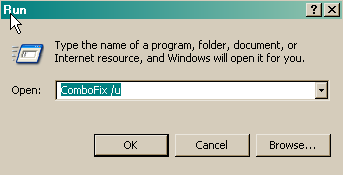
- Click START then RUN
- Now type Combofix /u in the runbox and click OK. Note the space between the x and the /u, it needs to be there.
[colour=blue]Open OTMoveIt2 again and this time, click on the Clean Up. Then just leave it to finish. It should be more than a couple of minutes.[/color]
Delete the older versions of Java and download the newest.
Please follow these steps to remove older version Java components.
- Close any programmes you may have running, ESPECIALLY your web browser
- Click Start > Control Panel.
- Click Add/Remove Programs.
- Check any item with Java Runtime Environment (JRE or J2SE) in the name.
- Click the Remove or Change/Remove button.
- Repeat as many times as necessary to remove all versions of Java.
- Reboot your computer once all Java components are removed.
Then download the latest version of Java Runtime Environment (JRE) (4th one down the list), which is JRE6u4, and click Yes at the page warning. Under "Platform" select Windows, then check the box to accept the Licence Agreement. Click Yes at the second page warning before downloading the Offline file.
Open Malwarebytes Anti-Malware (MBAM) and click on Update to ensure it is up to date, then select Perform full scan, then click Scan.
- When the scan is complete, click OK, then Show Results to view the results.
- Be sure that everything is checked, and click Remove Selected.
- When completed, a log will open in Notepad. Please save it to a convenient location.
- The log can also be found here:
C:\Documents and Settings\Owner\Application Data\Malwarebytes\Malwarebytes' Anti-Malware\Logs\mbam-log-date (time).txt - Post that log back here with a new HijackThis log and tell me of any problems you might still be having.