This thread's last reply is from August 13, 2012, 2:40 AM UTC. Software, malware, and removal-tool
advice below may be out of date — treat specific steps and download links with caution.
Will do, although we're on the road for about a week, so will not be able to "exercise" the computer significantly. I will continue to back up files. I'll watch for that message I noted in my last post. I'll post something before I "time out" in 3 days.
Booted up this morning on a relative's wireless connection.
Encountered a message that McAfee blocked "Host processes for Windows Services".
No option to allow this, and don't know the implications of this, nor whether it may cause problems.
Thoughts?
Also received two other messages yesterday at bootup, titled in a window, as follows.
1. Microsoft Visual C++ Runtime Library
The application has requested the runtime to terminate in an unusual way.
Contact the application's support team for more information.
I closed this window.
2. Microsoft Windows
HP Cue Status Root has stopped working. A problem caused the program to stop working correctly.
Windows will close the program and notify you if a solution is available.
I closed this window.
FSS Scan log (FSS.txt)
Farbar Service Scanner Version: 06-08-2012
Ran by [redacted] (administrator) on 06-08-2012 at 15:46:59
Running from "C:\Users\Bob\Downloads"
Microsoft® Windows Vista™ Home Premium Service Pack 2 (X64)
Boot Mode: Normal
****************************************************************
Internet Services:
============
Connection Status:
==============
Localhost is accessible.
LAN connected.
Google IP is accessible.
Google.com is accessible.
Yahoo IP is accessible.
Yahoo.com is accessible.
Those error messages do not appear to be related to malware or to any of the fixes I have given. Are they happening every time you boot or just intermittently?
I can take a closer look at these errors later, for now I am concerned with the message McAfee gave regarding Host processes for Windows. I would like to get a scan with FRST to investigate this. You will need a USB flashdrive for this.
Farbar Recovery Scanner Tool
Plug a USB flashdrive drive into the infected machine.
Download FRST64 and save it to the USB flash drive.
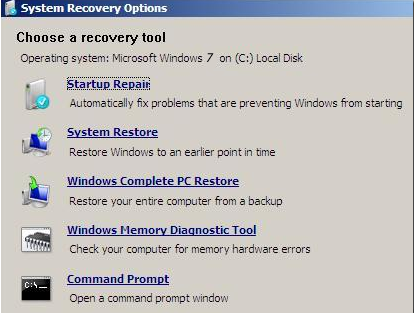
Boot your computer into Recovery Environment
Make sure the flashdrive is still plugged into the computer and that FRST64.exe is present.
Restart the computer and press F8 repeatedly until the Advanced Options Menu appears.
Select Repair your computer.
Select Language and click Next
Enter password (if necessary) and click OK, you should now see the screen below ...
Find the Flashdrive's Drive letter.
Select the Command Prompt option.
A command window will open.
Type notepad then hit Enter.
Notepad will open.
Click File > Open then select Computer.
Note down the drive letter for your USB Drive.
Close Notepad.
Run FRST.exe
Back in the command window ....
Type e:/frst64.exe and hit Enter (where e: is the drive letter of your USB drive)
FRST will start to run.
When the tool opens click Yes to disclaimer.
Press Scan button.
When finished scanning it will make a log FRST.txt on the flash drive.
Scan result of Farbar Recovery Scan Tool Version: 08-08-2012
Ran by [redacted] at 07-08-2012 21:31:26
Running from D:\
Windows Vista (TM) Home Premium Service Pack 1 (X64) OS Language: English(US)
The current controlset is ControlSet001
C:\Windows\System32\winlogon.exe => MD5 is legit
C:\Windows\System32\wininit.exe => MD5 is legit
C:\Windows\SysWOW64\wininit.exe => MD5 is legit
C:\Windows\explorer.exe => MD5 is legit
C:\Windows\SysWOW64\explorer.exe => MD5 is legit
C:\Windows\System32\svchost.exe => MD5 is legit
C:\Windows\SysWOW64\svchost.exe => MD5 is legit
C:\Windows\System32\services.exe => MD5 is legit
C:\Windows\System32\User32.dll => MD5 is legit
C:\Windows\SysWOW64\User32.dll => MD5 is legit
C:\Windows\System32\userinit.exe => MD5 is legit
C:\Windows\SysWOW64\userinit.exe => MD5 is legit
C:\Windows\System32\Drivers\volsnap.sys => MD5 is legit
==================== EXE ASSOCIATION =====================
HKLM\...\.exe: exefile => OK
HKLM\...\exefile\DefaultIcon: %1 => OK
HKLM\...\exefile\open\command: "%1" %* => OK
========================= Memory info ======================
Percentage of memory in use: 8%
Total physical RAM: 6075.98 MB
Available physical RAM: 5537.31 MB
Total Pagefile: 5889.37 MB
Available Pagefile: 5514.98 MB
Total Virtual: 8192 MB
Available Virtual: 8191.91 MB
No sign of a rootkit infection in the FRST log. At this point I do not believe there is any malware on your system.
The HP CUE status error relates to a service for your HP Multi function printer. I would suggest you install the latest software for the device to resolve this issue.
Before I close this topic I'd like to check that there are no insecure programs installed on the machine.
Security Check
Please download Security Check by screen317 from one of the links below:
Link 1
Link 2
Save it to your Desktop.
Right click SecurityCheck.exe And select " Run as administrator " , then follow the onscreen instructions inside of the black box.
A Notepad document should open automatically called checkup.txt
The Security Check log has a few interesting items. Let me know if there are any actions that I should take.
Before you close out this topic, I have a few questions that I'll send later. I would appreciate it if you would either point out any action necessary or confirm any that I may propose. Thanks.
Results of screen317's Security Check version 0.99.43
Windows Vista Service Pack 2 x64 (UAC is enabled)
Internet Explorer 9 ``````````````Antivirus/Firewall Check:``````````````
Windows Firewall Disabled!
McAfee Anti-Virus and Anti-Spyware WMI entry may not exist for antivirus; attempting automatic update. `````````Anti-malware/Other Utilities Check:`````````
Malwarebytes Anti-Malware version 1.62.0.1300
Java(TM) 6 Update 32 Java version out of Date!
Adobe Reader 9 Adobe Reader out of Date! ````````Process Check: objlist.exe by Laurent````````
Windows Defender MSASCui.exe
Windows Defender MSASCui.exe `````````````````System Health check`````````````````
Total Fragmentation on Drive C: 0 % ````````````````````End of Log``````````````````````
As you have noticed, securitycheck has flagged Java and Adobe Reader as insecure. Older versions of these applications contain vulnerabilities that can be exploited by malware resulting in malicious code execution. See instructions below to remove these programs and install up to date versions.
Remove Out of date Programs
The following programs installed on your PC are out of date and represent a significant risk of re-infection.
Java(TM) 6 Update 32
Adobe Reader 9
Click on start
Then Run
In the open text entry box please copy/paste appwiz.cpl Then click enter.
Press the "Remove" or "Change/Remove"...button to uninstall the programs listed above(in red).
Take care when answering any questions posed by an uninstaller. Some questions may be worded to deceive you into keeping the program.
There is also another version of Java shown in the list of programs (Java 6 Update 13 (64 bit) installed from Sun Microsystems on 10/1/2009). Should this also be removed?
I have the following questions for you. I would appreciate it if you would comment on any solution or action that I've noted, or recommend anything different.
Questions for diver79:
1. Some time back, you indicated that there was a hidden file attached to a video file (MVI_3315), but did not indicate that this was a problem or that any action was necessary. Is there anything that I should do? I've not opened it, but it remains on the Desktop. This is probably a video of family that I would like to retain, but cannot get McAfee to scan it for any potential problem. How can I force a scan of that file? If I run a complete scan, does this include all of the files on my Desktop? Thoughts?
2. I haven’t yet completely backed up all directories to CD that I might need if the computer actually becomes totally inoperative. I am working on that, but am in the middle of travel for the next two weeks. I will continue to use both CDs and USB drive to do this. If something happens that I cannot reply within the three day window or if something appears after you close the topic, how do I resume this process with you?
3. What software should I retain from this exercise? There is OTL, Belarc Advisor, stinger, dds, checkhd, tdsskiller, aswMBR, CKScanner, advisorinstaller, HijackThis, Spyhunter, FRST64 and mbam-setup--1.62.0.1300. The free version of Malwarebytes has timed out, but remains on the Desktop Taskbar, as well as a shortcut. Some are stored in the Downloads directory, with a shortcut on the Desktop.
4. Are any of the software results files needed? There are about 13 or so .txt/Notepad documents remaining in my Downloads directory, USB drive or on the Desktop. There may be others in the directory where the software was originally installed/copied/stored/executed.
5. I continue to open software from the Desktop and sometimes am getting strange results. (MS Word 2007 and MS PowerPoint 2007 both start up a box by Windows to configure Nuance PDF Professional 5, for instance). I have to "Cancel" a number of times before I can continue. Nuance PDF Professional 5 shows on MS Word 2007, MS Excel 2007 and MS PowerPoint 2007 as items in the top row Quick Access toolbar. I do not get the same strange set of windows for MS Excel 2007, however, only Word and PowerPoint. I will try to locate the original installation disk(s) for Nuance PDF Professional 5, reinstall it and see if the issues continue or not.
6. Is it possible for me to save the entire message stream between you and I, so that I can answer any questions in the future? If so, how do I do that?
1. Re: Video
The video C:\Users\Bob\Desktop\MVI_3315.AVI should have been deleted by OTL. Not sure why it remains. It appears to contain another file called TOC.WMV, After a bit of research on this it appears that Windows Photo Gallery and Movie maker do this to add metadata to the file. The nature of this technique is suspicious so that is why I alerted you to it. I no longer believe there is anything of suspicion in this file. If there was, it should have showed in the subsequent scans we did.
2. Re: Resuming topic
If this topic is closed for any reason you can open a new topic again. Either myself or another helper will pick it up.
3. What software should I retain from this exercise?
Once I issue cleanup instructions OTL and some of the other tools we have used will be removed. Anything else that is left over can be removed but I would recommend keeping malwarebytes.
4. Are any of the software results files needed?
There should be no need to keep them but you can if you choose. The logs you have posted here will remain here after the topic is closed.
5. Nuance PDF Professional 5
The Nuance icons in the quick access bar sound like convert to PDF links that allow you to convert you Office documents to PDF. It sounds like the plugin for this is only partially installed, so everytime you open Office it tries to load the rest of it. I would suggest loading the CD for Nuance and running a repair install. I do apologise if I have caused this. I removed some of the Nuance toolbars from loading to reduce the amount of programs you have loading at startup. Running the repair option will fix this.
Open the Control Panel
Select Programs and Features.
Select Nuance PDF Professional 5.0.
Click Change to auto-repair it.
6. Save topic.
You can either copy the contents of each page into MS Word or you can use your browsers Save as function to save a copy of each page. Either way you will still have access to this topic once it has been closed.
Let me know if you have any more questions, otherwise I will post cleanup instructions.
Should the Sun Microsystems version of Java noted in the last message be deleted using appwiz.cpl?
Let's do cleanup. I'll save the topic contents later.
Talk some about Malwarebytes. I used the free, expiring version. Would that version be available to me later?
If I subscribe to the paid version, how would this react with my current McAfee Security Center processes?
Yes, please do remove Java 6 Update 13 (64 bit), instructions to do so below.
Malwarebytes is classed as Anti-Spyware so you can safely use it to compliment your McAfee protection. The general rule of thumb is to have One AntiVirus application and at least one Anti-Spyware application The paid version of mabam provides real time scanning that will give you an extra layer of protection against malware. I would recommend this purchase.
Congratulations your PC is now free from infection Follow the below steps to cleanup the tools we have used and tighten your systems security.
Remove Out of date Programs
The following programs installed on your PC are out of date and represent a significant risk of re-infection.
Java 6 Update 13 (64 bit)
Click on Start...then... Click the Search Programs and Files search box on the Start Menu.
Copy and paste the value below, into the open text entry box: appwiz.cpl
Locate the out of date program(s) above.
Select the program and click on Uninstall to uninstall it.
Repeat these steps for each program in the list. When finished... Close the Control Panel window.
Clean up with OTL
Right click OTL.exe and select Run as Administrator to start the program. This will remove all the tools we used to clean your pc.
Close all other programs apart from OTL as this step will require a reboot
On the OTL main screen, press the CleanUp! button
Say Yes to the prompt and then allow the program to reboot your computer.
You may now remove any remaining programs\files that we used in this topic.
Create a new, clean System Restore point
Create a new, clean System Restore point which you can use in case of future system problems:
Press Start >> Right click on Computer, and select Properties.
Click on the System Protection link, located on the left hand side menu.
Select Create , type a name like All Clean then press the Create button and once it's done press Close and close any remaining windows.
Now remove old, infected System Restore points:
Next click Start >> in the Search Programs and Files search box type cleanmgr and press OK
Select the C: drive and click OK.
Ensure the following boxes are checked;
Recycle Bin
Temporary Files
Temporary Internet Files
Select the Clean Up System Files button.
Select the C: drive again and select OK.
Select the More Options tab and under System Restore and Shadow Copies click the Clean up button.
Select Delete, Press OK and Delete Files to confirm.
Microsoft Windows Update
Microsoft releases patches for Windows and Office products regularly to patch up Windows and Office products loopholes and fix any bugs found. Install the updates immediately if they are found. To update Windows
Go to Start > All Programs > Windows Update > Check for updates.
Please let me know that you completed the cleanup steps. Once I receive your reply, unless there are other malware questions or concerns, I will have this topic closed as resolved.
Uninstalled the old Java Update.
Ran OTL successfully. There are still files created by OTL that I'll send to the Recycle bin and then delete.
Created a new System Restore point successfully.
Started Disk Cleanup of C:. Checked Recycle Bin, Temporary Internet Files and Temporary Files.
The box showing this does not have "Cleanup System Files" button, only an OK button.
Will send followup message with what happens next.
After OK, asked to confirm that I wanted to delete files, then everything closed and nothing else in your message stream could be performed in "cleanmgr". I assume the remaining instructions would have deleted old, possibly infected System Restore points.
Remaining instructions were:
Select the Clean Up System Files button.
Select the C: drive again and select OK.
Select the More Options tab and under System Restore and Shadow Copies click the Clean up button.
Select Delete, Press OK and Delete Files to confirm.
Could not do this in "cleanmgr".
✨ Ask AI
AI can make mistakes. Check the cited posts. Archived advice can be out-of-date
Don't include personal information. Questions and selected public posts go to OpenAI. About Ask AI


 Follow the below steps to cleanup the tools we have used and tighten your systems security.