This thread's last reply is from June 21, 2009, 5:07 PM UTC. Software, malware, and removal-tool
advice below may be out of date — treat specific steps and download links with caution.
Actually after I ran both programs this morning everything got so much better. No more pop ups and my wall paper on my desktop went back to normal. Thanks so much for your help. Can I turn back the anti virus programs now?
Hello!
Yes you can.
So now we need to sort out your folder. So do you still have folders of A-02843? Is your important files all been restored?
Everything is just perfect with the folders. Again Thanks
Hello!
Do not delete this folder C:\_OTM for now. It still have back ups of that folder. Once you are happy that you havent lost anything then you can delete that folder so give it atleast 2 weeks.
Your log now appears to be clean. Congratulations!
You can get rid of the tools we used:
- Rootrepeal - (You can just delete the exe file from your desktop)
- ATF cleaner - (You can just delete the exe file from your desktop)
- DDS - (You can just delete the exe file from your desktop)
- OTM.exe - (You can just delete the exe file from your desktop)
Delete ComboFix and Clean Up
Click Start > Run > type combofix /u > OK (Note the space between combofix and /u)
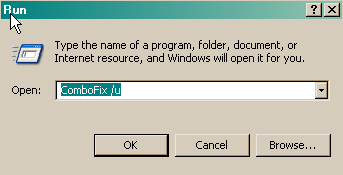
Please advise if this step is missed for any reason as it performs some important actions.
General Security and Computer Health
Below are some steps to follow in order to dramatically lower the chances of reinfection. You may have already implemented some of the steps below, however you should follow any steps that you have not already implemented.
- Make sure that you keep your antivirus updated
New viruses come out every minute, so it is essential that you have the latest signatures for your antivirus program to provide you with the best possible protection from malicious software.
NOTE: You should only have one antivirus installed at a time. Having more than one antivirus program installed at once is likely to cause conflicts and may well decrease your overall protection as well as impairing the performance of your PC.
- Security Updates for Windows, Internet Explorer & Microsoft Office
Whenever a security problem in its software is found, Microsoft will usually create a patch so that after the patch is installed, attackers can't use the vulnerability to install malicious software on your PC. Keeping up with these patches will help to prevent malicious software being installed on your PC. Ensure you are registered for Windows updates via Start > right-click on My Computer > Properties > Automatic Updates tab or visit the Microsoft Update site on a regular basis.
NOTE: The update process uses ActiveX, so you will need to use internet explorer for it and allow the ActiveX control to install.
- Update Non-Microsoft Programs
Microsoft isn't the only company whose products can contain security vulnerabilities. To check whether other programs running on your PC are in need of an update, you can use the Secunia Software Inspector or F-secure Health Check. I suggest that you run one of them at least once a month.
- Make Internet Explorer More Secure
You are using Internet Explorer v. 7. Therefore please read and follow the recommendations at this SITE
Recommended Programs
I would recommend the download and installation of some or all of the following programs (if not already present), and the updating of them on a regular basis.
- WinPatrol
As a robust security monitor, WinPatrol will alert you to hijackings, malware attacks and critical changes made to your computer without your permission. WinPatrol takes snapshot of your critical system resources and alerts you to any changes that may occur without your knowledge. For more information, please visit HERE.
- SpywareBlaster
SpywareBlaster sets killbits in the registry to prevent known malicious ActiveX controls from installing on your computer. If you don't know what ActiveX controls are, see HERE. You can download SpywareBlaster from HERE.
- Hosts File
For added protection you may also like to add a host file. A simple explanation of what a Hosts file does is HERE and for more information regarding host files read HERE.
- Use an alternative Internet Browser
Many of the exploits are directed to users of Internet Explorer. Try using a different browser instead: Firefox or Opera
Here is a great article by
miekiemoes How to prevent Malware.
Finally I am trying to make one point very clear. It is
ABSOLUTELY ESSENTIAL to keep all of your security programs up to date.
Please take the time to tell us what you would like to be done about the people who are behind all the problems you have had. We can only get something done about this if the people that we help, like you, are prepared to complain. We have a dedicated forum for collecting these complaints Malware Complaints. You need to be registered to post as, unfortunately, we were hit with too many spam posts to allow guest posting to continue. Just find your country room and register your complaint.
I'd be grateful if you could reply to this post so that I know you have read it and, if you've no other questions, the thread can be closed.
Happy surfing and stay clean!
Bio-HazardAs your problems appear to have been resolved,