This thread's last reply is from June 14, 2008, 3:00 PM UTC. Software, malware, and removal-tool
advice below may be out of date — treat specific steps and download links with caution.
You just had a very major infection that didn't want to leave. Please do this and your very close to being done with this cleaning processes.
Update Adobe Reader
Recently there have been vunerabilities detected in older versions of Adobe Reader. It is strongly suggested that you update to the current version. Adobe Reader 8.
You can download it from http://www.adobe.com/products/acrobat/readstep2.html
If you already have Adobe Photoshop® Album Starter Edition installed or do not wish to have it installed
UNcheck the box which says Also Download Adobe Photoshop® Album Starter Edition.
Adobe 8 is a large program and if you prefer a smaller program you can get Foxit 2.0 instead from
http://www.foxitsoftware.com/pdf/rd_intro.php
Please tell me how everything is running now?
Michael. I've installed Adobe 8 and removed Adobe 6. It's all good.
Thank you for staying with me to the end

This is my normal post for when you are clear - which you now are - or seem to be.
Please advise of any problems you still have. If you think you're clean please give one more reply so that I can archive this topic.
Now that you are clean, please follow these simple steps in order to keep your computer clean and secure:
Time for some housekeeping
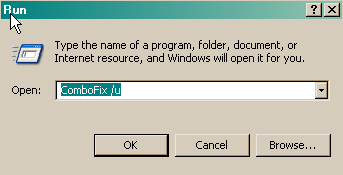
- Click START then RUN
- Now type Combofix /u in the runbox and click OK
Please delete these tools also,
The Avenger
SvcQuery
fix.reg
Make your Internet Explorer more secure - This can be done by following these simple instructions:
- From within Internet Explorer click on the Tools menu and then click on Options.
- Click once on the Security tab
- Click once on the Internet icon so it becomes highlighted.
- Click once on the Custom Level button.
- Change the Download signed ActiveX controls to Prompt
- Change the Download unsigned ActiveX controls to Disable
- Change the Initialise and script ActiveX controls not marked as safe to Disable
- Change the Installation of desktop items to Prompt
- Change the Launching programs and files in an IFRAME to Prompt
- Change the Navigate sub-frames across different domains to Prompt
- When all these settings have been made, click on the OK button.
- If it prompts you as to whether or not you want to save the settings, press the Yes button.
Next press the
Apply button and then the
OK to exit the Internet Properties page.
Visit Microsoft's Update Site Frequently - It is important that you visit
http://update.microsoft.com/ regularly. This will ensure your computer has always the latest security updates available installed on your computer. If there are new updates to install, install them immediately, reboot your computer, and revisit the site until there are no more critical updates.
WinPatrol by BillP
Winpatrol doesn't detect malware, but it helps stop it from getting on your machine in the first place. It is also a great Startup manager, and its free for personal use!
Update all these programs regularly - Make sure you update all the programs I have listed regularly. Without regular updates you
WILL NOT be protected when new malicious programs are released.
How to Help us
Please Consider donating =D
>> Here << you can see how you can help us.

