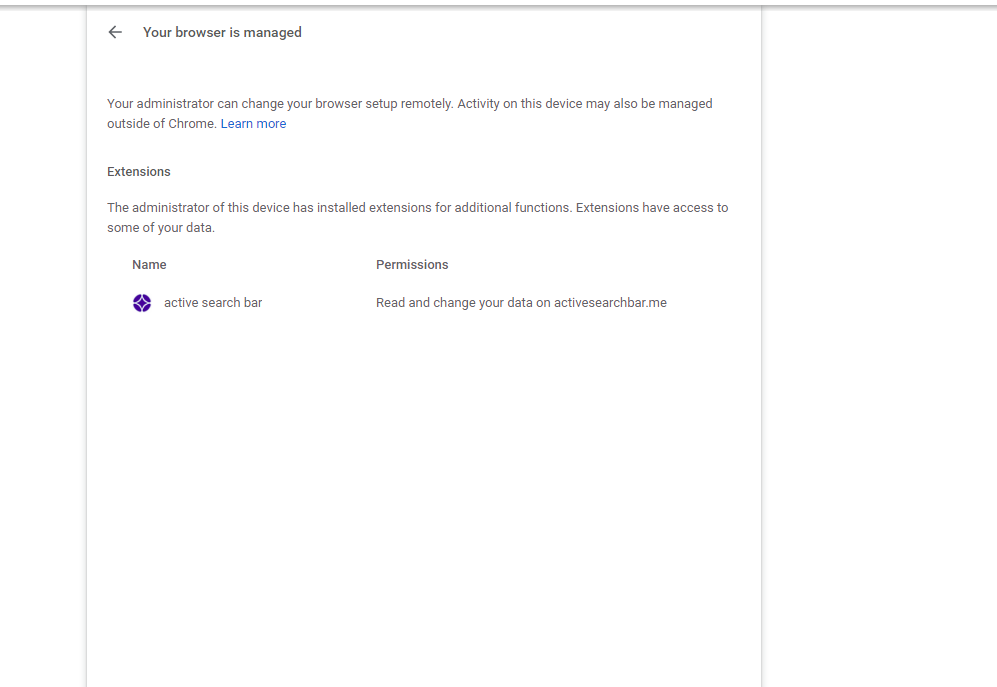
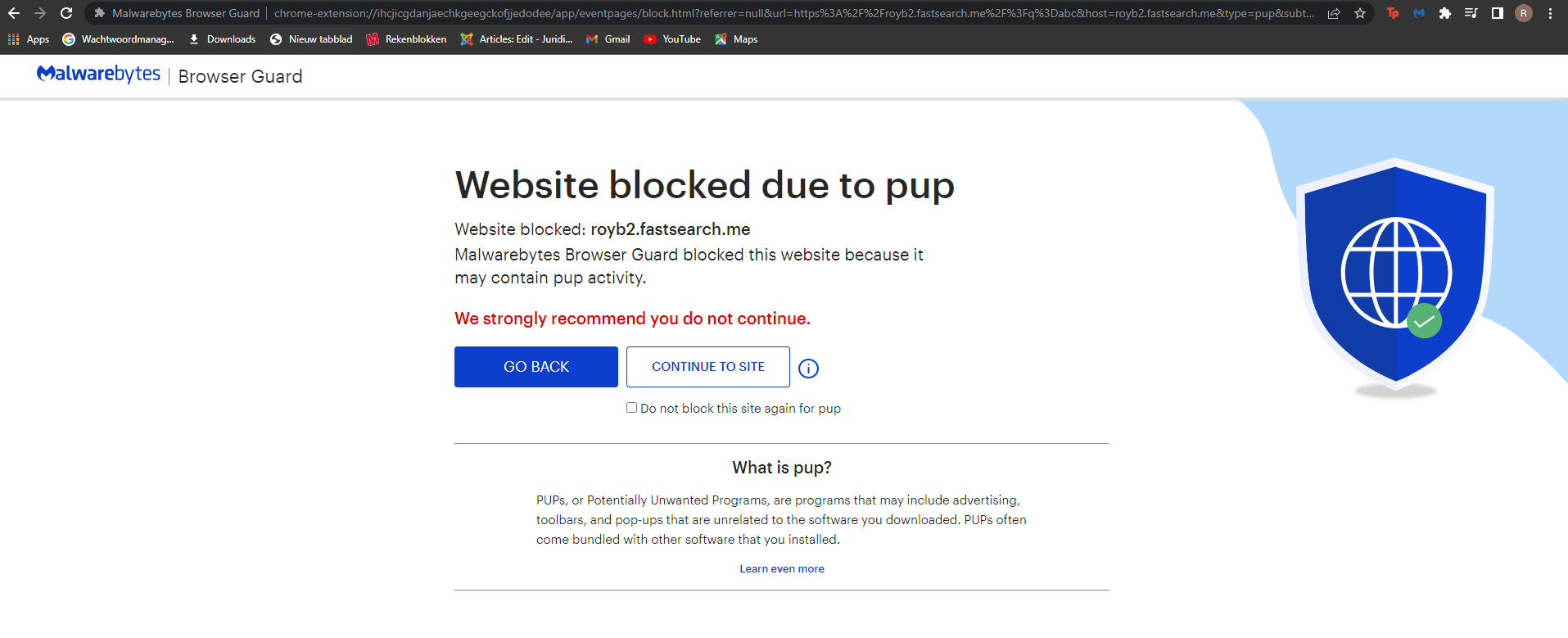
I do indeed still have activesearcbar, in the attached screenshots i simply entered abc into the searchbar.

Malware Removal Forums
I need help removing a program called Active search bar
75 min read
Hello Count_Dutchula,
Your most recent logs showed no obvious signs of an active infection on your machine, but there are a few things that still need attention.
Step 1.
Please check the list of extensions in Chrome and remove Active Search Bar and McAfee® WebAdvisor if they are listed here, by instruction in How to remove Chrome extension.
Step 2.
Search with FRST64
You should still have FRST64.exe on your Desktop.
Please post each log separately to prevent it being cut off by the forum post size limiter.
Check each after you've posted it to make sure it's all present, if any log is cut off you'll have to post it in sections....
Don't post anything as attachments unless I will ask you about it specifically!
Please include in your next reply:
Thanks,
pgmigg
Failure to post replies within 72 hours will result in this thread being closed
Your most recent logs showed no obvious signs of an active infection on your machine, but there are a few things that still need attention.
Step 1.
Please check the list of extensions in Chrome and remove Active Search Bar and McAfee® WebAdvisor if they are listed here, by instruction in How to remove Chrome extension.
Step 2.
Search with FRST64
You should still have FRST64.exe on your Desktop.
- Double click Frst64.exe to launch it.
- FRST will start to run.
- When the tool opens click Yes to the disclaimer.
- Please Copy/Paste or Type the following line into the Search: box.
SearchAll:activesearchbar;McAfee;fheoggkfdfchfphceeifdbepaooicaho;WebAdvisor;customsearchbar
- Press the Search Files button.
- When finished searching a log will open on your Desktop ... Search.txt
- Please post it in your next reply.
Please post each log separately to prevent it being cut off by the forum post size limiter.
Check each after you've posted it to make sure it's all present, if any log is cut off you'll have to post it in sections....
Don't post anything as attachments unless I will ask you about it specifically!
Please include in your next reply:
- Do you have any problems executing the instructions?
- Which Chrome extensions were removed if any?
- Contents of the Search.txt log file after Search by FRST scan
- Do you see any changes in computer behavior?
Thanks,
pgmigg
Failure to post replies within 72 hours will result in this thread being closed
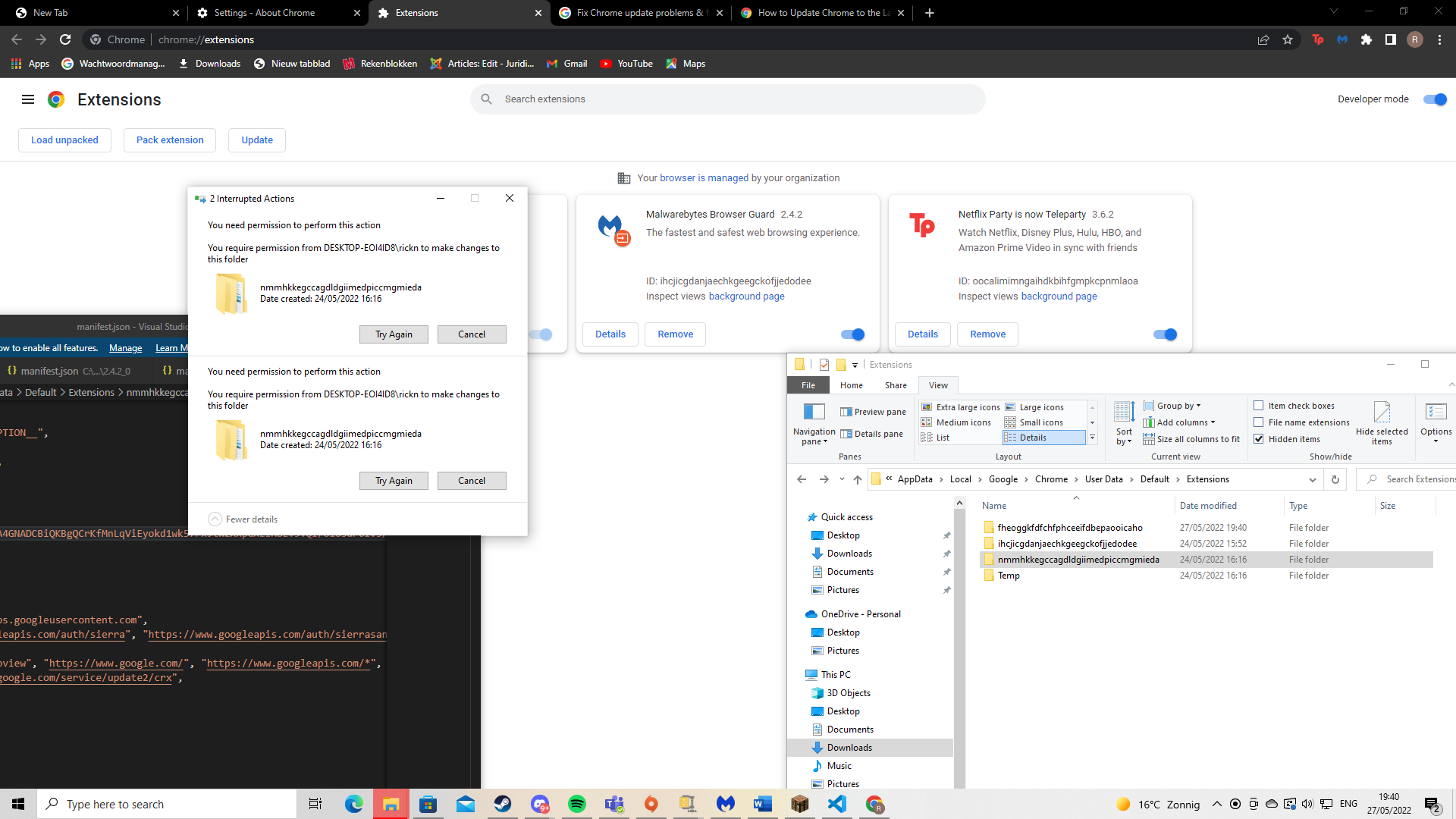
Alright so i am indeed having trouble executing the instructions.
I followed the link you included in your previous post. I followed the instructions that it gives for the removal of extensions however when i try to remove the extension in the chrome folder it tells me it needs permission from DESKTOP-EOI4ID8/rickn. However i have admin acces on my account which is also the only account. Do you know what may cause this or how i can get around this?
.
Hello Count_Dutchula,
Sorry for delay in reply!
There is a list of Chrome extensions from your initial logs:
I asked you to remove just two of them, highlighted in red above - McAfee® WebAdvisor and ActiveSearchBar (last two lines below):
Somehow you tried to delete legit extension:
Then I will deal with the rest after could analyze Search.txt log - I am waiting for it...
Thanks,
pgmigg
Failure to post replies within 72 hours will result in this thread being closed
Sorry for delay in reply!
There is a list of Chrome extensions from your initial logs:
CHR Extension: (McAfee® WebAdvisor) - C:\Users\rickn\AppData\Local\Google\Chrome\User Data\Profile 2\Extensions\fheoggkfdfchfphceeifdbepaooicaho [2022-05-20]
CHR Extension: (Google Docs Offline) - C:\Users\rickn\AppData\Local\Google\Chrome\User Data\Profile 2\Extensions\ghbmnnjooekpmoecnnnilnnbdlolhkhi [2022-05-20]
CHR Extension: (Malwarebytes Browser Guard) - C:\Users\rickn\AppData\Local\Google\Chrome\User Data\Profile 2\Extensions\ihcjicgdanjaechkgeegckofjjedodee [2022-05-24]
CHR Extension: (Chrome Web Store Payments) - C:\Users\rickn\AppData\Local\Google\Chrome\User Data\Profile 2\Extensions\nmmhkkegccagdldgiimedpiccmgmieda [2022-05-20]
CHR Extension: (Netflix Party is now Teleparty) - C:\Users\rickn\AppData\Local\Google\Chrome\User Data\Profile 2\Extensions\oocalimimngaihdkbihfgmpkcpnmlaoa [2022-05-24]
CHR Extension: (the web) - C:\Users\rickn\AppData\Local\Google\Chrome\User Data\Profile 2\Extensions\pkofdnfadkamabkgjdjcddeopopbdjhg [2022-05-24]
CHR Profile: C:\Users\rickn\AppData\Local\Google\Chrome\User Data\System Profile [2022-05-24]
CHR HKLM\...\Chrome\Extension: [fheoggkfdfchfphceeifdbepaooicaho]
CHR HKLM-x32\...\Chrome\Extension: [fheoggkfdfchfphceeifdbepaooicaho]
CHR HKLM-x32\...\Chrome\Extension: [ihcjicgdanjaechkgeegckofjjedodee]
I asked you to remove just two of them, highlighted in red above - McAfee® WebAdvisor and ActiveSearchBar (last two lines below):
CHR Extension: (McAfee® WebAdvisor) - C:\Users\rickn\AppData\Local\Google\Chrome\User Data\Profile 2\Extensions\fheoggkfdfchfphceeifdbepaooicaho [2022-05-20]
CHR HKLM\...\Chrome\Extension: [fheoggkfdfchfphceeifdbepaooicaho]
CHR HKLM-x32\...\Chrome\Extension: [fheoggkfdfchfphceeifdbepaooicaho]
Somehow you tried to delete legit extension:
CHR Extension: (Chrome Web Store Payments) - C:\Users\rickn\AppData\Local\Google\Chrome\User Data\Profile 2\Extensions\nmmhkkegccagdldgiimedpiccmgmieda [2022-05-20]So, we will not discuss right now anything about permissions to delete something (yes, you are Administrator on this computer, but some actions should be done by clicking "Run as Administrator..." to prove it one more time for security purposes) - please just continue with steps from previous post, using the beginning part of instruction "Quickly Remove Chrome Extension" and remove McAfee® WebAdvisor and ActiveSearchBar.
Then I will deal with the rest after could analyze Search.txt log - I am waiting for it...
Thanks,
pgmigg
Failure to post replies within 72 hours will result in this thread being closed
Sorry i wasn't able to reply sooner. I will reply asap.
Please take your time...
Reasonable time to respond has expired...
Due to a lack of response, this topic is now closed.
If you still require help, please open a new thread in the Infected? Virus, malware, adware, ransomware, oh my! forum, include a fresh FRST log, and wait for a new helper.
Due to a lack of response, this topic is now closed.
If you still require help, please open a new thread in the Infected? Virus, malware, adware, ransomware, oh my! forum, include a fresh FRST log, and wait for a new helper.