This thread's last reply is from July 21, 2014, 7:08 PM UTC. Software, malware, and removal-tool
advice below may be out of date — treat specific steps and download links with caution.
Ok so just after I submitted that last post, the computer restarted all on its own with no warning. The screen would go black and then turn back on and then go black again and then it just restarted. I figured I would let you know about all that is going on.
I followed the instructions in Step 2 but I simply can't find "rpcss.dll" when I select browse from either website.
I looked up the file without using the browse from the websites and it is there. For some reason when I choose browse from either website, rpcss.dll, isn't there at all. So I looked up the file and tried to drag it into Jotti's file to scan box and hit submit but it just says "File is empty (0 bytes)!" Virus Total doesn't even recognize it.
Hi sturdman,
That is a new one on me. Copy the file C:\Windows\System32\rpcss.dll to your desktop and then repeat step 2. Then it will work. This is what I had to do to get mine to work.
wbg
Hi sturdman,
Your file has no valid signature from Microsoft so we will work on getting it replaced. But first we must find a good one. I will be asking you to check some others that we find.
Please run the following:
SystemLook
Please download
SystemLook from one of the links below and save it to your
Desktop.
Download Mirror #1
Download Mirror #2
- Right-click SystemLook.exe and select " Run as administrator " to run it.
- Copy the content of the following codebox into the main textfield: Do not include the word Code or Select all:
:filefind

*rpcss.dll*
- Click the Look button to start the scan.
- When finished, a notepad window will open with the results of the scan. Please post this log in your next reply.
Note: The log can also be found on your Desktop entitled
SystemLook.txtI apologize, for some reason I didn't get any email notifications this time around that you had posted. Will post the results as soon as the scan finishes.
SystemLook 30.07.11 by jpshortstuff
Log created at 08:08 on 02/07/2014 by bamf
Administrator - Elevation successful
========== filefind ==========
Searching for "*rpcss.dll*"
C:\Users\bamf\Desktop\rpcss.dll --a---- 528384 bytes [04:02 30/06/2014] [13:27 20/11/2010] D042E5FE276874195047E9872DE6A14D
C:\Windows\System32\rpcss.dll --a---- 528384 bytes [16:26 25/06/2011] [13:27 20/11/2010] D042E5FE276874195047E9872DE6A14D
C:\Windows\winsxs\amd64_microsoft-windows-com-base-qfe-rpcss_31bf3856ad364e35_6.1.7600.16385_none_c5bfcda3579104e3\rpcss.dll --a---- 509440 bytes [00:00 14/07/2009] [01:41 14/07/2009] 7266972E86890E2B30C0C322E906B027
C:\Windows\winsxs\amd64_microsoft-windows-com-base-qfe-rpcss_31bf3856ad364e35_6.1.7601.17514_none_c7f0e16b547f887d\rpcss.dll --a---- 512000 bytes [16:26 25/06/2011] [13:27 20/11/2010] (Unable to calculate MD5)
C:\Windows\winsxs\Backup\amd64_microsoft-windows-com-base-qfe-rpcss_31bf3856ad364e35_6.1.7601.17514_none_c7f0e16b547f887d_rpcss.dll_fd3e269b --a---- 512000 bytes [06:16 25/02/2012] [05:47 25/02/2012] 5C627D1B1138676C0A7AB2C2C190D123
-= EOF =-
Hi sturdman,
I need you to create a batch file, save it to your desk top and then run it.
Then I need you to identify the C:\ drive letter in the Recovery Environment on your PC. It will be different.
This is needed in order to replace the bad rpcss.dll file in the System32 folder.
Step 1.
Create a batch file
- Open Notepad.
- Copy/paste the following text into the empty Notepad window.
@echo off
copy C:\Windows\winsxs\Backup\amd64_microsoft-windows-com-base-qfe-rpcss_31bf3856ad364e35_6.1.7601.17514_none_c7f0e16b547f887d_rpcss.dll_fd3e269b C:\rpcss.dll
- Save the file as MoveDriver.bat on your desktop. Save it with the file type... all types *.*.
- Right click the file MoveDriver.bat select "Run As Administrator" to run it. If prompted by UAC, please allow it.
Verify that the file rpcss.dll has copied to the root folder C:\
Step 2.
Boot into Recovery Environment
- Restart the computer and press F8 repeatedly until the Advanced Options Menu appears.
- Select Repair your computer. (Should be the top entry already Highlighted)
- Select Language and click Next
- Enter password (if necessary) and click OK, you should now see the screen below ...
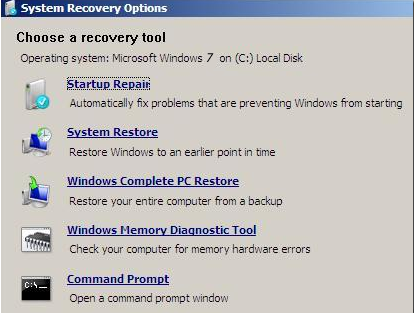
- Take note of what drive Recovery Environment sees the Operating System on. RE sometimes sees drive allocations differently to how they are in Normal Mode, so it's important that you know so you can post appropriate instructions. It can be found at the top of the System Recovery Options window.

- Hit Restart button to boot back into Normal Mode.
- Post details of the Drive letter you've just noted down.
Okay I'm not sure how to "Verify that the file rpcss.dll has copied to the root folder C:\"
but went through with everything else it says "Microsoft Windows 7 on (C:) OS"
Hi sturdman,
Please re-run SystemLook.
SystemLook
SystemLook should still be on your
Desktop.
- Right-click SystemLook.exe and select " Run as administrator " to run it.
- Copy the content of the following codebox into the main textfield: Do not include the word Code or Select all:
:filefind

*rpcss.dll*
- Click the Look button to start the scan.
- When finished, a notepad window will open with the results of the scan. Please post this log in your next reply.
Note: The log can also be found on your Desktop entitled
SystemLook.txtSystemLook 30.07.11 by jpshortstuff
Log created at 13:46 on 05/07/2014 by bamf
Administrator - Elevation successful
========== filefind ==========
Searching for "*rpcss.dll*"
C:\rpcss.dll --a---- 512000 bytes [18:38 05/07/2014] [05:47 25/02/2012] 5C627D1B1138676C0A7AB2C2C190D123
C:\Users\bamf\Desktop\rpcss.dll --a---- 528384 bytes [04:02 30/06/2014] [13:27 20/11/2010] D042E5FE276874195047E9872DE6A14D
C:\Windows\System32\rpcss.dll --a---- 528384 bytes [16:26 25/06/2011] [13:27 20/11/2010] D042E5FE276874195047E9872DE6A14D
C:\Windows\winsxs\amd64_microsoft-windows-com-base-qfe-rpcss_31bf3856ad364e35_6.1.7600.16385_none_c5bfcda3579104e3\rpcss.dll --a---- 509440 bytes [00:00 14/07/2009] [01:41 14/07/2009] 7266972E86890E2B30C0C322E906B027
C:\Windows\winsxs\amd64_microsoft-windows-com-base-qfe-rpcss_31bf3856ad364e35_6.1.7601.17514_none_c7f0e16b547f887d\rpcss.dll --a---- 512000 bytes [16:26 25/06/2011] [13:27 20/11/2010] (Unable to calculate MD5)
C:\Windows\winsxs\Backup\amd64_microsoft-windows-com-base-qfe-rpcss_31bf3856ad364e35_6.1.7601.17514_none_c7f0e16b547f887d_rpcss.dll_fd3e269b --a---- 512000 bytes [06:16 25/02/2012] [05:47 25/02/2012] 5C627D1B1138676C0A7AB2C2C190D123
-= EOF =-
Hi sturdman,
According to the Systemlook results the file we want has copied to the root folder C:\
Now I need you to create a batch file, save it to the root folder C:\ and then run it in Recovery Environment.
Step 1.
Create a batch file
- Open Notepad.
- Copy/paste the following text into the empty Notepad window.
@echo off
ren C:\Windows\System32\rpcss.dll rpcss.dll.vir
copy C:\rpcss.dll C:\Windows\System32\rpcss.dll
- Note: Step 3 is a 3 stage process prior to actually saving the file.
- Save the file as ReplaceDriver.bat . Change location to Local Disk (C:). Save it with the file type... all types *.*.
Step 2.
Boot into Recovery Environment again
- At the System Recovery Options window select Command Prompt
- A Command Window will open with the cursor flashing next to X:\Windows\System32>
- Type C: and hit Enter
- The cursor should now be flashing beside C:\>
- Type ReplaceDriver.bat into the Command Window
- You should get a 1 file copied reply in the Command Window.
- Type Exit into the Command Window then hit Enter to re-boot into Normal Mode.
Step 3.
SystemLook
SystemLook should still be on your
Desktop.
- Right-click SystemLook.exe and select " Run as administrator " to run it.
- Copy the content of the following codebox into the main textfield: Do not include the word Code or Select all:
:filefind

*rpcss.dll*
- Click the Look button to start the scan.
- When finished, a notepad window will open with the results of the scan. Please post this log in your next reply.
Note: The log can also be found on your Desktop entitled
SystemLook.txtOkay, everything went smoothly. Here's the SystemLook log:
SystemLook 30.07.11 by jpshortstuff
Log created at 11:14 on 06/07/2014 by bamf
Administrator - Elevation successful
========== filefind ==========
Searching for "*rpcss.dll*"
C:\rpcss.dll --a---- 512000 bytes [18:38 05/07/2014] [05:47 25/02/2012] 5C627D1B1138676C0A7AB2C2C190D123
C:\Users\bamf\Desktop\rpcss.dll --a---- 528384 bytes [04:02 30/06/2014] [13:27 20/11/2010] D042E5FE276874195047E9872DE6A14D
C:\Windows\System32\rpcss.dll --a---- 512000 bytes [16:26 25/06/2011] [05:47 25/02/2012] 5C627D1B1138676C0A7AB2C2C190D123
C:\Windows\System32\rpcss.dll.vir --a---- 528384 bytes [16:26 25/06/2011] [13:27 20/11/2010] D042E5FE276874195047E9872DE6A14D
C:\Windows\winsxs\amd64_microsoft-windows-com-base-qfe-rpcss_31bf3856ad364e35_6.1.7600.16385_none_c5bfcda3579104e3\rpcss.dll --a---- 509440 bytes [00:00 14/07/2009] [01:41 14/07/2009] 7266972E86890E2B30C0C322E906B027
C:\Windows\winsxs\amd64_microsoft-windows-com-base-qfe-rpcss_31bf3856ad364e35_6.1.7601.17514_none_c7f0e16b547f887d\rpcss.dll --a---- 512000 bytes [16:26 25/06/2011] [13:27 20/11/2010] (Unable to calculate MD5)
C:\Windows\winsxs\Backup\amd64_microsoft-windows-com-base-qfe-rpcss_31bf3856ad364e35_6.1.7601.17514_none_c7f0e16b547f887d_rpcss.dll_fd3e269b --a---- 512000 bytes [06:16 25/02/2012] [05:47 25/02/2012] 5C627D1B1138676C0A7AB2C2C190D123
-= EOF =-
Hi,
How is the computer responding/performing?
wbg
