This is a read-only archive of malwareremoval.com. No new posts or registrations. Privacy Page
Malware Removal Forums

Help needed in Removing Rootkit

59 min read

This thread's last reply is from May 15, 2013, 4:32 PM UTC. Software, malware, and removal-tool advice below may be out of date — treat specific steps and download links with caution.

Hi

Please reboot and run GMER.

Gmer

Download GMER Rootkit Scanner from here.

  • Disconnect from the Internet and close all running programs.
  • Temporarily disable any real-time active protection (Avast) so your security programs will not conflict with gmer's driver.
  • It is very important you do not use your computer while GMER is running
  • Right click the randomly named GMER icon & choose "Run as Administrator"
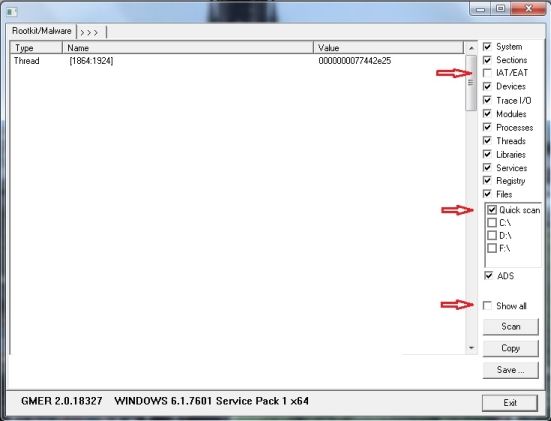
  • GMER will open to the Rootkit/Malware tab and perform an automatic quick scan
  • If you receive a warning about rootkit activity and are asked to fully scan your system click NO
  • Please check the Quick scan box
  • Please uncheck the following:
    • IAT/EAT
    • Show All <<< Important


  • Click Scan
  • If you see a rootkit warning window click OK
  • When the scan is finished, Save the results to your desktop as gmer.log
  • Click Copy then paste the results in your reply
  • Exit GMER and be sure to re-enable your Antivirus, Firewall and any other security programs you had disabled

Note:
  • If you encounter any problems, try running GMER in Safe Mode
  • If GMER crashes or keeps resulting in a Blue Screen of Death, uncheck Devices on the right side before scanning
Hi

This is GMER LOG:

GMER 2.1.19163 - http://www.gmer.net
Rootkit scan 2013-05-12 17:34:26
Windows 6.1.7601 Service Pack 1 \Device\Harddisk0\DR0 -> \Device\00000060 Hitachi_ rev.ES2O 298.09GB
Running: ejg47i5v.exe; Driver: C:\Users\Rakmo\AppData\Local\Temp\ugtyrpoc.sys


---- Kernel code sections - GMER 2.1 ----

.text ntkrnlpa.exe!ZwRollbackEnlistment + 140D 82E919E9 1 Byte [06]
.text ntkrnlpa.exe!KiDispatchInterrupt + 5A2 82ECB1C2 19 Bytes [E0, 0F, BA, F0, 07, 73, 09, ...] {LOOPNZ 0x11; MOV EDX, 0x97307f0; MOV CR4, EAX; OR AL, 0x80; MOV CR4, EAX; RET ; MOV ECX, CR3}
.text C:\Windows\system32\DRIVERS\atikmdag.sys section is writeable [0x8E41F000, 0x38E905, 0xE8000020]

---- User code sections - GMER 2.1 ----

.text C:\Program Files\Mozilla Firefox\firefox.exe[1564] ntdll.dll!LdrGetProcedureAddress + 26 77782239 7 Bytes JMP 6A396D70 C:\Program Files\Mozilla Firefox\xul.dll
.text C:\Program Files\Mozilla Firefox\firefox.exe[1564] kernel32.dll!K32GetDeviceDriverBaseNameW + 5D 75BF941E 7 Bytes JMP 6A6ED713 C:\Program Files\Mozilla Firefox\xul.dll
.text C:\Program Files\Mozilla Firefox\firefox.exe[1564] kernel32.dll!QueryPerformanceCounter + 13 75BFC435 7 Bytes JMP 6A6ED736 C:\Program Files\Mozilla Firefox\xul.dll
.text C:\Program Files\Mozilla Firefox\firefox.exe[1564] kernel32.dll!LoadAppInitDlls + 355 75BFF4F6 7 Bytes JMP 6A3B1C62 C:\Program Files\Mozilla Firefox\xul.dll
.text C:\Program Files\Mozilla Firefox\firefox.exe[1564] GDI32.dll!GetViewportOrgEx + 26C 7790884B 7 Bytes JMP 6A6ED694 C:\Program Files\Mozilla Firefox\xul.dll

---- Devices - GMER 2.1 ----

AttachedDevice \Driver\kbdclass \Device\KeyboardClass0 Wdf01000.sys
AttachedDevice \Driver\kbdclass \Device\KeyboardClass1 Wdf01000.sys

---- Registry - GMER 2.1 ----

Reg HKLM\SYSTEM\CurrentControlSet\services\BTHPORT\Parameters\Keys\9439e5cfd94a
Reg HKLM\SYSTEM\ControlSet002\services\BTHPORT\Parameters\Keys\9439e5cfd94a (not active ControlSet)

---- EOF - GMER 2.1 ----
Hi

You ran combofix before seeking help here. Do you have the combofix log found at:

C:\combofix.txt

If so, please post the contents of that log.
Hi

No Sir i dont have.

yes i had ran combofix earlier before coming to these forums myself but couldn't do anything.

but it is deleted.

Kindly tell me what should i do ?
Hi

Look in the folder:

C:\qoobox

Are there any files there named combofix*.txt

Please post the contents of ComboFix-quarantined-files.txt if it exists.
Hi

There is qoobox and folder inside it.

But iam Denied permission to access that folder
Hi

I'm not seeing anything wrong so far.

The service we stopped - MWAgent - pertains to MicroWorld Technologies eScan, which is an antivirus. That service running could have caused conflicts with your currently installed antivirus - Avast - which could be the cause of the symptoms you have been experiencing.


Malwarebytes' Anti-Malware (MBAM)

Please download Malwarebytes' Anti-Malware to your desktop.

  • Double-click mbam-setup-version.number.exe and follow the prompts to install the program.
  • At the end, Uncheck Enable the free trial Malwarebytes' Anti-Malware PRO
    (You can activate this when we've finished, if you wish)
  • Be sure a checkmark is placed next to Update Malwarebytes' Anti-Malware and Launch Malwarebytes' Anti-Malware, then click Finish.
  • If an update is found, it will download and install the latest version.
  • Select the Settings tab, then the Scanner Settings tab
  • For Action for Potentially Unwanted Programs (PUP), choose Show in results list and check for removal
  • Select to the Scanner tab, select Perform Quick scan, then click on Scan
  • When done, you will be prompted. Click OK. If Items are found, then click on Show Results
  • Check all items then click on Remove Selected
  • After it has removed the items, Notepad will open. Please post this log in your next reply.

    The log can also be found here:
  • C:\Documents and Settings\Username\Application Data\Malwarebytes\Malwarebytes' Anti-Malware\Logs\mbam-log-date (time).txt
  • Or via the Logs tab when the application is started.

.
Note: MBAM may ask to reboot your computer so it can continue with the removal process, please do so immediately. Failure to reboot will prevent MBAM from removing all the malware.
Hi

I ran MBAM and follwed the steps as you suggested.

It showed that No Malicious items were detected.

Here is the Log :

Malwarebytes Anti-Malware 1.75.0.1300
http://www.malwarebytes.org

Database version: v2013.05.12.03

Windows 7 Service Pack 1 x86 NTFS
Internet Explorer 9.0.8112.16421
Rakmo :: RAKMO-VAIO [administrator]

12-05-2013 PM 06:30:02
mbam-log-2013-05-12 (18-30-02).txt

Scan type: Quick scan
Scan options enabled: Memory | Startup | Registry | File System | Heuristics/Extra | Heuristics/Shuriken | PUP | PUM
Scan options disabled: P2P
Objects scanned: 209068
Time elapsed: 13 minute(s), 17 second(s)

Memory Processes Detected: 0
(No malicious items detected)

Memory Modules Detected: 0
(No malicious items detected)

Registry Keys Detected: 0
(No malicious items detected)

Registry Values Detected: 0
(No malicious items detected)

Registry Data Items Detected: 0
(No malicious items detected)

Folders Detected: 0
(No malicious items detected)

Files Detected: 0
(No malicious items detected)

(end)

Thanks
Hi

At this stage I wouldn't say your problems are attributed to a rootkit or any other malware.

Q.1 How are things running since stopping and disabling the MWAgent service?
Q.2 Have you run a disk check (chkdsk) yet?

We'll run one last scan.

aswMBR

Download aswMBR and save it to your Desktop.

  • Right click aswMBR.exe & choose "Run as Administrator" to run it.
  • Click the Scan button.
    (Please be patient whilst your computer is scanned.)
  • When the scan reports "Scan finished successfully", click Save log & save the log to your desktop.
  • Click OK
  • Two files will be created, aswMBR.txt & a file named MBR.dat
  • Save MBR.dat to to a form of removable media. (CD, DVD, USB flash drive etc) - This is a backup of your MBR. Do not delete this file.
  • NOTE: Do not click to fix anything at this stage!
  • Click EXIT.
  • Copy & Paste the contents of aswMBR.txt into your next reply.
Hi

I haven't run a disk check (chkdsk) yet.

While i was running aswMBR Scan, it showed BSOD but this time it DID NOT SHOW the message "OS NOT FOUND".

After BSOD ,it directly went to Windows Recovery Option which showed Safe Mode and other modes and I normally started it.

Again i ran the scan AND i have Saved MBR.dat in removable media.

Here is the Log :

aswMBR version 0.9.9.1771 Copyright(c) 2011 AVAST Software
Run date: 2013-05-12 19:10:26
-----------------------------
19:10:26.178 OS Version: Windows 6.1.7601 Service Pack 1
19:10:26.178 Number of processors: 2 586 0x200
19:10:26.178 ComputerName: RAKMO-VAIO UserName: Rakmo
19:10:28.019 Initialize success
19:10:28.424 AVAST engine defs: 13051200
19:10:44.773 Disk 0 (boot) \Device\Harddisk0\DR0 -> \Device\00000064
19:10:44.773 Disk 0 Vendor: Hitachi_ ES2O Size: 305245MB BusType: 11
19:10:44.992 Disk 0 MBR read successfully
19:10:45.007 Disk 0 MBR scan
19:10:45.007 Disk 0 Windows 7 default MBR code
19:10:45.023 Disk 0 Partition 1 00 27 Hidden NTFS WinRE NTFS 9552 MB offset 2048
19:10:45.054 Disk 0 Partition 2 80 (A) 07 HPFS/NTFS NTFS 100 MB offset 19564544
19:10:45.070 Disk 0 Partition 3 00 07 HPFS/NTFS NTFS 148870 MB offset 19769344
19:10:45.085 Disk 0 Partition - 00 0F Extended LBA 146720 MB offset 324657152
19:10:45.116 Disk 0 Partition 4 00 07 HPFS/NTFS NTFS 73122 MB offset 324659200
19:10:45.132 Disk 0 Partition - 00 05 Extended 73597 MB offset 474413056
19:10:45.179 Disk 0 Partition 5 00 07 HPFS/NTFS NTFS 73596 MB offset 474415104
19:10:45.226 Disk 0 scanning sectors +625139712
19:10:45.928 Disk 0 scanning C:\Windows\system32\drivers
19:10:59.827 Service scanning
19:11:44.974 Modules scanning
19:12:08.795 Disk 0 trace - called modules:
19:12:08.826
19:12:10.183 AVAST engine scan C:\Windows
19:12:14.302 AVAST engine scan C:\Windows\system32
19:15:39.645 AVAST engine scan C:\Windows\system32\drivers
19:15:53.903 AVAST engine scan C:\Users\Rakmo
19:17:06.240 AVAST engine scan C:\ProgramData
19:18:02.744 Scan finished successfully
19:19:32.662 Disk 0 MBR has been saved successfully to "C:\Users\Rakmo\Desktop\MBR.dat"
19:19:32.678 The log file has been saved successfully to "C:\Users\Rakmo\Desktop\aswMBR.txt"

Thanks
Hi

Hard-Drive Maintenance:

  • Click Start and type CMD in the start search box. When CMD is found, right click it and choose "Run as Administrator"
  • At the Command Prompt type the following:
  • CD C:\ and hit the Enter/Return key.
  • Now type in CHKDSK C: /R and hit the Enter/Return key (Note the space between C: and /R).
  • When prompted with:
    CHKDSK cannot run because the volume is in use by another process. Would you like to schedule this volume to be checked next time the system restarts (Y/N)
  • Hit the Y key then at the Command Prompt C:\ >
  • Type in EXIT and and hit the Enter/Return key.
  • Now Reboot (Restart) your computer.


Note: Upon Reboot (Restart) the CHKDSK (check-disk) will start and carry out any repairs required.

Note: Do not touch either the keyboard or Mouse, otherwise the Check-Disk will be canceled and you computer will continue to boot-up as normal.

Note: When CHKDSK has completed its scans, the machine will proceed to load and Boot to Windows.

Then give me an update on how things are running.
Hi

Yes Sir , I did hard-drive maintenance as per your instruction. But just when windows were loading it again showed Both the error, BSOD and OS not found.

What do you think about the Cause of BSOD and OS not found ?

Thanks
Hi

What is the exact model number for your Sony Vaio?
My Sony Vaio Model No: VPCYB35AN (Yseries)
Hi

Open the VAIO Control Center and look under System Information for the BIOS Version.

Post it here.