

Dakeyras
MRU Honors Graduate
Hi 
OK there appears to be some problems with the Hard-Drive, we should be able to rectify this as follows.
Please download ATF Cleaner to your desktop.
For Technical Support, double-click the e-mail address located at the bottom of each menu.
Hard-Drive Maintenance/Repair:
Note: for the CHKDSK portion you may refer to this tutorial of mine here and follow the instructions for Graphical Mode if you so wish.
Note: Upon Reboot(Restart) the CHKDSK(check-disk) will start and carry out the repairs required.
You should see a screen like this just after the Post(power on self test) screen:
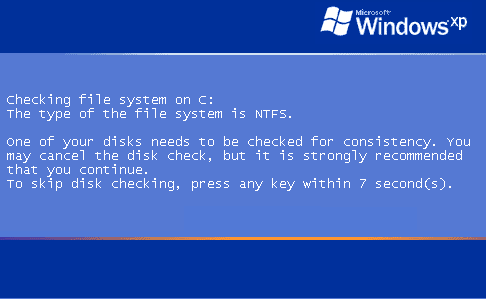
Note: Do not touch either the keyboard or Mouse, otherwise the Check-Disk will be canceled and you computer will continue to boot-up as normal.
Run Kaspersky Online AV Scanner:
Go to this Kaspersky website and perform an online antivirus scan.
Note: Use Internet Explorer for this scan.
This online tuturial will help explain how to use the aforementioned online scan.
When completed the above, please post back the following:
OK there appears to be some problems with the Hard-Drive, we should be able to rectify this as follows.
Please download ATF Cleaner to your desktop.
- Double-click ATF-Cleaner.exe to run the program.
- Under Main choose: Select All
- Click the Empty Selected button.
- Click Firefox at the top and choose: Select All
- Click the Empty Selected button.
- NOTE: If you would like to keep your saved passwords, please click No at the prompt.
- Click Opera at the top and choose: Select All
- Click the Empty Selected button.
- NOTE: If you would like to keep your saved passwords, please click No at the prompt.
For Technical Support, double-click the e-mail address located at the bottom of each menu.
Hard-Drive Maintenance/Repair:
Note: for the CHKDSK portion you may refer to this tutorial of mine here and follow the instructions for Graphical Mode if you so wish.
- Click Start >> Run... then type in CMD and click on OK.
- At the Command Prompt C:\ > type the following:
- CD C:\ and hit the Enter/Return key.
- Now type in DEFRAG C: -F
- A Analysis report will be displayed and then Windows will start the Defragmention run automatically.
- This may take some time, when completed the Command Prompt C:\ > will appear.
- Now type in CHKDSK C: /R and hit the Enter/Return key.
- When prompted with:
CHKDSK cannot run because the volume is in use by another process
Would you like to schedule this volume to be checked next time the system
restarts (Y/N)
- Hit the Y key then at the Command Prompt C:\ >
- Type in EXIT and and hit the Enter/Return key.
- Now Reboot(Restart) your computer.
Note: Upon Reboot(Restart) the CHKDSK(check-disk) will start and carry out the repairs required.
You should see a screen like this just after the Post(power on self test) screen:
Note: Do not touch either the keyboard or Mouse, otherwise the Check-Disk will be canceled and you computer will continue to boot-up as normal.
Run Kaspersky Online AV Scanner:
Go to this Kaspersky website and perform an online antivirus scan.
Note: Use Internet Explorer for this scan.
- Read through the requirements and privacy statement and click on Accept button.
- It will start downloading and installing the scanner and virus definitions. You will be prompted to install an application from Kaspersky. Click Run.
- When the downloads have finished, click on Settings.
- Make sure these boxes are checked (ticked). If they are not, please tick them and click on the Save button:
- Spyware, Adware, Dialers, and other potentially dangerous programs
Archives
Mail databases - Click on My Computer under Scan.
- Once the scan is complete, it will display the results. Click on View Scan Report.
- You will see a list of infected items there. Click on Save Report As....
- Save this report to a convenient place. Change the Files of type to Text file (.txt) before clicking on the Save button.
- Please post this log in your next reply.
This online tuturial will help explain how to use the aforementioned online scan.
When completed the above, please post back the following:
- How is you computer performing now? Any problems encountered and or any further symptoms?
- Kaspersky report.
- A new HijackThis Log.


