Okay, I got everything done. Here is the Blacklight log.
07/05/09 22:54:49 [Info]: BlackLight Engine 2.2.1092 initialized
07/05/09 22:54:49 [Info]: OS: 5.1 build 2600 (Service Pack 3)
07/05/09 22:54:49 [Note]: 7019 4
07/05/09 22:54:49 [Note]: 7005 0
07/05/09 22:55:02 [Note]: 7006 0
07/05/09 22:55:02 [Note]: 7011 1560
07/05/09 22:55:02 [Note]: 7035 0
07/05/09 22:55:03 [Note]: 7026 0
07/05/09 22:55:03 [Note]: 7026 0
07/05/09 22:55:07 [Note]: FSRAW library version 1.7.1024
07/05/09 23:14:53 [Note]: 2000 1012
07/06/09 00:07:46 [Note]: 7007 0
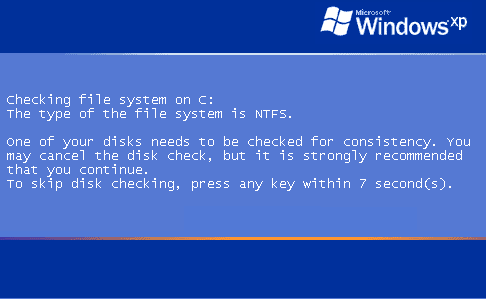
Here is the checkhd file contents:
The type of the file system is NTFS.
WARNING! F parameter not specified.
Running CHKDSK in read-only mode.
CHKDSK is verifying files (stage 1 of 3)...
CHKDSK is verifying indexes (stage 2 of 3)...
CHKDSK is recovering lost files.
CHKDSK is verifying security descriptors (stage 3 of 3)...
CHKDSK is verifying Usn Journal...
Usn Journal verification completed.
CHKDSK discovered free space marked as allocated in the
master file table (MFT) bitmap.
Correcting errors in the Volume Bitmap.
Windows found problems with the file system.
Run CHKDSK with the /F (fix) option to correct these.
40106272 KB total disk space.
25397432 KB in 105394 files.
46344 KB in 6390 indexes.
0 KB in bad sectors.
324264 KB in use by the system.
65536 KB occupied by the log file.
14338232 KB available on disk.
4096 bytes in each allocation unit.
10026568 total allocation units on disk.
3584558 allocation units available on disk.
And here is a new HiJackThis log:
Logfile of Trend Micro HijackThis v2.0.2
Scan saved at 12:57:13 AM, on 7/6/2009
Platform: Windows XP SP3 (WinNT 5.01.2600)
MSIE: Internet Explorer v7.00 (7.00.6000.16850)
Boot mode: Normal
Running processes:
C:\WINDOWS\System32\smss.exe
C:\WINDOWS\system32\winlogon.exe
C:\WINDOWS\system32\services.exe
C:\WINDOWS\system32\lsass.exe
C:\WINDOWS\system32\svchost.exe
C:\WINDOWS\System32\svchost.exe
C:\WINDOWS\Explorer.EXE
C:\WINDOWS\system32\spoolsv.exe
C:\WINDOWS\system32\hkcmd.exe
C:\WINDOWS\BCMSMMSG.exe
C:\SCANJET\PrecisionScanPro\HPLamp.exe
C:\Program Files\Common Files\Real\Update_OB\realsched.exe
C:\PROGRA~1\AVG\AVG8\avgtray.exe
C:\WINDOWS\system32\ctfmon.exe
C:\PROGRA~1\AVG\AVG8\avgwdsvc.exe
C:\Program Files\Java\jre6\bin\jqs.exe
C:\Program Files\Alcohol Soft\Alcohol 120\StarWind\StarWindServiceAE.exe
C:\WINDOWS\System32\svchost.exe
C:\PROGRA~1\AVG\AVG8\avgemc.exe
C:\PROGRA~1\AVG\AVG8\avgrsx.exe
C:\PROGRA~1\AVG\AVG8\avgnsx.exe
C:\Program Files\AVG\AVG8\avgcsrvx.exe
C:\WINDOWS\System32\svchost.exe
C:\Program Files\Mozilla Firefox\firefox.exe
C:\Program Files\Alarm Clock\Alarm Clock.exe
C:\Program Files\MySpace\IM\MySpaceIM.exe
C:\Program Files\MySpace\IM\MySpaceIM.exe
C:\PROGRA~1\Yahoo!\MESSEN~1\YAHOOM~1.EXE
C:\WINDOWS\system32\msiexec.exe
C:\Program Files\Trend Micro\HijackThis\HijackThis.exe
R0 - HKCU\Software\Microsoft\Internet Explorer\Main,Start Page = http://www.playlist.com/user/28616089/view
R1 - HKLM\Software\Microsoft\Internet Explorer\Main,Default_Page_URL =
http://go.microsoft.com/fwlink/?LinkId=69157
R1 - HKLM\Software\Microsoft\Internet Explorer\Main,Default_Search_URL = http://go.microsoft.com/fwlink/?LinkId=54896
R1 - HKLM\Software\Microsoft\Internet Explorer\Main,Search Bar = http://us.rd.yahoo.com/customize/ie/defaults/sb/msgr8/*http://www.yahoo.com/ext/search/search.html
R1 - HKLM\Software\Microsoft\Internet Explorer\Main,Search Page = http://go.microsoft.com/fwlink/?LinkId=54896
R0 - HKLM\Software\Microsoft\Internet Explorer\Main,Start Page =
http://go.microsoft.com/fwlink/?LinkId=69157
R1 - HKCU\Software\Microsoft\Internet Connection Wizard,ShellNext = http://www.worldofwarcraft.com/account
R3 - URLSearchHook: (no name) - {A3BC75A2-1F87-4686-AA43-5347D756017C} - (no file)
O2 - BHO: &Yahoo! Toolbar Helper - {02478D38-C3F9-4efb-9B51-7695ECA05670} - C:\PROGRA~1\Yahoo!\Companion\Installs\cpn0\yt.dll
O2 - BHO: AcroIEHelperStub - {18DF081C-E8AD-4283-A596-FA578C2EBDC3} - C:\Program Files\Common Files\Adobe\Acrobat\ActiveX\AcroIEHelperShim.dll
O2 - BHO: WormRadar.com IESiteBlocker.NavFilter - {3CA2F312-6F6E-4B53-A66E-4E65E497C8C0} - C:\Program Files\AVG\AVG8\avgssie.dll
O2 - BHO: Yahoo! IE Services Button - {5BAB4B5B-68BC-4B02-94D6-2FC0DE4A7897} - C:\Program Files\Yahoo!\Common\yiesrvc.dll
O2 - BHO: (no name) - {724d43a9-0d85-11d4-9908-00400523e39a} - C:\Program Files\Siber Systems\AI RoboForm\roboform.dll
O2 - BHO: SSVHelper Class - {761497BB-D6F0-462C-B6EB-D4DAF1D92D43} - C:\Program Files\Java\jre6\bin\ssv.dll
O2 - BHO: Windows Live Sign-in Helper - {9030D464-4C02-4ABF-8ECC-5164760863C6} - C:\Program Files\Common Files\Microsoft Shared\Windows Live\WindowsLiveLogin.dll
O2 - BHO: IE Developer Toolbar BHO - {CC7E636D-39AA-49b6-B511-65413DA137A1} - C:\Program Files\Microsoft\Internet Explorer Developer Toolbar\IEDevToolbar.dll
O2 - BHO: Java(tm) Plug-In 2 SSV Helper - {DBC80044-A445-435b-BC74-9C25C1C588A9} - C:\Program Files\Java\jre6\bin\jp2ssv.dll
O2 - BHO: JQSIEStartDetectorImpl - {E7E6F031-17CE-4C07-BC86-EABFE594F69C} - C:\Program Files\Java\jre6\lib\deploy\jqs\ie\jqs_plugin.dll
O2 - BHO: SingleInstance Class - {FDAD4DA1-61A2-4FD8-9C17-86F7AC245081} - C:\PROGRA~1\Yahoo!\Companion\Installs\cpn0\YTSingleInstance.dll
O3 - Toolbar: &RoboForm - {724d43a0-0d85-11d4-9908-00400523e39a} - C:\Program Files\Siber Systems\AI RoboForm\roboform.dll
O3 - Toolbar: Yahoo! Toolbar - {EF99BD32-C1FB-11D2-892F-0090271D4F88} - C:\PROGRA~1\Yahoo!\Companion\Installs\cpn0\yt.dll
O4 - HKLM\..\Run: [IgfxTray] C:\WINDOWS\system32\igfxtray.exe
O4 - HKLM\..\Run: [HotKeysCmds] C:\WINDOWS\system32\hkcmd.exe
O4 - HKLM\..\Run: [BCMSMMSG] BCMSMMSG.exe
O4 - HKLM\..\Run: [REGSHAVE] C:\Program Files\REGSHAVE\REGSHAVE.EXE /AUTORUN
O4 - HKLM\..\Run: [HP Lamp] C:\SCANJET\PrecisionScanPro\HPLamp.exe
O4 - HKLM\..\Run: [TkBellExe] "C:\Program Files\Common Files\Real\Update_OB\realsched.exe" -osboot
O4 - HKLM\..\Run: [AVG8_TRAY] C:\PROGRA~1\AVG\AVG8\avgtray.exe
O4 - HKLM\..\Run: [Adobe Reader Speed Launcher] "C:\Program Files\Adobe\Reader 9.0\Reader\Reader_sl.exe"
O4 - HKCU\..\Run: [ctfmon.exe] C:\WINDOWS\system32\ctfmon.exe
O4 - HKUS\S-1-5-18\..\Run: [DWQueuedReporting] "C:\PROGRA~1\COMMON~1\MICROS~1\DW\dwtrig20.exe" -t (User 'SYSTEM')
O4 - HKUS\S-1-5-18\..\Run: [MySpaceIM] C:\Program Files\MySpace\IM\MySpaceIM.exe (User 'SYSTEM')
O4 - HKUS\S-1-5-18\..\RunOnce: [RunNarrator] Narrator.exe (User 'SYSTEM')
O4 - HKUS\.DEFAULT\..\Run: [DWQueuedReporting] "C:\PROGRA~1\COMMON~1\MICROS~1\DW\dwtrig20.exe" -t (User 'Default user')
O4 - HKUS\.DEFAULT\..\RunOnce: [RunNarrator] Narrator.exe (User 'Default user')
O8 - Extra context menu item: Customize Menu -
file://C:\Program Files\Siber Systems\AI RoboForm\RoboFormComCustomizeIEMenu.html
O8 - Extra context menu item: E&xport to Microsoft Excel -
res://C:\PROGRA~1\MICROS~2\Office12\EXCEL.EXE/3000
O8 - Extra context menu item: Fill Forms -
file://C:\Program Files\Siber Systems\AI RoboForm\RoboFormComFillForms.html
O8 - Extra context menu item: RoboForm Toolbar -
file://C:\Program Files\Siber Systems\AI RoboForm\RoboFormComShowToolbar.html
O8 - Extra context menu item: Save Forms -
file://C:\Program Files\Siber Systems\AI RoboForm\RoboFormComSavePass.html
O9 - Extra button: (no name) - {08B0E5C0-4FCB-11CF-AAA5-00401C608501} - C:\Program Files\Java\jre6\bin\ssv.dll
O9 - Extra 'Tools' menuitem: Sun Java Console - {08B0E5C0-4FCB-11CF-AAA5-00401C608501} - C:\Program Files\Java\jre6\bin\ssv.dll
O9 - Extra button: Send to OneNote - {2670000A-7350-4f3c-8081-5663EE0C6C49} - C:\PROGRA~1\MICROS~2\Office12\ONBttnIE.dll
O9 - Extra 'Tools' menuitem: S&end to OneNote - {2670000A-7350-4f3c-8081-5663EE0C6C49} - C:\PROGRA~1\MICROS~2\Office12\ONBttnIE.dll
O9 - Extra button: Fill Forms - {320AF880-6646-11D3-ABEE-C5DBF3571F46} -
file://C:\Program Files\Siber Systems\AI RoboForm\RoboFormComFillForms.html
O9 - Extra 'Tools' menuitem: Fill Forms - {320AF880-6646-11D3-ABEE-C5DBF3571F46} -
file://C:\Program Files\Siber Systems\AI RoboForm\RoboFormComFillForms.html
O9 - Extra button: Save - {320AF880-6646-11D3-ABEE-C5DBF3571F49} -
file://C:\Program Files\Siber Systems\AI RoboForm\RoboFormComSavePass.html
O9 - Extra 'Tools' menuitem: Save Forms - {320AF880-6646-11D3-ABEE-C5DBF3571F49} -
file://C:\Program Files\Siber Systems\AI RoboForm\RoboFormComSavePass.html
O9 - Extra button: IE Developer Toolbar - {48FFE35F-36D9-44bd-A6CC-1D34414EAC0D} - C:\Program Files\Microsoft\Internet Explorer Developer Toolbar\IEDevToolbar.dll
O9 - Extra button: Yahoo! Services - {5BAB4B5B-68BC-4B02-94D6-2FC0DE4A7897} - C:\Program Files\Yahoo!\Common\yiesrvc.dll
O9 - Extra button: RoboForm - {724d43aa-0d85-11d4-9908-00400523e39a} -
file://C:\Program Files\Siber Systems\AI RoboForm\RoboFormComShowToolbar.html
O9 - Extra 'Tools' menuitem: RoboForm Toolbar - {724d43aa-0d85-11d4-9908-00400523e39a} -
file://C:\Program Files\Siber Systems\AI RoboForm\RoboFormComShowToolbar.html
O9 - Extra button: Research - {92780B25-18CC-41C8-B9BE-3C9C571A8263} - C:\PROGRA~1\MICROS~2\Office12\REFIEBAR.DLL
O9 - Extra button: (no name) - {e2e2dd38-d088-4134-82b7-f2ba38496583} - C:\WINDOWS\Network Diagnostic\xpnetdiag.exe
O9 - Extra 'Tools' menuitem: @xpsp3res.dll,-20001 - {e2e2dd38-d088-4134-82b7-f2ba38496583} - C:\WINDOWS\Network Diagnostic\xpnetdiag.exe
O9 - Extra button: Bodog Poker - {F47C1DB5-ED21-4dc1-853E-D1495792D4C5} - C:\Program Files\Bodog Poker\BPGame.exe
O9 - Extra button: Messenger - {FB5F1910-F110-11d2-BB9E-00C04F795683} - C:\Program Files\Messenger\msmsgs.exe
O9 - Extra 'Tools' menuitem: Windows Messenger - {FB5F1910-F110-11d2-BB9E-00C04F795683} - C:\Program Files\Messenger\msmsgs.exe
O16 - DPF: {02A2D714-433E-46E4-B217-7C3B3FAF8EAE} (ScrabbleCubes Control) - http://www.worldwinner.com/games/v46/scrabblecubes/scrabblecubes.cab
O16 - DPF: {18C3FD15-74F6-4280-9C98-3590C966B7B8} (SkillGam Control) - http://www.worldwinner.com/games/v47/skillgam/skillgam.cab
O16 - DPF: {1A1F56AA-3401-46F9-B277-D57F3421F821} (FunGamesLoader Object) - http://www.worldwinner.com/games/v47/shared/FunGamesLoader.cab
O16 - DPF: {30528230-99f7-4bb4-88d8-fa1d4f56a2ab} (Installation Support) - C:\Program Files\Yahoo!\Common\Yinsthelper.dll
O16 - DPF: {5ED80217-570B-4DA9-BF44-BE107C0EC166} (Windows Live Safety Center Base Module) - http://cdn.scan.onecare.live.com/resource/download/scanner/wlscbase6662.cab
O16 - DPF: {8A94C905-FF9D-43B6-8708-F0F22D22B1CB} (Wwlaunch Control) - http://www.worldwinner.com/games/shared/wwlaunch.cab
O16 - DPF: {D27CDB6E-AE6D-11CF-96B8-444553540000} (Shockwave Flash Object) -
https://fpdownload.macromedia.com/get/s ... wflash.cab
O16 - DPF: {D4323BF2-006A-4440-A2F5-27E3E7AB25F8} (Virtools WebPlayer Class) -
http://3dlifeplayer.dl.3dvia.com/player ... taller.exe
O18 - Protocol: linkscanner - {F274614C-63F8-47D5-A4D1-FBDDE494F8D1} - C:\Program Files\AVG\AVG8\avgpp.dll
O20 - Winlogon Notify: avgrsstarter - C:\WINDOWS\SYSTEM32\avgrsstx.dll
O23 - Service: AVG Free8 E-mail Scanner (avg8emc) - AVG Technologies CZ, s.r.o. - C:\PROGRA~1\AVG\AVG8\avgemc.exe
O23 - Service: AVG Free8 WatchDog (avg8wd) - AVG Technologies CZ, s.r.o. - C:\PROGRA~1\AVG\AVG8\avgwdsvc.exe
O23 - Service: InstallDriver Table Manager (IDriverT) - Macrovision Corporation - C:\Program Files\Common Files\InstallShield\Driver\11\Intel 32\IDriverT.exe
O23 - Service: Java Quick Starter (JavaQuickStarterService) - Sun Microsystems, Inc. - C:\Program Files\Java\jre6\bin\jqs.exe
O23 - Service: StarWind AE Service (StarWindServiceAE) - Rocket Division Software - C:\Program Files\Alcohol Soft\Alcohol 120\StarWind\StarWindServiceAE.exe
--
End of file - 10195 bytes