This thread's last reply is from May 30, 2009, 4:13 AM UTC. Software, malware, and removal-tool
advice below may be out of date — treat specific steps and download links with caution.
So i just connected to the internet and it came up with a different link from those other two. here it is:
http://users.conduit.com/iis2ebs.asp
any ideas?
It looks like you installed the ask tool bar when you installed foxit reader, we take care of that soon.
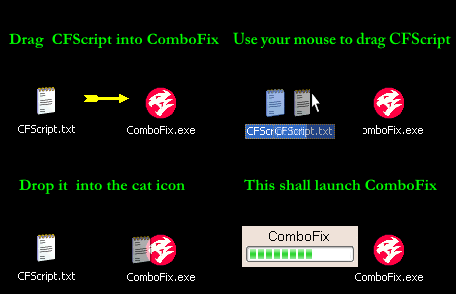
This Fix should take care of /storage.conduit.com.
Make a New uninstall list using HijackThis
To access the Uninstall Manager you would do the following:
1. Start HijackThis
2. Click on the Config button
3. Click on the Misc Tools button
4. Click on the Open Uninstall Manager button.
Click on the Save list... button and specify where you would like to save this file.
When you press Save button a notepad will open with the contents of that file.
Simply copy and paste the contents of that notepad here on your next reply.
- Very Important!, before running CombofixEnsure you have Temporarily disabled your anti-virus, script blocking and any anti-malware real-time protection before performing a scan.
They can interfere with ComboFix or remove some of its embedded files which may cause "unpredictable results".
AVG
Please open the AVG Control Center program -> double-click on the "AVG Resident Shield" component (looks like this:  ) -> deselect the "Turn on AVG Resident Shield" checkmark and save the setting.
CAUTION: Do not mouse-click ComboFix's window while it is running. That may cause it to stall.
Please Post back the log below so we can continue cleaning the system.
Combofix Log C:\ComboFix.txt
Uninstall list
A New HijackThis log