

Scotty
Retired Graduate
Hi
I would go ahead and delete those files.
Congratulations, you appear to be malware free.
Time for some housekeeping
Open OTMoveIt and cleick on the CleanUp button, and allow it to finish.
If it still exists, delete the SDFix icon from your Desktop and then navigate to and delete this folder:
C:\SDFix
You may wish to keep hold of the Kaspersky Online Scan as an extra on-demand virus-scanner.
If not you can uninstall it through Start>Control Panel>Add/Remove Programs
Delete the older versions of Java and download the newest.
Please follow these steps to remove older version Java components.
Then download the latest version of Java Runtime Environment (JRE) (5th one down the list), which is JRE6u6, and click Yes at the page warning. Under "Platform" select Windows, then check the box to accept the Licence Agreement. Click Yes at the second page warning before downloading the Offline file.
There is no need to download the Sun Download manager but it is optional.
Malwarebytes Anti-Malware is a good program to keep. If you wish to keep it, use it to do a quick scan once a week and keep it updated.
Remember, only the paid for version offers real-time protection
Here is another couple of free programs I recommend.
Winpatrol
Winpatrol is heuristic protection program, meaning it looks for patterns in codes that work like malware. It also takes a snapshot of your system's critical resources and alerts you to any changes that may occur without you knowing. You can read more about Winpatrol's features here.
You can get a free copy of Winpatrol or use the Plus version for more features.
You can read Winpatrol's FAQ if you run into problems.
Spyware Blaster
SpywareBlaster is a program that is used to secure Internet Explorer by making it harder for ActiveX programs to run on your computer. It does this by disabling known offending ActiveX programs from running at all.
You can download SpywareBlaster from Javacool.
If you need help in using SpywareBlaster, you can read SpywareBlaster's tutorial at Bleeping Computer.
Hosts File
A Hosts file is like a phone book. You look up someone's name in the phone book before calling him/her. Similarly, your PC will look up the website's IP address before you can view the website.
Hosts file will replace your current Hosts file with another one containing well-known advertisement sites, spyware sites and other bad sites. This new Hosts file will protect you by re-directing these bad sites to 127.0.0.1.
Here is a good Hosts file:
MVPS Hosts File
A tutorial about Hosts File can be found at Malware Removal.
Make sure your Windows is ALWAYS up to date!
An unpatched Windows is vulnerable and even with the "best" Antivirus and Firewall installed, malware will find its way through.
So visit http://windowsupdate.microsoft.com/ to download and install the latest updates.
Update your Antivirus programs and other security products regularly to avoid new threats that could infect your system.
Please check out Tony Klein's article "How did I get infected in the first place?"
Here is some great information from experts in this field that will help you stay clean and safe online.
http://forum.malwareremoval.com/viewtopic.php?t=14
Follow this list and your potential for being infected again will reduce dramatically.
I'd be grateful if you could reply to this post so that I know you have read it and, if you've no other questions, the thread can be closed.
I would go ahead and delete those files.
Congratulations, you appear to be malware free.
Time for some housekeeping
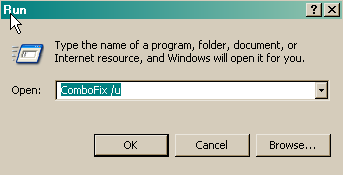
- Click START then RUN
- Now type Combofix /u in the runbox and click OK. Note the space between the x and the /u, it needs to be there.
Open OTMoveIt and cleick on the CleanUp button, and allow it to finish.
If it still exists, delete the SDFix icon from your Desktop and then navigate to and delete this folder:
C:\SDFix
You may wish to keep hold of the Kaspersky Online Scan as an extra on-demand virus-scanner.
If not you can uninstall it through Start>Control Panel>Add/Remove Programs
Delete the older versions of Java and download the newest.
Please follow these steps to remove older version Java components.
- Close any programmes you may have running, ESPECIALLY your web browser
- Click Start > Control Panel.
- Click Add/Remove Programs.
- Check any item with Java Runtime Environment (JRE or J2SE) in the name.
- Click the Remove or Change/Remove button.
- Repeat as many times as necessary to remove all versions of Java.
- Reboot your computer once all Java components are removed.
Then download the latest version of Java Runtime Environment (JRE) (5th one down the list), which is JRE6u6, and click Yes at the page warning. Under "Platform" select Windows, then check the box to accept the Licence Agreement. Click Yes at the second page warning before downloading the Offline file.
There is no need to download the Sun Download manager but it is optional.
Malwarebytes Anti-Malware is a good program to keep. If you wish to keep it, use it to do a quick scan once a week and keep it updated.
Remember, only the paid for version offers real-time protection
Here is another couple of free programs I recommend.
Winpatrol
Winpatrol is heuristic protection program, meaning it looks for patterns in codes that work like malware. It also takes a snapshot of your system's critical resources and alerts you to any changes that may occur without you knowing. You can read more about Winpatrol's features here.
You can get a free copy of Winpatrol or use the Plus version for more features.
You can read Winpatrol's FAQ if you run into problems.
Spyware Blaster
SpywareBlaster is a program that is used to secure Internet Explorer by making it harder for ActiveX programs to run on your computer. It does this by disabling known offending ActiveX programs from running at all.
You can download SpywareBlaster from Javacool.
If you need help in using SpywareBlaster, you can read SpywareBlaster's tutorial at Bleeping Computer.
Hosts File
A Hosts file is like a phone book. You look up someone's name in the phone book before calling him/her. Similarly, your PC will look up the website's IP address before you can view the website.
Hosts file will replace your current Hosts file with another one containing well-known advertisement sites, spyware sites and other bad sites. This new Hosts file will protect you by re-directing these bad sites to 127.0.0.1.
Here is a good Hosts file:
MVPS Hosts File
A tutorial about Hosts File can be found at Malware Removal.
Make sure your Windows is ALWAYS up to date!
An unpatched Windows is vulnerable and even with the "best" Antivirus and Firewall installed, malware will find its way through.
So visit http://windowsupdate.microsoft.com/ to download and install the latest updates.
Update your Antivirus programs and other security products regularly to avoid new threats that could infect your system.
Please check out Tony Klein's article "How did I get infected in the first place?"
Here is some great information from experts in this field that will help you stay clean and safe online.
http://forum.malwareremoval.com/viewtopic.php?t=14
Follow this list and your potential for being infected again will reduce dramatically.
I'd be grateful if you could reply to this post so that I know you have read it and, if you've no other questions, the thread can be closed.
